Review: WordMic for iPad
WordMic, developed by Focustrain LLC, allows you to read, record, and share your favorite books and stories. WordMic converts your voice and page images into a video that can be shared through email, Dropbox, Facebook, YouTube or Google Drive.
Word Mic is a great way to reinforce reading and language concepts and build a new reader’s confidence. And, because Word Mic can import PDF’s, teachers and students can save their own stories and drawings or illustrations as PDFs, and then create a video with the author’s voice narrating their new “book.” The app works great for flash cards, math problems, alphabet review, sight words, and virtually any concept that can be saved in PDF format.
With WordMic you Import a book from any website or even your Dropbox. If you are unsure where to get FREE books, look no further. WordMic incorporates a bunch of FREE books for you to download as well. Now you have access to all of your books and can record them instantly. This is a great tool for teachers and students to help track their reading level and see how they have progressed. It is also a great tool for parents to read their child’s favorite book and record it so that they can play it back when they are gone.
WordMic is currently FREE on the Apple App Store but it will only be FREE for a limited time. Hurry up and grab this app before the price jumps back to $1.99.
read moreReview: Note Anytime – a full featured easy to use note taking app for iPad / iPhone
Note Anytime – a full featured easy to use note taking app for iPad / iPhone, developed by MetaMoJi Corporation, is an Appy Award finalist in the productivity category. Note Anytime gives you the ability to write, draw, sketch, annotate PDFs, and allows you to share and print your notes.
When you first launch the app you will have an opportunity to download some sample notes so that you can see some examples of how you can use this app. Once you get started you can view the user manual, view video tutorials, or just play around by pushing buttons to see what everything does.
When you create a note, there are a ton of sample models to start you off with different layouts and types of paper. If the included ones are not enough for you just jump to the in-app purchases store and you can get a ton more. Not only that but you can also purchase additional useful items such as different types of inks.
The application gives you the ability to sync your notes across different devices. Say you started talking some notes at school on your iPad and on the bus home you your iPhone. Just open it up and instantly make changes. In order to sync notes you will have to register for a FREE account with Digital Cabinet.
Some other cool features include the ability to grab a photo from your photo album or you could instantly snap a picture and draw all over it. There is even an interactive web browser within the app to surf the web. You can also grab a webpage and instantly mark it up with notes.
Even though Apple despises stylus pens, using one can be a tremendous help and can make note taking a lot easier. I recommend getting one along with this app. Note Anytime is currently a FREE download on the Apple App Store. There are more features for free in this little app than most expensive paid apps. It will allow a lot of functionality for free, but if you really want to customize your experience you will want to check out the in-app purchases as well.

Incoming search terms:
- note anytime user manual
- ipad 4 note taking app review
- metamoji note anytime manual
- note anytime
- note anytime app help
- note anytime ipad app
- note anytime web page
Review: Cool Writer – Awesome writing & note taking app with a variety of great features
Cool Writer – Awesome writing & note taking app with a variety of great features, developed by Cool Rabbit Studio, is exactly what the name and description of the app is. A cool writing app. It has tons of customization and is perfect for anyone who loves writing or taking notes on their iOS device.
Cool Writer is a universal application and is priced at $2.99. Just buy it once and you will have access to it on all of your iOS devices including the iPad, iPhone, and iPod Touch.
When I said Cool Writer has tons of customization, I was not kidding. You have access to 5 keyboards, which include, characters, emoji, articles pics, crazy text, and shortcut keys. Customization does not stop there, you can create new shortcuts, access tons of fonts, and even convert your info to images and PDF with password security.
Cool Writer also integrates directly with Dropbox or a web server so you can access your files anywhere. Obviously you can create and edit documents directly from the app, but you can also work with Office documents, iWork documents, PDF, and you can open and print images.
If you are sick and tired of Apple’s default notes app, you should check out Cool Writer. You can customize everything down to the color and layout of the notepad. They have a ton of built in designs, you can even create your own with personal pictures. There is so much you can do just check out the official app description or view their detailed online instructions.
Incoming search terms:
- iphone 5 md642ll
- myibider download
Review: PDF Reader – iPhone Edition
PDF Reader – iPhone Edition, developed by Kdan Mobile Software, is a multi-functional PDF reader that can be used in any occasion. This tool literally turns your iPhone or iPod Touch into a perfect document manager. With PDF Reader, you can carry a vast library of PDFs on the go and add supporting notes to help you in your study or work. You can read, manage, annotate, scan, and transfer files in a few simple taps. PDF Reader also makes it easier for you to store and access files from the cloud. It’s simple and intuitive interface require no learning curves.
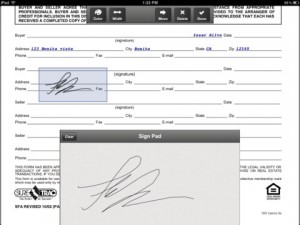
Some of my favorite capabilities of this app include turning scanned images into PDFs, adding markups to PDFs, saving documents to the cloud, and the ability to sign documents on the go. PDF-iPhone Edition incorporates the built-in camera of your iOS device and allows you to scan everything you’ve come across. Scanned images can be combined and converted into a multi-page PDF document for convenient viewing and transferring.
PDF Reader-iPhone Edition enables you to mark up your files by inserting sticky notes, textboxes as well as drawing lines, circles, and freehand on your PDF files, so you can sign documents if necessary.
PDF Reader-iPhone Edition also lets you retrieve, share, and save files to a selection of cloud storage services including iCloud, iDisk, Dropbox, GoogleDocs , box.net, SugarSync, FTP, and WebDAV Client and Server. It also provides an interface for you to efficiently manage and access all your cloud storage accounts. Not only can you store your files in the cloud, but you can also password protect folders within the application so that if someone accesses your iPhone your files are still secure.
Overall this is an all-in-one application for PDFs and is highly recommended. If you can’t figure out how to do something, this application provides excellent documenation on how everything works and gives you step by step instructions with pictures. It is currently available on the Apple App Store for just $1.99. If your looking for a way to read a manage PDFs than PDF Reader – iPhone edition is the app you need.
Incoming search terms:
- pdfreader iphone edition
Review: PDF Reader Pro
PDF Reader Pro, developed by YUYAO Mobile Software, Inc., is Top ranked in the business category of iTunes App Stores throughout the world, PDF Reader Pro continues to be the most cost-effective mobile PDF solution among competitors. The app was also selected as the Best Business App of App Store Rewind 2011 in Australia, New Zealand and other countries. PDF Reader Pro offers comprehensive functions such as fast rendering speed, saving documents to PDFs, scanning images to PDFs, and annotating documents. In addition, the app differentiated itself from other competitors with its PDF form filling function. It has also incorporated iCloud, SugarSync and a handful of other convenient cloud storage solutions.
PDF Reader Pro supports “Save to PDF” for all major file formats including Word, Excel, PowerPoint, Web Pages, Pages, Numbers, Keynote and many others. The new text selection feature enables you to highlight, underline, strikeout, and copy text in any PDF file you want. With PDF Reader Pro, you no longer need to purchase other apps to convert and markup PDF files. PDF Reader Pro gives you all the great features with the best price.
Supported Files
-MS Office: Word, Excel, PowerPoint
-image files (png, jpg, thm, jpeg, tif, tiff, gif, bmp, bmpf, ico, cur, xbm)
-audio files (aiff, aifc, wav, next, adts, mp3, acc)
-video files (mov, mp4, mpv, m4v, 3gp)
-Text files (txt, rtf)
-iWork files (keynote, pages, numbers)
-Comic files (cbr, cbz,ePub)
-HTML files and Safari webarchives
-Other file formats

PDF Reader Pro is currently on sale for 50% off in the Apple App Store for the low price of $2.99. It is a universal application so it will work on your iPhone / iPod Touch and your iPad. Overall it is an excellent application that combines multiple applications into one. One of my favorite features is the built in browser. You can visit any website and download files, save them to iCloud, Dropbox and even locally. The ability to quickly take a picture of a document, convert it to a PDF, make edits, and send the file off via email, cloud, or WiFi make it a perfect business companion app.
Incoming search terms:
- apps icon
- apple apps logo
- pdf reader pro mobile
- sky drive pdf reader pro yuyao