Flex – The iOS GameGenie
If you we’re at least born in the 90′s you should know what a GameGenie is right?
Well for those of you who don’t know, a GameGenie was a cartridge that you placed between your game console and game (namely Nintendo Entertainment System, Sega Genesis, etc) that let you modify the game you were playing without actually changing anything inside the original game cartridge, it was all runtime based.
This is what Flex is for iOS
It lets you pull up any application installed on your device, and poke around inside it. Change this, change that, break this, whatever you feel like doing you can do it inside Flex. With Cloud support you can share the “tweaks” you make in Flex with other users who use it.
A simple rundown on how to use it:
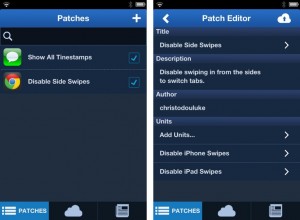
- Open Flex and in the “Patches” view hit the “+”
- Choose the App you want to play with.
- Tap on “Add Units…” (these are the actual things that make the changes to the apps)
- Usually you will want to tap the name of the app under “Executable” but this is where experimenting comes in.
- If a dialog wanting you to Process the executable comes up, do so
- Next you will want to choose a class to play with (experiment)
- Next choose a method you want to override (experiment!
) - Ticking a method will setup a unit that basically overrides it to do nothing
- After this you can go back to the “Patches” view and hit the check box to turn your patch on
Currently with Flex you can only override a method to where it doesn’t do anything anymore, advanced stuff isn’t possible yet, if ever.
Flex is currently available from John Coates for $3.99 in the BigBoss Repository
Incoming search terms:
- flex for ios patches
- patch games with flex
- IPHONE MD234LL M350
- ios flex patch list
- ios flex patch
- ios flex game hacks
- how to use ios flex to hack game
- gamegenie ios
- game genie ios
- flex ios cheats
iPhone 5 Already Jailbroken By Chpwn
A well known iPhone hacker, Grant Paul aka Chpwn, has already jailbroken the new iPhone 5 that was just released today.
He posted a picture of the iPhone 5 running Cydia to his twitter. Don’t get too excited though as a public release is probably weeks away still. They will have to work out all of the bugs, make sure everything works properly and develop software for easy installation.
Overall this is great news as this most likely means that all devices will be able to run jailbroken on iOS 6. As we get more info we will post it.
Incoming search terms:
- gold iphone 5 backplate
- where does unlimtones save files
- dtvrunner repo
- most expensive jordans in the world
- how to install Lei mobile
- dtvrunner issues
- safe to upgrade iOS simple mobile Curia
- lemobile cydia
- leimobile com breaking_news
- is it normal for the home screen of cydia be app builder when you first get it
Russian Hacker Cracks Apple’s In-App Purchases
Developers beware! All applications on the Apple App Store could easily be hacked and run on unauthorized devices. Developers were able to get around this buy locking premium content down with in-app purchases. Well those days are over. A Russian hacker named ZonD80 who posted the video above, has bypassed in-app purchases. At this point it seems that apps which properly validate in-app purchase receipts are unaffected by the hack; however, it appears that many apps do not do this.
We encourage all developers to change the way they are doing the in-app purchases with their apps to stop this hack. We also encourage all users to stay away from trying this hack as your connecting to a Russian server. While you may be saving money by pirating an app, the Russian’s may be accessing your personal data. The bad news is that there will be lots of little kids trying to do this hack as it is very simple and you do not need a jailbroken device. You install 2 CA certificates and change DNS settings on your device.
We will wait to hear back from Apple to see what they do to fix the current situation.
Incoming search terms:
- تحميل Total Defense 3D - iPhone Gameplay Video
Siri Ported To The iPhone 4 Via Jailbreak
Siri has been ported to the iPhone 4 and is now fully functional. The port is called H1Siri and can be found on 2 different Cydia repositories. The main one being http://Cydia.be and an alternate being http://iphone3gsystem.fr/cydia. We are still unsure how the hacker got this to work. It may be connecting to Apple’s server through a proxy. Due to the huge influx of traffic there have been reports of intermittent connectivity from multiple users.
Siri on iPhone 4S and now the iPhone 4 lets you use your voice to send messages, schedule meetings, place phone calls, and more. Ask Siri to do things just by talking the way you talk. Siri understands what you say, knows what you mean, and even talks back. Siri is so easy to use and does so much, you’ll keep finding more and more ways to use it.
UPDATE:
DO NOT, and I repeat DO NOT! Uninstall this once its on your phone, majority of uses experience respring loops which as of this moment are only curable by restoring your device.
read moreFix: AirPlay Audio Only? Enable Any HTML 5 Video Over AirPlay
So you are trying to play a video from a website on your Apple TV over AirPlay and you notice that only sound is coming out. Where is the video? How come some videos work over AirPlay and others don’t? It appears that every HTML 5 video needs to add some special parameters for video to work over AirPlay. This means that most of the videos on the web are not Apple TV compatible yet.
There is a workaround to this which will enable video over AirPlay using javascript. Take a website like http://chronictv.org/ when you watch a video and then transfer it to your Apple TV you will notice that only the audio is passing through. In order to fix this we will create a new bookmark with some javascript code to enable the video.
1. On your iPhone, iPad, or iPod Touch, click the square with the arrow in safari and hit Add Bookmark.
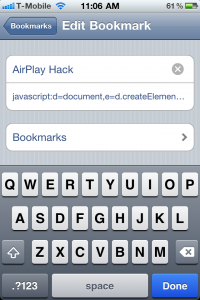
2. Name it something like AirPlay Hack and then hit save.

3. Now click the book icon and hit edit. Click on the bookmark you just created “AirPlay Hack” and remove the URL and put : javascript:d=document,e=d.createElement('script');e.src='http://bendodson.com/bookmarklets/ios-airplay.js?'+(new%20Date()*1);void(d.body.appendChild(e));

4. Now go back to the video you want to watch and wait until all the images load and you see a play button over the video. Once you see the play button open up your bookmarks and click on AirPlay Hack. The video will reload, so wait until you see the play button over the video again.
5. This time you can press play and when you send the video to your Apple TV it will transfer both the video and audio over to your TV.
Via [bendodson]
Incoming search terms:
- airplay only playing audio
- airplay audio only
- sky go airplay hack
- skyfire airplay
- airplay only plays audio
- apple tv only plays audio
- airplay sound only
- hbo go apple tv airplay hack
- skyfire AirPlay video
- airplay hack