Fix: the operation couldn’t be completed. (com.apple.appleaccount error 0.)
Did you get this error when trying to restore your iPhone or iPad from an iCloud backup while beta testing iOS 5
? I did and here is how to fix it. When your iDevice asks for your Apple ID and you are positive you are entering the right username and password in and you still get the error “The operation couldn’t be completed. (com.apple.appleaccount error 0.)” this is due to some glitch in Apple’s servers. To fix this problem you will need to login to your account on a computer through iTunes. Change your password and make sure your credit card and billing are correct.
Now try to login to your Apple ID on your iPhone, iPod Touch, or iPad and you will finally be able to get past this error and restore from an iCloud backup.
Incoming search terms:
- apple account error 500
- com apple appleaccount error 0
- icloud backup error
- appleaccount error 500
- aterror error 3
- the operation couldn’t be completed (coredavhttpstatuserrordomain error 500 )
- com apple appleaccount error 500 ipad
- icloud error 500
- iCloud restore error
- restore iphone from icloud
iCloud A First Look
One of the biggest things announced at WWDC last Monday was iCloud. A revolutionary new (more so improved) service to keep all of your digital life in sync. Steve promised a way to have contacts, calendars, bookmarks, photos, and even music in sync. When I first heard of it I knew I had to test it, so I did. Turns out that I love it, there are a few flaws but those are outweighed greatly by all of the benefits that iCloud brings. So I have compiled some of the best new features of iCloud.
Setup: iCloud is much simpler than mobile me, one of the reasons for that would be setup. When you first start iOS 5 after restoring you are greeted with a welcome page to set up your iPhone. iCloud is turned on by default and you simply login with your Apple ID to start the account. A few other things are setup like find my iPhone and wifi but with that first login your Apple ID will be tied in with all of your Apple Developed apps (app store, iTunes etc.). From there all your iDevices are seamless.
Contacts, Calendars, and Mail: After setup your contacts and calendars currently synced to your iPhone will be automatically pushed to the cloud and then served to the rest of your devices activated with iCloud. When you add a new contact or event the update is nearly instant for the rest of your devices. Also with iCloud you get a new mail account that is made from your current email used to setup iCloud, it just changes the extension from yahoo or gmail to @me.com. You can then use that as your new address and you can back up mail from that address or any other address to your 5GB of storage on your cloud.
Photostream: One of the big features (and my personal favorite) of iCloud is keeping your most recent photos on the cloud. When you take a picture (with wifi) it is instantly uploaded to the cloud and then pushed to your iPad and MacBook. You would think this process would take a while but it is actually fairly fast. Although when you are outside on 3G and take a picture your iPhone waits until on a wifi network to upload the new pic. Once your photos are on the cloud you can go to Photostream from any of your iDevices and save them to a new or previous album, share them, or copy. One thing that you cannot do though is delete from the cloud. So for 30 days up to 1000 photos will be permanently on you phone, computer, or tablet. Overall though Photostream is a very convenient feature in that all of your photos will be on all of your devices at all times.
Music and Apps: A feature that is now available to all iOS users on 4.3.3 or 5 is previous purchases. In iTunes and the App Store there is a section of your previous purchases, every single one, even apps or songs that have been removed can be re-downloaded from the store. With every song or app you have purchased but don’t have on your device there will be a new cloud icon next to it which will allow you to re-download it. This is very convenient especially since the apps and songs are categorized into an All section and a Not On This Device section so you can see what you forgot to sync to your device or an app you may have forgot you had purchased. This feature takes the second guessing of “Did I buy that app?” and allows you to get that app again without having to pay.
Overall iCloud makes syncing a thing of the past, because you can even back up your entire iPhone or iPad to your 5GB of data on the cloud. Being able to have all of your content on all of your devices all the time is a great thing and makes managing your digital content very easy.
Incoming search terms:
- icloud photostream
- how to delete photos from photo stream
- delete from photostream
- how to delete photos from photostream
- does photostream take up memory
- delete photos from photostream
- remove photos from photostream
- delete photo from photostream
- delete from photostream icloud
- delete photostream
iMessage Waiting for activation
This post is currently about the iOS 5 beta 1, but may apply to future versions of iOS 5.
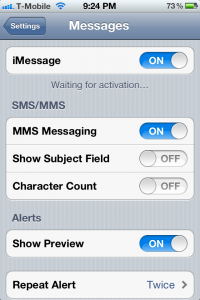
Are you having issues with iMessage not activating? This is very similar the the FaceTime issues where it says waiting for activation. You may find that iMessage will activate if you add another email address. When you do this you may also see an iMessage phone number error.
When you turn on iMessage under the message settings you will see a FaceTime message pop up saying your carrier may charge for SMS messages used to activate FaceTime. Click OK. Go out of settings and try sending a text message to someone you know who is running iOS 5. This will help manually activate iMessage.
Also in the Message settings you will see Received At. Click on that and enter your Apple ID email address and a few other email address if you want. As long as you have a valid email address you will be able to send and receive iMessages but you may have an error receiving them from a phone number if you are on a non approved carrier like T-Mobile. Currently I am on an officially unlocked iPhone 4 running iOS 5 beta 1 on the Tmobile network. I can send and receive iMessages but only with an email address. It shows that there is an error activating with my phone number.
We are working on finding a solution to this problem. Hopefully Apple will fix it before the official release of iOS 5.
iMessages can be sent between iPhone, iPad, and iPod touch.
Incoming search terms:
- imessage waiting for activation
- how to activate imessage
- imessage activation
- activate imessage
- imessage not activating
- imessage activation error
- imessage wont activate
- activating iMessage
- my imessage is not activating
- imessage not working
This Apple ID Is Not Currently Eligible To Purchase Gift Certificates
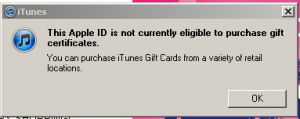
Are you trying to buy an iTunes gift certificate online that you can either download and print or email to someone? Are you getting this error? “This Apple ID is not currently eligible to purchase gift certificates. You can purchase iTunes Gift Cards from a variety of retail locations.”
It seems that Apple has been limiting certain accounts due to all of the fraud that has been happening lately. Hackers were stealing peoples passwords and buying gift certificates that they were selling on eBay or the black market.
In order for your Apple ID to be eligible automatically you need to purchase something with your credit card from an Apple Retail store on apple.com. Others have had success with removing all credit cards from the account and then adding one at the time of purchasing your iTunes Gift Certificate.
Get A Free $100 iTunes Gift Card
Incoming search terms:
- this apple id is not currently eligible to purchase gift certificates
- apple id not eligible to purchase gift certificates
- this apple Id is not eligible to purchase gift certificates
- this apple id is currently not eligible to purchase gift certificates
- apple id is not currently eligible to purchase gift certificates
- this apple id is currently not eligible
- this apple id is not currently eligible to purchase gift
- this apple id is not eligible to purchase gift
- apple id not currently eligible to purchase gift certificates
- apple id not eligible to buy gift certificates