Apple released iOS 27.2 on October 26, bringing new Shortcuts automations, broader Siri AI language support, and a long list of security fixes to supported iPhones. Apple identifies the public release as build 24B119.
The update is available for iPhone 11 and later. You can install it from Settings > General > Software Update. As usual, back up your iPhone before starting the installation.
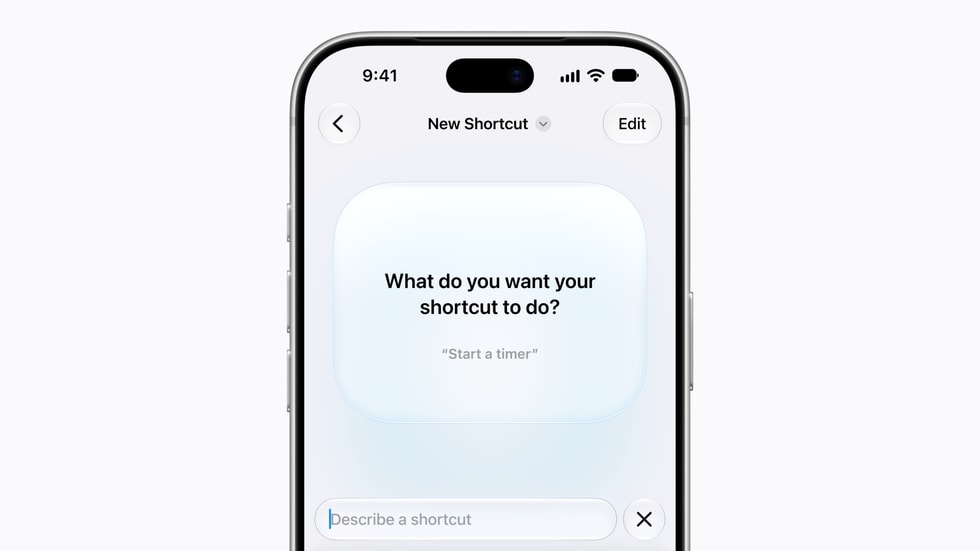
Shortcuts gets useful new automations
iOS 27.2 expands what the Shortcuts app can do automatically. The most interesting addition for iPhone Duo owners is a new trigger that can run an automation when the device is opened or closed. That could be used to change a Focus mode, open a favorite app, adjust audio, or perform another action based on the phone’s position.
Apple also added Workout automation support for the Fitness app. App automations can now identify which app was closed, making it easier to build one automation that responds differently to several apps. The Use Model action can retrieve current information from the web in more languages, and iPhone users can edit a shortcut’s name and icon directly from the library.
Siri AI expands to five more languages
With iOS 27.2, Siri AI is now available in French, Japanese, Korean, Portuguese, and Spanish in addition to English. Apple says availability can vary by language and region, and the features remain in beta. A compatible Apple Intelligence device is also required.
The expansion matters because Siri AI can use personal context and onscreen information to help with requests, while maintaining the privacy protections built into Apple Intelligence. It also makes supported Shortcuts actions more useful for people who do not use English as their primary device language.
Security is the biggest reason to update
Apple’s security notes list fixes across many parts of iOS, including Apple Intelligence, Siri, WebKit, the kernel, Wi-Fi, USB, Mail, Contacts, Quick Look, and media processing. The addressed issues include possible exposure of sensitive information, unexpected app termination, maliciously crafted content, and code execution vulnerabilities.
Several fixes are especially notable. Apple corrected WebKit issues that could allow a sandbox escape or arbitrary code execution through malicious web content. Other updates address authorization checks in Apple Intelligence, the handling of Siri data, attacks involving nearby Wi-Fi, and malicious USB devices.
Apple’s advisory does not say these vulnerabilities were actively exploited. Still, the breadth of the security update makes iOS 27.2 worth installing even if you do not plan to use the new features immediately.
Should you install iOS 27.2?
For most users, yes. The security fixes alone justify updating, while the new Shortcuts triggers and expanded Siri AI support add practical improvements. Anyone who depends on an iPhone for critical work may prefer to wait briefly for early battery-life and compatibility feedback, but should not postpone the security update for long.
Before installing, make an iCloud or computer backup, connect the iPhone to power, and allow enough time for the download and restart.
Direct firmware downloads
Hey there, Apple just released 6 new iOS Firmwares:
- iOS 26.6.1 (Build 23L781) for:
- Apple TV 4 (AppleTV5,3) — Download
- iOS 27.2 (Build 24K122) for:
- iOS 18.7.11 (Build 22H384) for:
- iOS 26.7.2 (Build 23H128) for:
- iPad Pro 3 (11-inch, Wi-Fi) (iPad8,1) — Download
- iPad Pro 3 (11-inch, Wi-Fi, 1 TB) (iPad8,2) — Download
- iPad Pro 3 (11-inch, Cellular) (iPad8,3) — Download
- iPad Pro 3 (11-inch, Cellular, 1 TB) (iPad8,4) — Download
- iPad Pro 3 (12.9-inch, Wi-Fi) (iPad8,5) — Download
- iPad Pro 3 (12.9-inch, Wi-Fi, 1 TB) (iPad8,6) — Download
- iPad Pro 3 (12.9-inch, Cellular) (iPad8,7) — Download
- iPad Pro 3 (12.9-inch, Cellular, 1 TB) (iPad8,8) — Download
- iPad mini 5 (Wi-Fi) (iPad11,1) — Download
- iPad mini 5 (Cellular) (iPad11,2) — Download
- iPad Air 3 (Wi-Fi) (iPad11,3) — Download
- iPad Air 3 (Cellular) (iPad11,4) — Download
- iPad 8 (Wi-Fi) (iPad11,6) — Download
- iPad 8 (Cellular) (iPad11,7) — Download
- iOS 27.2 (Build 24B119) for:
- iPad Pro 4 (11-inch, Wi-Fi) (iPad8,9) — Download
- iPad Pro 4 (11-inch, Cellular) (iPad8,10) — Download
- iPad Pro 4 (12.9-inch, Wi-Fi) (iPad8,11) — Download
- iPad Pro 4 (12.9-inch, Cellular) (iPad8,12) — Download
- iPad 9 (Wi-Fi) (iPad12,1) — Download
- iPad 9 (Cellular) (iPad12,2) — Download
- iPad Air 4 (Wi-Fi) (iPad13,1) — Download
- iPad Air 4 (Cellular) (iPad13,2) — Download
- iPad Pro 3 (11-inch, Wi-Fi) (iPad13,4) — Download
- iPad Pro 3 (11-inch, Cellular) (iPad13,5) — Download
- iPad Pro 3 (11-inch, Wi-Fi) (iPad13,6) — Download
- iPad Pro 3 (11-inch, Cellular) (iPad13,7) — Download
- iPad Pro 5 (12.9-inch, Wi-Fi) (iPad13,8) — Download
- iPad Pro 5 (12.9-inch, Wi-Fi) (iPad13,9) — Download
- iPad Air 4 (Cellular) (iPad13,10) — Download
- iPad Pro 5 (12.9-inch, Cellular) (iPad13,11) — Download
- iPad Air 5 (Wi-Fi) (iPad13,16) — Download
- iPad Air 4 (Cellular) (iPad13,17) — Download
- iPad 10 (Wi-Fi) (iPad13,18) — Download
- iPad 10 (Cellular) (iPad13,19) — Download
- iPad mini 6 (Wi-Fi) (iPad14,1) — Download
- iPad mini 6 (Cellular) (iPad14,2) — Download
- iPad Pro 4 (11-inch, Wi-Fi) (iPad14,3) — Download
- iPad Pro 4 (11-inch, Cellular) (iPad14,4) — Download
- iPad Pro 6 (12.9-inch, Wi-Fi) (iPad14,5) — Download
- iPad Pro 6 (12.9-inch, Cellular) (iPad14,6) — Download
- iPad Air 6 (Wi-Fi) (iPad14,8) — Download
- iPad Air 4 (Cellular) (iPad14,9) — Download
- iPad Air 6 (13-inch, Wi-Fi) (iPad14,10) — Download
- iPad Air 6 (13-inch, Cellular) (iPad14,11) — Download
- iPad mini 7 (Wi-Fi) (iPad16,1) — Download
- iPad mini 7 (Cellular) (iPad16,2) — Download
- iPad Pro 5 (11-inch, Wi-Fi) (iPad16,3) — Download
- iPad Pro 5 (11-inch, Cellular) (iPad16,4) — Download
- iPad Pro 5 (12.9-inch, Wi-Fi) (iPad16,5) — Download
- iPad Pro 5 (12.9-inch, Wi-Fi) (iPad16,6) — Download
- iPhone 11 (iPhone12,1) — Download
- iPhone 11 Pro (iPhone12,3) — Download
- iPhone 11 Pro Max (iPhone12,5) — Download
- iPhone SE (2020) (iPhone12,8) — Download
- iPhone 12 mini (iPhone13,1) — Download
- iPhone 12 (iPhone13,2) — Download
- iPhone 12 Pro (iPhone13,3) — Download
- iPhone 12 Pro Max (iPhone13,4) — Download
- iPhone 13 Pro (iPhone14,2) — Download
- iPhone 13 Pro Max (iPhone14,3) — Download
- iPhone 13 mini (iPhone14,4) — Download
- iPhone 13 (iPhone14,5) — Download
- iPhone SE (2022) (iPhone14,6) — Download
- iPhone 14 (iPhone14,7) — Download
- iPhone 14 Plus (iPhone14,8) — Download
- iPhone 14 Pro (iPhone15,2) — Download
- iPhone 14 Pro Max (iPhone15,3) — Download
- iPhone 15 (iPhone15,4) — Download
- iPhone 15 Plus (iPhone15,5) — Download
- iPhone 15 Pro (iPhone16,1) — Download
- iPhone 15 Pro Max (iPhone16,2) — Download
- iPhone 16 Pro (iPhone17,1) — Download
- iPhone 16 Pro Max (iPhone17,2) — Download
- iPhone 16 (iPhone17,3) — Download
- iPhone 16 Plus (iPhone17,4) — Download
- iPhone 16e (iPhone17,5) — Download
- iPad 11 (Wi-Fi) (iPad15,7) — Download
- iPad 11 (Cellular) (iPad15,8) — Download
- iPad Air 7 (13-inch, Wi-Fi) (iPad15,5) — Download
- iPad Air 7 (11-inch, Wi-Fi) (iPad15,3) — Download
- iPad Air 7 (11-inch, Cellular) (iPad15,4) — Download
- iPad Air 7 (13-inch, Cellular) (iPad15,6) — Download
- iPhone 17 Pro Max (iPhone18,2) — Download
- iPhone Air (iPhone18,4) — Download
- iPhone 17 Pro (iPhone18,1) — Download
- iPhone 17 (iPhone18,3) — Download
- iPad Pro 8 (11-inch, Cellular) (iPad17,2) — Download
- iPad Pro 8 (11-inch, Wi-Fi) (iPad17,1) — Download
- iPad Pro 8 (13-inch, Wi-Fi) (iPad17,3) — Download
- iPad Pro 8 (13-inch, Cellular) (iPad17,4) — Download
- iPad16,10 (iPad16,10) — Download
- iPad16,9 (iPad16,9) — Download
- iPad16,8 (iPad16,8) — Download
- iPad16,11 (iPad16,11) — Download
- iPhone18,5 (iPhone18,5) — Download
- iPhone19,2 (iPhone19,2) — Download
- iPhone19,3 (iPhone19,3) — Download
- iPhone19,7 (iPhone19,7) — Download
- iOS 27.2 (Build 24B91020) for:
- iPhone19,4 (iPhone19,4) — Download
Use only the firmware file that exactly matches your device identifier. Restoring with an IPSW can erase the device, so make a backup first.
Leave a Reply