Apple is giving its creative-app bundle a substantial upgrade this November, and some of the most useful additions are headed directly to iPhone and iPad. The new Apple Creator Studio release brings an intelligent assistant to Keynote, Pages, and Numbers, expands Final Cut Pro for iPad, and keeps Final Cut Camera available as a companion tool for mobile video production.
The update was announced by Apple on October 27. It is less about one headline feature than making a group of familiar apps work together more intelligently. For people who build presentations on an iPad, edit video while traveling, or start projects on an iPhone before finishing them on a larger screen, that could make Creator Studio considerably more practical.
Keynote, Pages, and Numbers get in-app assistants
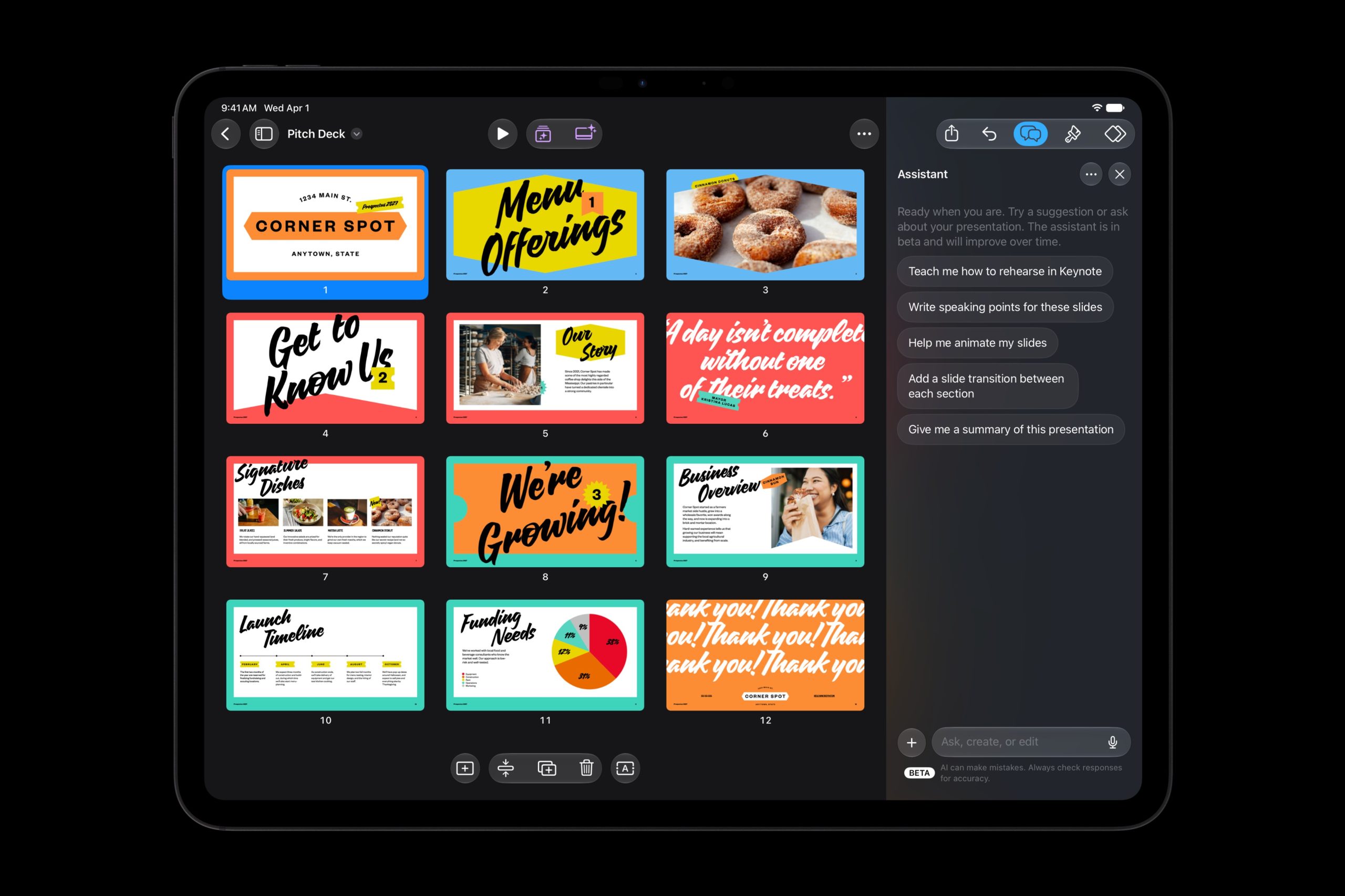
The biggest mobile change is a new intelligent assistant, currently labeled beta, inside Keynote, Pages, and Numbers. Apple says it understands the context of the document that is open, so users can ask for help without first explaining the entire project.
In Keynote, the assistant can help design, animate, and refine slides. Pages can use it to draft, reorganize, and polish writing. Numbers can calculate and organize data, recommend chart types with a preview, and create custom tables. Apple says these features use Apple models and OpenAI, though the company has not yet detailed every privacy or processing choice for each request.
There are important limits at launch. The assistant requires an Apple Intelligence-capable device running iOS 27, iPadOS 27, or macOS 27 or later, and it will initially be available only in U.S. English. Apple’s new Model Context Protocol support, which allows external AI tools to read and edit documents or trigger actions, is limited to macOS 27 at launch rather than iPhone or iPad.
What changes for iPad video editors
Final Cut Pro for iPad remains one of the bundle’s centerpieces. Apple says the November update adds broader creative workflows across Final Cut Pro, including access to its Content Hub with curated stock video, photos, and backgrounds. That gives editors a way to fill a visual gap or add a background without leaving the project to search for material elsewhere.
Hardware compatibility is worth checking before subscribing. Final Cut Pro for iPad requires iPadOS 26.6 or later and an iPad with an A16, A17 Pro, M1, or newer chip. Pixelmator Pro for iPad requires iPadOS 26 or later and the same chip families. Logic Pro for iPad has broader support, requiring iPadOS 26 or later and an A12 Bionic chip or newer.
Final Cut Camera also stays part of the mobile workflow. Apple lists it as requiring iOS 26.6 or iPadOS 26.6 or later, allowing a compatible iPhone or iPad to serve as a capture device before footage moves into Final Cut Pro.
Price, release timing, and what remains free
Apple says the Creator Studio updates will arrive through the App Store in November and will be free for current subscribers. A new subscription costs $12.99 per month or $129 per year in the United States, with a one-month trial for new subscribers. Eligible college students and educators can subscribe for $2.99 per month or $29.99 per year.
The subscription can be shared with up to six family members through Family Sharing. Buying a new Mac or qualifying iPad may also include three free months for eligible new or returning subscribers; Apple says a qualifying iPad needs at least 6GB of memory and an A16, A17 Pro, or M-series chip or newer.
Crucially, Apple is not putting the basic versions of its productivity apps behind the bundle. Free versions of Keynote, Pages, Numbers, and Freeform will continue to be included with new iPhones, iPads, and Macs. The new assistant and other premium capabilities are the reasons to consider Creator Studio, not continued access to basic document editing.
Should iPhone and iPad users subscribe?
For someone who only writes an occasional document or creates a few slides, the free apps should remain enough. The subscription makes more sense for people who regularly combine several Apple creative tools: filming with an iPhone, editing in Final Cut Pro on iPad, preparing graphics, and packaging the finished work in Keynote or Pages.
Before paying, confirm that every device meets the feature requirements and wait to test the one-month trial after the updates actually arrive. The intelligent assistant is still a beta, U.S. English is the only supported language at launch, and some of the deepest automation is Mac-only. For compatible iPads, however, the November release looks like a meaningful step toward making a complete creative workflow possible away from a desk.
Leave a Reply