These are the settings you need to get MMS working on your iPhone running iOS 5.0 and above. This includes iOS 5.1.1 and iOS 6.0. There are 2 ways to get MMS working on your Simple Mobile iPhone. The first requires you to jailbreak. This is the easiest way. If you have a factory unlocked iPhone, you can use the iBackupbot method below to get mms working without a jailbreak.
If you are on the $25 15 Day Talk & Text plan, you cannot use MMS as a data plan is required. When your current plan expires, upgrade your plan to one that includes data so you may take advantage of the MMS feature.
1. Add our Cydia repo to find the iPhone MMS Fix for Simple Mobile.
Our Repo is http://beta.leimobile.com/repo/
Once you install the fix you will need to reboot your phone and go into settings->general->network and make sure the APN is correct.
The settings should look like this:
Apn: simple
Mmsc: http://smpl.mms.msg.eng.t-mobile.com/mms/wapenc
Mms proxy: 216.155.165.050 You may need to change the proxy to 216.155.165.50:8080
Mms max: 1048576
Mms ua prof URL: http://www.apple.com/mms/uaprof.rdf
If you are using the $40 TalkTextILD plan, you cannot use MMS as a data plan is required. When your current plan expires, upgrade your plan to one of the data capable plans – 50MB or 150MB – that Simple Mobile offers.
2. If you are unable to jailbreak and/or have a factory unlocked iPhone you can use iBackupBot which allows you to modify files on your iPhone without jailbreaking.
1. First things first. Make a full backup of your iPhone in iTunes.
2. Download the program iBackupBot. Make sure to select Mac or Windows. You may use the free trial, but it is best to purchase!
3. Launch iBackupBot and just hit OK to all of the messages that may pop up. It may take a while to load all the device information if you have multiple backups saved on your computer.
4. Once loaded you will want to find your most recent backup on the left had side and select it.
5. Next you will see a list of files show up in the righthand box. Scroll down until you see Library/Preferences/com.apple.mms_override.plist.
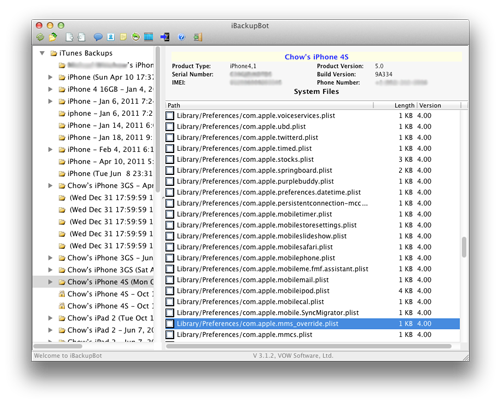
6. Double click on the mms override.plist and it will pop up a box to edit the file.
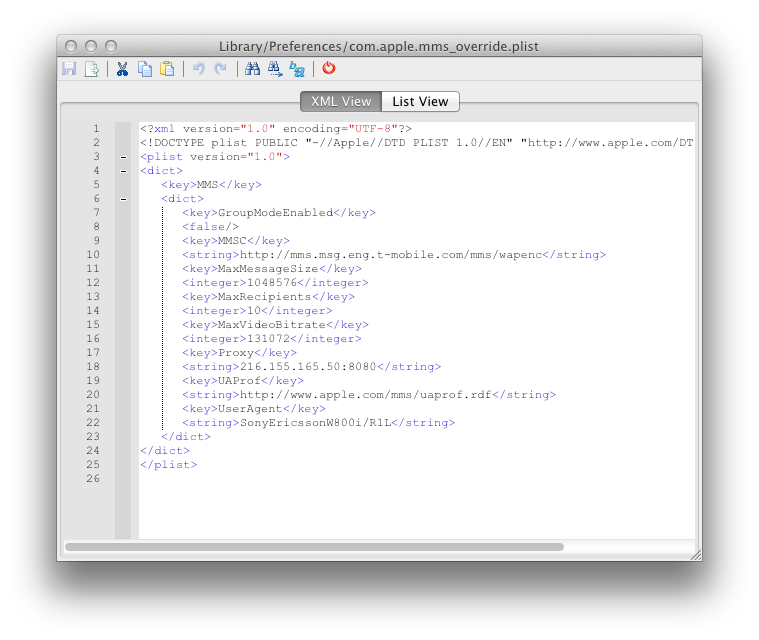
7. Download this com.apple.mms_override.plist and paste the contents into the box or manually write it out. It should looks similar to the picture below which is for T-Mobile. Simple Mobile’s will look a bit different. The MMSC string should be http://smpl.mms.msg.eng.t-mobile.com/mms/wapenc
8. Now put a checkmark in the box next to Library/Preferences/com.apple.mms_override.plist and then click on File at the top and select restore.
9. iBackupBot will restore this new edited file onto your iPhone.
10. I will make a video Tutorial soon.
Incoming search terms:
- iphone3 1_6 0_10a403
- simple mobile mms settings for iphone 4 ios 5 1 1
- ios 5 0 1
- iphone 5 simple mobile
- plist for simple mobile
- ios 5 0 1 tmobile mms
- simple mobile mms iphone 4s
- simple mobile iphone 5
- simple mobile iphone 4s mms
- simple mobile iphone 5 mms
i tried installing this on to my 3gs with ios 5.0.1 after installation i rebooted got stuck at the reboot screen no i dont have a working phone and i wont get untill another 9 hrs sucks!!!!!!!
worked great on my 3gs first try
i tried this and now when i try to restore it tells me code 10 and ask me if i want to try again. can you help me fix this problem; i’m using it on an iphone 4S; and i can’t restore from any other previous backup even with itunes.
Did u try the alt it works perfect I installed earlier today and don’t forget to simple under apn
the problem am having is that am not able to copy the edited file onto my iphone as described; when i did the apn; i can only send but not able to receive. this worked for me last time i tried; but i took my sim card out and when i replaced it; i lost all the settings and now am not able to get it back to work. like i said now i’m not able to even restore to my previous backup with itunes; i need help.
Crap I gotta 3GS I don’t know anything about installing cydia or anything I had mine unlocked by someone sorry
Thanks got it working via override the file
hi i just want to say that it worked for me; this is the best way to make your mms work including internet tethering on my iphone 4S 64gig. the mistake i made before was backing up with the application instead of making the backup with itunes first; if you try and it didn’t work; it is very likely that you are not doing things right.
Hello mcnallydood, I was wondering what company is your iphone ? I have an iPhone 4s 16gb at&t factory unlocked and I’ve I am paying $40 a month on simple mobile. I have T-Mobile bars and everything. The MMS isn’t working for me though, I’ve tried everything ! Do I keep 3g data on ? are you also paying $40?
you running simple mobile service on iphone 4s? if so HOW?
yep; just that it reads T-Mobile;and nothing else has changed; i will say it is the best service i need right now. Kudos to the team
when i click send a picture i have the mms option now and i can click the camera to the left of chat box when texting, but when i try to send to mms it loads to the end then just stops, after awhile a red error sign pops up and says to resend. I do not have a data plan
TravisHayes; how do you intend to send mms without data plan?
Uninstall and reinstall
Tried using the method above on iphone 4 running 5.1.1 unlocked from apple. I cannot receive mms at all.
oh and I am on Simple mobile
Hi Joseph; do you get T-Mobile with your Simple Mobile sim card? if yes then it should work if you follow the above instructions; just make sure that you have simple in the APN for both data and mms; and in the mms proxy you might want to add the gateway:8080 at the end of the ip address.
i still cant receive the ptc just massege Relate Error: ‘The media content was not included due to a picture resolution or message size restriction’
can you help me
i’m running on 5.1.1 ios; 4S. it first it didn’t work but i kept trying and finally i rebooted the phone and it works fine now; i can receive and send mms.
After doing this (with the iBackupBot, not jailbroken) It still didn’t work. I had to add Simple Mobile as my APN (unlockit.co.nz) and change the max message size to 307200.
You can do this on iOS 5 by going to General > Network > Cellular Data Network > MMS Max Message Size
Works great now. 🙂
I have an iPhone 4 AT&T, untethered 5.1.1. I’ve tried adding the cellular data but I still get no service in the upper left. I’m using the unlimited $40 simple mobile plan. There is data in the plan and there is simple coverage in my area so I’d like to know what’s wrong.
If you don’t have service it means your phone is not unlocked.
Joe, could it be that you are confusing jailbreaking from UNLOCKING? you can have an untethered jailbreak; but you gonna have to unlock it to get it to work with a non contracted sim card from other cellular providers besides AT&T
I always thought they were one in the same. If there is an unlocking method through software rather than the gevey sim, please let me know. In the mean time I’ll search for a fix.
i use simple mobile on iphone 3gs and after i updated my iphone software ro iOS 5 it says “only compatible SIM cards from a supported carrier may be used to activate iPhone. Plase insert the SIM card that came with your iPhone or visit a supported carrier’s store to recieve a replacement SIM card.” Please can someone reply and help me what i should do! i cant proceed and use my phone now b/c the SIM is not supported!
You need to allow fake activation when you did the upgrade or your iPhone is no longer unlocked because you did not preserve your baseband. Try finding someone with an AT&T sim card you can borrow really quick.
THANKS SO MUCH FOR THIS!!!!!! WORKED PERFECTLY ON MY IPHONE 🙂
In my Iphone 4 factory unlocked works fine but I need to modify the proxy after .50 you need to add :8080 and now I can send and receive mms my iphone has ios 6.0 thanks for you information to everyone….
I have a factory unlocked iPhone 4 with iOS 6.0, and added 8080 at the end of the ip address, but it still doesn’t work. The camera icon is no longer grayed out, but it gives me a “not delivered” every time. Help!
hi diane did you do the option 2 ?? because you need to download the ibackupbot and follow the instructions……and modify Library/Preferences/com.apple.mms_override.plist you need do all this first, after that just be sure that the apn name has simple or the t-mobile name and you write the :8080 in the mmsc proxy.
I had forgotten to put in the APN after option two! Thanks so much! It works now! 🙂
I have simple mobile but my Internet isn’t working . I have iPhone 4 with ios 6 please help. I got my mms to work but not the Internet.
Thank you
Carlos
Do you have a data plan? Did you put simple as your APN?
Whenever I click to download ibackupbot for Mac, I get an error msg saying safari cannot download,
Trying to get my mms working on my iPhone 4 running ios 6.
do i need MMS to recieve/send messages on SIMPLE Mobile?
not basic messages or iMessages. You need to have a data plan for picture messages (MMS).
I am working on it ,… do i have to purchase the Ibackupbot,..i don’t have much info to loose
Hi I have an iphone4 by at&t that is factory unlocked and on the simple mobile network. I paid for the 4g plan and have been having mms issues since I have had the phone. I cannot send-receive date but the net works fine (ios 6.0)
Please assist me with this process. Thanks!
Did you use the ibackupbot process?
i used the ibackupbot an have had no luck with fxing the mms issues i have a factory unlocked iphone 4 8g runinng on simple mobie $40 a month plan. any help would be awesome
you can try changing the mms proxy to 216.155.165.050:8080
I did change my mms proxy and included the :8080
Still can’t send picture messages
Hello
Can get MMS and internet working on my unlocked 4S….any suggestions? Please help
I “can’t” get MMS and internet working on my unlocked 4S…..please help
if you have the 40 $ plan you have data they have to update that i just fixed my problem the picture was too many megabytes so i did the leimobile repo twice i errased it and reinstalled it and it works on my iPhone 4 5.1.1 on the 4.12.01 that i had to pay to unlock on ebay cause it was unlockable and after 30 minutes 5 bars on Simple Mobile
I can’t get MMS to work on iphone 4 factory unlock on IOS 6.0.1. my Carrie is simple mobile. please any suggestions or help.
i bought an iphone 4 unlocked and jailbroken. i am on simple mobile. the phone aready has cydia installed. please explain how i add the repo. i do not have the acount info for cydia as it was on the phone when i bought it.
disregard this post, i used the ibackupbot and it worked! thanks!
the link on step 7 for using ibackupbot does not work!
my appologies it did work.
Do you have a video Tutorial
This did not work for me. What did work for me was adding “:8080” at the end of the line. It looks like this
Mms proxy: 216.155.165.50:8080 Also the mms proxy ends in “.50” not “.050”
It worked after I added
.50:8080
I saw in an earlier post about “fake” activating your phone. How do I do this in order to get phone working with my SIMPLE SIM card?
How can I get and send picture texts on my iPhone?
I have a Simpe Mobile $40 Uld Tlk,txt,web with 1g of 4g lte then when that’s all used I continue my plan on 3g uld data. Will I be able to use the internet & mms on an iphone 4s?