Holiday gatherings create the same photo problem every year: one person has the group portrait, someone else captured the candid moments, and half the family never receives the best shots. In iOS 27 and iPadOS 27, Apple’s upgraded Shared Albums offer a much cleaner answer—especially when a group includes Android or Windows users.
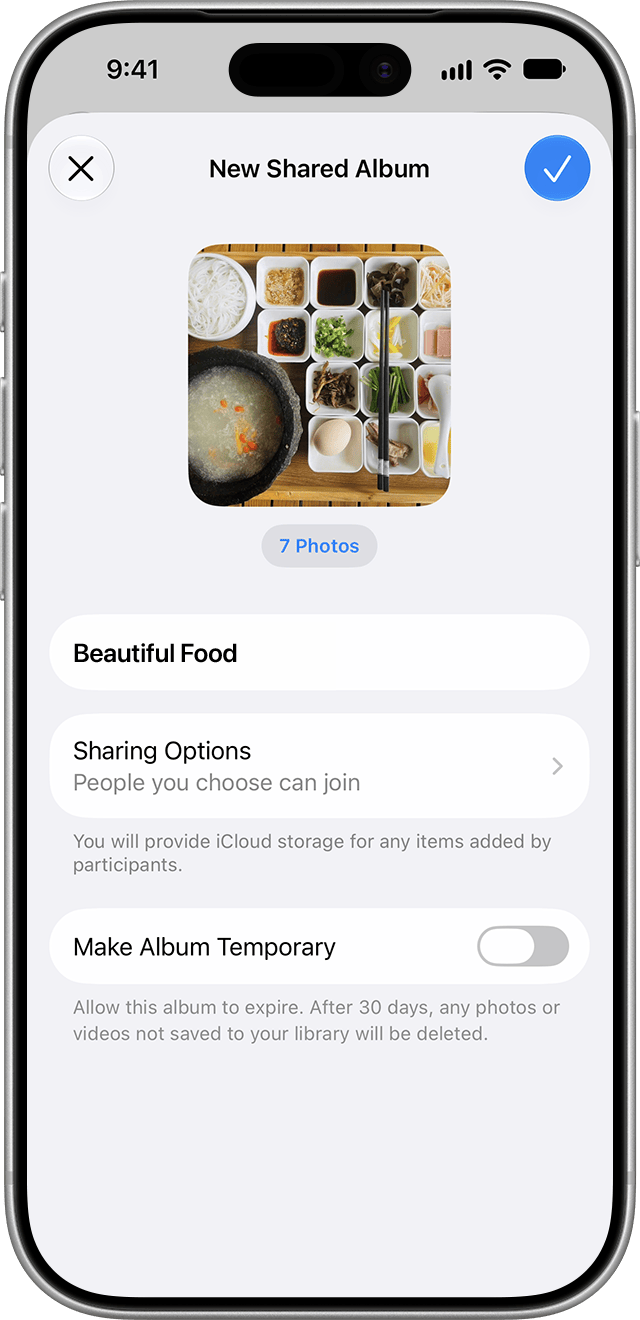
Apple says Shared Albums now support full-resolution sharing, improved filters and sorting, emoji reactions, and new invitation controls. People can also join and contribute on the web without owning an Apple device or Apple Account. That makes now a good time to create an album for Thanksgiving, an upcoming trip, or the entire holiday season—before everyone starts taking pictures.
1. Choose Shared Albums, not Shared Library
The names are similar, but the tools serve different purposes. A Shared Album is a collection you create for an event or group. People can view, comment, react, and—if you allow it—add their own photos. Apple’s separate iCloud Shared Photo Library is a persistent joint library for as many as six people, where participants can add, edit, and delete shared content.
For a holiday party, school event, or family trip, a Shared Album is usually the safer and simpler choice. It keeps the event separate from your main library and gives the owner more control over participation.
2. Turn the feature on before guests arrive
On an iPhone or iPad running iOS 27 or iPadOS 27, go to Settings > your name > iCloud > Photos. Make sure iCloud Photos is enabled, then turn on Shared Albums. Apple recommends updating devices to the latest available software first.
To create an album, open Photos, tap Collections, scroll to Shared Albums, and tap the Add button. Give the album a clear name such as “Thanksgiving 2026,” choose a few starter photos, and review Sharing Options before sending the link.
3. Full-resolution sharing is the biggest upgrade
Older versions of Shared Albums uploaded a reduced copy, so downloaded pictures might not preserve the same quality or information as the original. Apple’s current Shared Albums guide says iOS 27, iPadOS 27, and macOS 27 add full-resolution sharing. That makes the feature far more useful when relatives want to print a group photo, save an original-quality portrait, or edit an image later.
There is still a practical rule worth following: keep your own originals in your Photos library and maintain a backup. A collaborative album is convenient distribution, not a replacement for protecting irreplaceable pictures.
4. Guests no longer need to be all-in on Apple
The new web option removes a long-standing source of friction. Friends and relatives can open an album link and contribute from a web browser even if they do not have an Apple Account or Apple device. On your album’s Sharing Options screen, decide whether access is limited to invited or approved people, whether anyone with the link can join, and whether new visitors must request access.
For a private family event, approval is the sensible default. Avoid posting the album link publicly, and remove participants you no longer recognize. Anyone who can view a shared photo may be able to save it to their own device.
5. Decide who can add—and who can manage
Inviting someone does not have to mean handing over every control. The album owner can allow participants to add photos, while management permissions determine who can manage people and content. Before sharing the link widely, invite one trusted person and test the experience together.
Apple also notes that the owner, or someone with permission to manage the album and photos, can delete photos, videos, or comments contributed by anyone. Other participants can delete items they added themselves. A removed image disappears from the shared album across participants’ devices, although copies people already saved remain in their personal libraries.
6. Use a temporary album for one-off events
iOS 27 can create a temporary Shared Album, which Apple says is deleted after 30 days. That is ideal for a single dinner, party, or weekend trip when nobody wants another permanent album hanging around. If a photo matters, save it to your personal library before the temporary album expires.
7. Make the album useful, not noisy
A little setup etiquette goes a long way. Ask guests to contribute their best shots rather than every burst photo. Use reactions and comments to identify favorites, then sort and filter the collection when it is time to make a print order or family recap. If children are pictured, confirm that parents are comfortable with who can access and download the images.
The takeaway
Set up the album a day or two before the event, test its link with one participant, and put a trusted co-organizer in charge of reminding people to contribute. With full-resolution uploads and browser-based participation, iOS 27 Shared Albums finally work well for mixed-device groups—and a five-minute setup now can prevent weeks of “send me that photo” messages later.
Leave a Reply