Apple’s redesigned Health app is reaching a much wider audience. On November 3, Apple announced support for global English, Simplified and Traditional Chinese, French, Japanese, Korean, Norwegian, Portuguese, Spanish, Turkish, and Vietnamese. The expansion matters because the update is more than a translation: it brings Apple’s newest personalized health tools to millions of additional iPhone and iPad users.
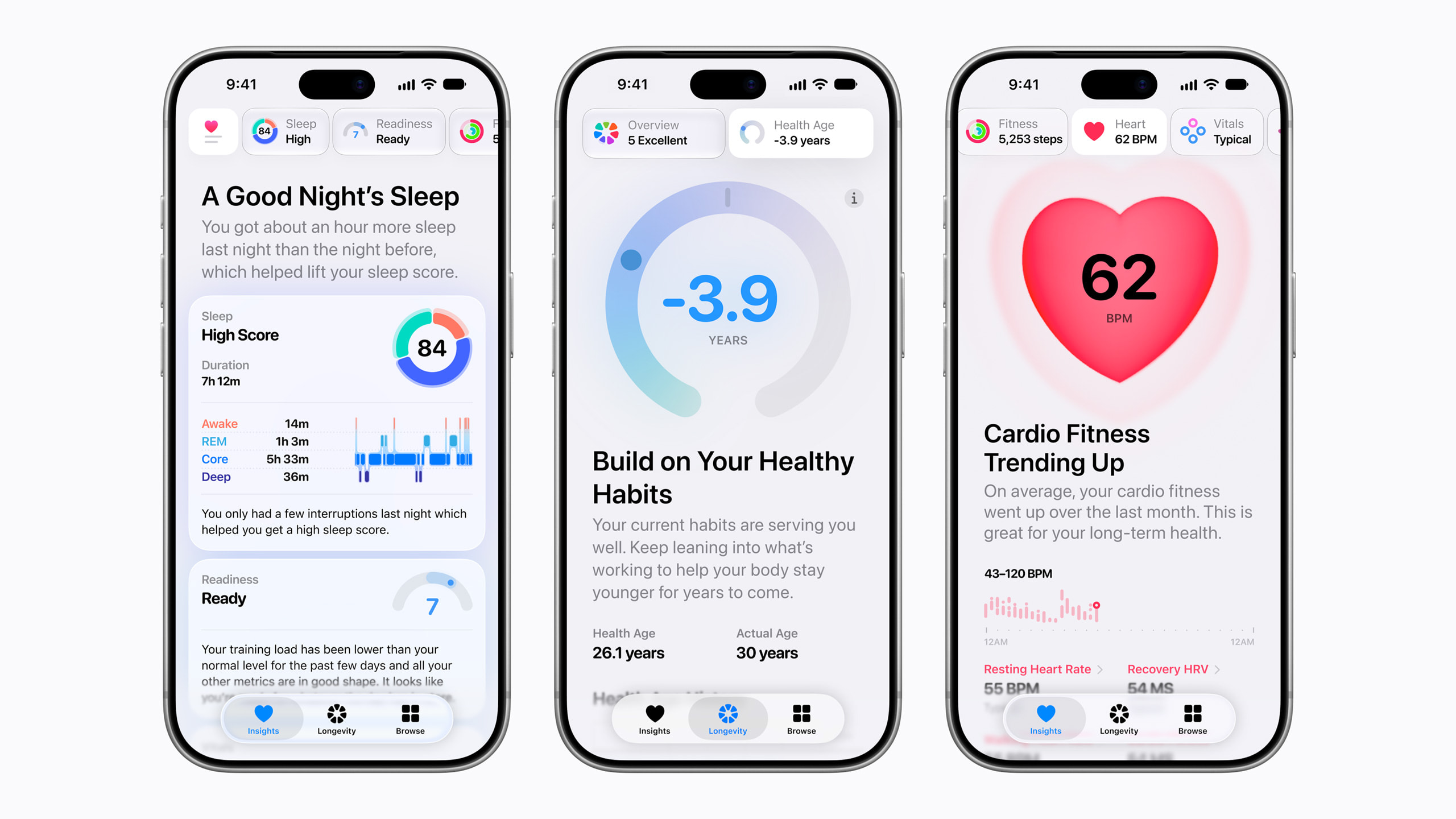
According to Apple’s announcement, the redesigned experience uses Apple Intelligence to adapt to each person’s health metrics and provide both daily guidance and a longer-term view. Apple says the app was designed to protect health information throughout the experience.
What the expanded Health app includes
The centerpiece is a new Longevity tab. Instead of showing isolated measurements, it examines patterns across heart health, sleep, mental wellbeing, movement, metabolic health, hearing, and nutrition. The goal is to help users see how everyday habits and measurements fit into a broader trajectory.
Within that tab, Health Age turns selected Apple Watch measurements into an estimate of how the body is tracking relative to chronological age. Apple says the calculation can use VO2 max, resting heart rate, sleep, and heart rate variability. Users may also add compatible clinical lab results, including A1c and LDL cholesterol, to make the long-term picture more complete.
Health Age is best treated as a trend and conversation starter, not a diagnosis. A single score cannot account for every part of a person’s health, and unexpected readings should be discussed with a qualified healthcare professional.
At-home movement checks use the iPhone camera
The update also adds guided movement evaluations that can assess flexibility, strength, balance, movement mechanics, and VO2 max without specialized gym or clinical equipment. The system combines an iPhone camera with Apple Watch and provides real-time audio and visual feedback.
Privacy is especially important for a camera-based health feature. Apple says the movement analysis runs entirely on the device and that video is never recorded, stored, or shared. That distinction lets the phone interpret motion while avoiding the creation of a video file that could later be uploaded or exposed.
Apple notes that estimating VO2 max through the test requires Apple Watch, AirPods Pro 3, or a compatible third-party heart-rate sensor. Some functions require users to be 18 or older, and availability can differ by country, region, or language.
Which devices can use the redesigned experience?
The redesigned Health app requires an Apple Intelligence-capable iPhone or iPad running the latest software. Apple also cautions that some features are iPhone-only. Health Age specifically requires Apple Watch, so owning a supported iPhone or iPad does not unlock every capability by itself.
If the new interface does not appear, check Settings > General > Software Update, then confirm the device and Siri language use a supported option. Apple’s Apple Intelligence availability page lists compatible devices, languages, and regional limitations.
Four things to do before relying on the new insights
- Review your Health Details. Open Health, tap your profile, and check information such as birth date, sex, and other relevant details. Accurate inputs help connected devices calculate more useful measurements.
- Audit data permissions. In Health, open your profile and review which apps can read or write each category. Apple’s Health app guide explains how to manage compatible apps and devices.
- Wear Apple Watch consistently. Features built from resting heart rate, sleep, heart-rate variability, and VO2 max become more meaningful when the underlying data is collected regularly rather than sporadically.
- Look for patterns, not one-off numbers. Illness, travel, stress, poor sleep, and an unusually hard workout can temporarily shift metrics. Long-term direction is usually more informative than a single day.
Start with the Health Checklist
Before exploring the new Longevity tools, open the Health app and review the Health Checklist from your profile. Apple uses this area to show which available health features are active and which still need setup. It is also worth pinning the measurements you check most often—such as sleep, steps, or heart-rate trends—so they remain easy to find. Notifications for health trends can be managed from the same profile area. Taking a few minutes to organize these settings makes the redesigned app more useful and reduces the chance that an important feature stays disabled simply because setup was never completed.
A useful update with sensible limits
Language expansion makes Apple’s most ambitious Health app redesign more accessible, and its emphasis on longitudinal trends could help users notice changes earlier. The on-device approach to movement analysis is also a reassuring privacy choice for a feature that depends on a camera.
The practical takeaway is simple: update your devices, review your Health profile and permissions, and give the app time to build a consistent data history. Use the new tools to ask better questions about wellbeing—not as a substitute for professional medical care.
Leave a Reply