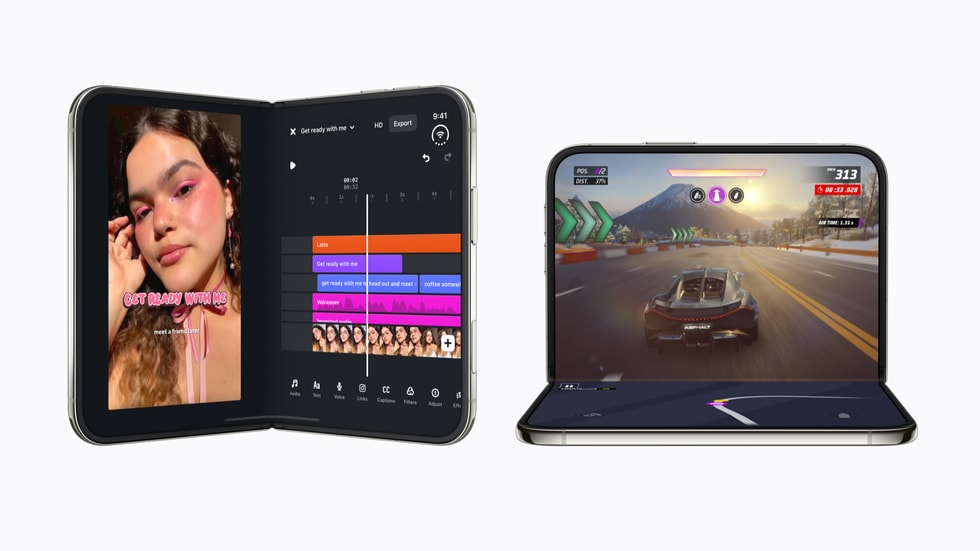
The iPhone Duo has now reached customers, and its folding screen changes more than the shape of the phone. Open it and iOS 27 gains room for side-by-side work; partially fold it and the device can support itself for calls or video; close it and the outer display behaves like a compact, one-handed iPhone.
If you have just unboxed Apple’s first foldable, these are the features worth trying before you settle into your usual iPhone habits. They focus on what is genuinely different about Duo, based on Apple’s official iPhone Duo specifications, the iPhone User Guide, and Apple’s look at apps designed for the new display.
1. Use the outer display for quick jobs
Before opening the phone every time, spend a day using the 5.4-inch outer display for messages, maps, music controls, and short calls. It is designed for comfortable one-handed use and shares the same general aspect ratio as the inner screen, so content can move naturally between the two. The smaller display is also the battery-friendly choice: Apple rates video playback at up to 44 hours on the outer display, compared with up to 31 hours on the inner display.
2. Put two apps side by side
The 7.6-inch inner display is 50 percent larger than the iPhone 18 Pro Max screen, and multitasking is where that space starts to earn its keep. Try pairing apps that normally force constant switching: Maps with Messages, Calendar with Mail, Notes with Safari, or a video call with a document. Apple says iOS 27 was redesigned for Duo’s poses and orientations, including side-by-side apps. The practical win is context: you can compare information without repeatedly leaving one app to find it in another.
3. Test apps that adapt to the fold
Not every app simply stretches to fill the larger screen. Apple highlights optimized experiences from Zoom, Slack, Prime Video, MLB, Fantastical, NYT Cooking, OpenTable, Yelp, and others. Some present controls or supporting information in a second pane; others react to whether the phone is flat or partially folded. Update your apps in the App Store, then open the ones you use most and rotate or bend the phone through several positions. That is the fastest way to find which developers have already built a genuinely Duo-aware layout.
4. Make FaceTime hands-free
Partially fold iPhone Duo and place it on a stable surface for a FaceTime call without leaning the phone against a mug or buying a separate stand. Apple specifically lists hands-free FaceTime among the new iOS experiences made for Duo. The under-display FaceTime camera supports 1080p video, while the phone’s posture lets you adjust the angle before the call begins. This setup is also useful for a group call at a table because the phone can remain upright without occupying your hands.
5. Try the Duo-only camera tools
The camera app includes features that take advantage of both displays. Duo Preview can show a live view on the outer screen, allowing the person being photographed to check framing. Smart Take can capture hands-free photos automatically, and Kid Cue uses playful animations to help hold a child’s attention. These are more meaningful than a spec-sheet camera comparison because they change how a photo is made. Start with Duo Preview during a portrait session; it gives your subject a chance to fix the framing before you press the shutter.
6. Turn the phone into its own viewing stand
Video is an obvious use for the large display, but the useful trick is setting the Duo at an angle on a desk, counter, or tray table. Apple describes the phone as “posable,” and optimized apps can adjust their layouts for different positions. A partially folded setup keeps playback visible while reducing the footprint, and it can make recipe steps easier to follow without repeatedly picking up the phone. Use a clean, stable surface and keep liquids and loose grit away from the hinge and inner display.
7. Learn which charging method fits your day
iPhone Duo supports MagSafe, Qi2 charging at up to 25W, and fast wired charging. With a compatible high-power adapter, Apple says the battery can reach about 50 percent in roughly 20 minutes. Because the inner screen is larger and has a different video-playback rating, your first week is a good time to watch battery use under Settings > Battery. If you spend hours multitasking on the inner display, a short wired top-up may be more useful than relying only on overnight wireless charging.
8. Finish setup with protection and recovery in mind
Apple lists IP68 water and dust resistance, a Grade 5 titanium frame and hinge cover, Ceramic Shield on the outer surfaces, and a scratch-resistant coating on the inner display. Those protections do not make a foldable indestructible. Avoid pressing objects against the inner screen, keep debris away before closing it, and use a case designed specifically for Duo so it does not interfere with the hinge.
Finally, complete the same safeguards that matter on every iPhone: install the latest iOS update, confirm iCloud Backup is running, enable Find My, and add an account recovery contact. Apple’s setup guide walks through the essentials. The biggest benefit of iPhone Duo is not simply having more screen; it is choosing the right screen, posture, and app pairing for the task in front of you.
Leave a Reply