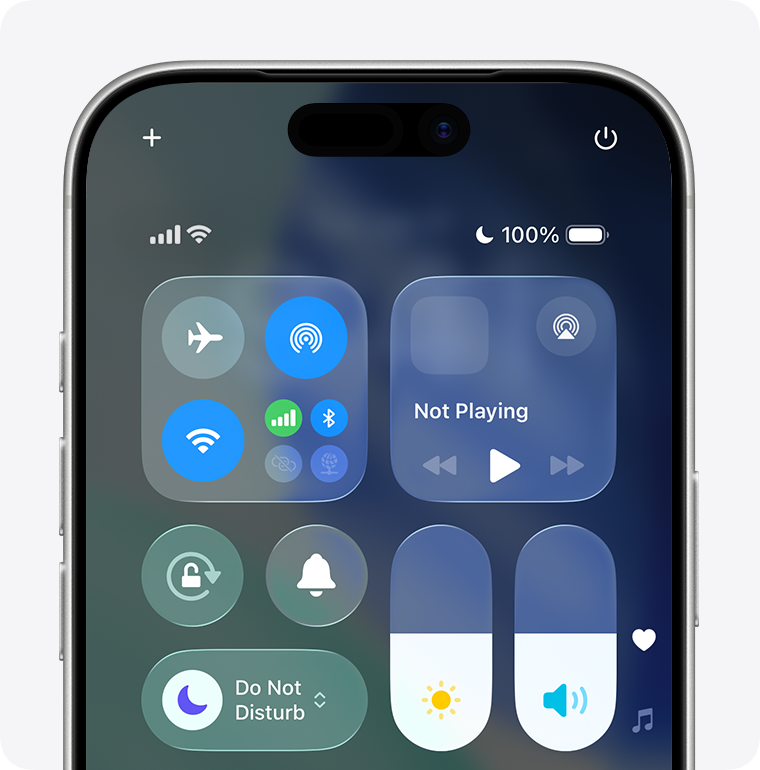
Thanksgiving dinner is a bad time for a work alert, a shopping promotion, or a group chat that suddenly catches fire. Turning your iPhone off solves the noise problem, but it can also hide a call from a relative who is running late, a message about a changed arrival time, or a timer you actually need.
A better option is a temporary Focus. Apple’s Focus settings let you decide which people and apps may interrupt you, then switch the setup on only for the meal. You can build a practical Thanksgiving Focus in about five minutes and remove it after the holiday.
Start with Do Not Disturb or create a custom Focus
For the fastest setup, open Settings > Focus > Do Not Disturb. If you already use Do Not Disturb for sleep, work, or another routine, tap the Add button in Focus and choose Custom instead. Name it “Thanksgiving,” pick an icon and color, and keep the rules separate from your everyday settings.
Apple says a Focus can allow notifications from selected people and apps while silencing the rest. That is the key distinction: the goal is not to make your phone unreachable, but to make interruptions intentional.
Allow the people who may genuinely need you
Inside the Focus, tap People, choose to allow notifications, and add the relatives or friends who might need to coordinate dinner, rides, or travel. Also review the option for calls. Allowing calls from Favorites or a specific contact group is often easier than adding every person one by one.
Consider enabling repeated calls if you want a second call from the same person within a short period to break through. That can be useful for an urgent situation, but it also means a persistent caller can interrupt the meal. Choose based on your family’s needs rather than turning it on automatically.
Keep only the apps that matter during the meal
Next, tap Apps and allow only what you expect to use. Messages and Phone are obvious choices. Maps may matter if guests are still traveling. A weather app can be useful when people are driving, and Home may be worth allowing if a doorbell or security alert needs attention.
You usually do not need to allow Clock just to hear an alarm or timer, but test your exact setup before the turkey depends on it. Start a one-minute timer, turn the Focus on, lock the phone, and confirm that the alert behaves as expected. That quick rehearsal is more valuable than assuming every notification rule works the same way.
Be cautious with intelligent notification filtering
On supported iPhones, Apple offers Intelligent Breakthrough & Silencing. It analyzes notification content so potentially important alerts can come through while less important ones stay quiet. Your explicit allow and silence choices still take priority.
That feature can be convenient, but a short family gathering is a good case for simple, predictable rules. If you want a truly quiet table, allow the people and apps you need and leave intelligent filtering off. If travel coordination is still active, turn it on and watch how it handles alerts before dinner begins.
Turn it on for a limited time
When dinner is ready, open Control Center by swiping down from the top-right corner on modern iPhones. Touch and hold Focus, select your Thanksgiving Focus, tap the More button, and choose a duration such as one hour or until you leave the current location. Apple’s Do Not Disturb instructions also explain how to switch Focus modes directly from Control Center.
A time limit prevents the classic mistake of waking up Friday with missed notifications because Focus stayed on all night. You can also schedule a Focus, but a manual duration is usually safer for a one-day event whose timing may change.
Do a 30-second check before guests arrive
- Ask an allowed contact to send a test message.
- Confirm that an unimportant app stays silent.
- Run a one-minute kitchen timer.
- Check whether Focus is shared across your Apple devices and decide if that is what you want.
- Show another family member how to turn the Focus off from Control Center.
The best Thanksgiving Focus is not the strictest one. It is the one that keeps you present while leaving a narrow, tested path for the people and alerts that genuinely matter. Five minutes of setup can buy a much quieter meal—and you can delete the custom Focus when the leftovers are gone.
Leave a Reply