How to Setup Airprint on Ubuntu 11.10 Desktop

In Ubuntu 11.10, setting up AirPrint is easy.

1. Have a Standard install of Ubuntu Desktop 11.10 32-bit. I my case it was running under Windows 7 using Virtualbox.

2. Go into the CUPS interface and make sure “Share published printers connected to this system” is enabled on the server settings. Use Firefox for this browser as shown below:

3. The Print Server is the Ubuntu computer that is directly connected to the printers.

4. On the server machine (the one the printer is attached to), open System -> Administration -> Printing. This will open the Printer Configuration window. OR you can open the following URL in your browser: http://localhost:631

5. Select Server in the menu bar, and then Settings. This will open the Basic Server Settings window.

6. Check the second box:

  • Publish shared printers connected to this server

7. If this computer acts as both a Print Server and a client (it does need access to a printer connected to another computer), select also the first box, “Show printers shared by other systems”.

8. OK.

9. Right click the printer and check the Shared option, if not checked yet.

10. On the Printer Properties, make sure the Shared checkbox is check on the Policies tab.

11. If you have a firewall running, make sure you allow the needed ports (one of the is port 631). I didn’t need to do this on my default install.

12. Restart CUPS “/etc/init.d/cups restart” or reboot the computer, this is done automatically when you save changes in the GUI admin for CUPS that you use Firefox to Access.

13. Make sure your iPhone/iPad is on the same network.

14. On your iPhone/iPad, go into Safari or email and, print, and search for printers. Your new printer should be in there.

Incoming search terms:

  • ubuntu airprint
  • airprint ubuntu
  • ubuntu airprint server
  • airprint server ubuntu
  • airprint on ubuntu
  • airprint for ubuntu
  • ubuntu airprint setup
  • air print ubuntu
  • ubuntu server airprint
  • simple mobile mms settings for ios 6
read more

Microsoft Office On Your iPad

A company called OnLive has released an iPad app that gives you access to Microsoft Office in the Cloud. You can instantly view, edit and create documents using actual Microsoft® Office Word, Excel and PowerPoint. This virtualized copy of Windows 7 / Microsoft Office is streamed to your iPad directly from OnLive’s servers.

OnLive offers a couple of different plans including a FREE version that gives you 2 GB of secure cloud storage and access to your multi-touch OnLive Desktop, preloaded with Microsoft Word, Excel®, PowerPoint®. Sign up for free at www.onlive.com/desktop

read more

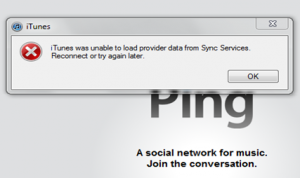
Fix: iTunes was unable to load provider data from Sync Services. Reconnect or try again later

Are you getting the error iTunes was unable to load provider data from Sync Services. Reconnect or try again later? We have had reports of users experiencing this issue with the latest iOS 5 beta and the iTunes 10.5 beta.  You may also be receiving this error on non beta software as well.

Since I have not personally seen this error this is no way for me to verify that these solutions fix the problem.  In iOS 5 if you just hit OK and ignore the problem you can still Sync.  Other people may have problems syncing on older versions of iOS.

This error seems to happen mostly in Windows 7 systems.In order to fix the problem you can try renaming the sqllite file in Windows/System32 or Windows/SysWOW64 to sqllite.dll.old.  This will allow a new file to be written and the old file will get ignored.


Another possible fix would be (Win7 64 bit with Roaming profile):

1. Unplug iPhone

2. Rename theSyncServices folder found at C:\Users\<username>\AppData\Roaming\AppleComputer to SyncServices_Old

3. Reconnect iPhone


If you know of any other solutions please post them in the comments.  You may also want to read Apple’s long support thread.

Incoming search terms:

  • itunes was unable to load provider data from sync services
  • itunes was unable to load data from sync services
  • itunes was unable to load provider data from sync services reconnect or try again later
  • iTunes was unable to load provider data
  • itunes was unable to load provider data from sync services itunes 10 5
  • itunes was unable to load provider
  • iTunes was unable to load dataclass information from Sync Services
  • itunes was unable to load data class information from sync services
  • itunes unable to load provider data
  • itunes was unable to load provider data from sync services reconnect and try again later
read more