How To Jailbreak iOS 5 On Windows Or Mac

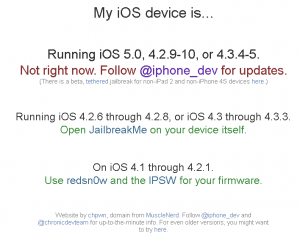
First things first. Go to http://jailbrea.kr/ to determine if and how you can jailbreak. In this guide I will show you how to jailbreak an iPhone 4 running iOS 5 via Windows. This will be the same exact procedure on a Mac.

Please note that this is a tethered jailbreak. This means you will have to hook your iDevice up to the computer every time you reboot. Also note that this guide WILL NOT work for the iPhone 4S and iPad 2. You will also need to make sure that you have iTunes 10.5 installed.

1. Download RedSn0w from the iPhone Dev Team: http://blog.iphone-dev.org/redsn0w-iOS5 You will want to choose Windows or Mac. The current version as of writing this is redsn0w_0.9.9b6

2. Open RedSn0w and click on Jailbreak and install Cydia.

3. You will then need to make sure your device is plugged in and powered off. Follow the onscreen instructions to put your iDevice into DFU mode.

4. A bunch of code and jailbreaking commands will flash on your screen and eventually your device will reboot.

5. You will notice a white icon that says Cydia. Since we have jailbroken the device we need to boot into tethered mode before Cydia will work. We also have to do these next steps anytime we reboot the device as this is a tethered jailbreak.

6. Hit back on RedSn0w if you still have it open or go into the Extras option.

7. From here you will see the following features:


8. Select just boot tethered right now.

9. You will need to turn your device off and plug it into the computer again and follow the instructions to get into DFU mode.

10. Once it sees you are in DFU mode, RedSn0w will run some code and boot your iDevice in a jailbroken state. Congratulations you have jailbroken iOS 5!

Incoming search terms:

  • mms fix ios 5
  • mms fix for ios 5
  • ipod4 1_5 1_9b176 _restore
  • md276ll jailbreak
  • mc920ll iphone 4s invalid sim
  • just boot tethered right now
  • is model md276ll jailbreakable
  • ipod3 1_5 1_9b176 _restore
  • iphone3 1_5 1_9b176 _restore ipsw dev-team
  • iphone 4 md276ll jailbroke
read more

Can I Jailbreak My iPhone?

The iPhone Dev Team has set up a site titled http://Jailbrea.kr/ which helps you determine if you can jailbreak your iPhone and what tools you need to perform the jailbreak. The website was created by chpwn, and the domain is donated by MuscleNerd. Follow @iphone_dev and @chronicdevteam for up-to-the-minute info. For even older versions, you might want to try here.

read more

[UPDATE] Apple Releases iOS 4.3.4 To Fix PDF Vulnerability; Kills Jailbreak

[Update 1] As always, this version for all devices except iPad 2 is capable of a “tethered” jailbreak. i0n1c, the hacker behind untethered jailbreaks for 4.3 – 4.3.3, says not to expect an untethered for 4.3.4 anytime soon. Since all this update does is patch out JailbreakMe 3.0 there’d be no benefit from upgrading to this firmware so, STAY AWAY FROM IT :)

If you want to stay jailbroken and unlocked stay away from the latest iOS 4.3.4 update that was just released.  As soon as the iPhone Dev Team says it is OK to upgrade we will let you know.

So far the only changes that we know of is that they blocked Jailbreakme.com which took advantage of a PDF exploit.  More details will follow as soon as we have them.

You can find the iOS 4.3.4 and all other iOS downloads here: iOS Software Downloads

Incoming search terms:

  • ios 4 3 4 changelog
  • iOS 4 3 4 torrent
  • 4 3 4 changes
  • iOS 4 3 4 changes
  • jailbreakme com 4 3 4
  • iphone 4 3 4 changes
  • iphone 4 3 4 update details
  • iphone 4 3 4 changelog
  • iphone 4 3 4 details
  • IOS 4 3 4 update details
read more

PwnageTool 4.3.3 & RedSn0w Released to support iOS 4.3.3 Untethered Jailbreak

The iPhone Dev Team has released PwnageTool 4.3.3 which will jailbreak iOS 4.3.3.  The untethered jailbreak that i0n1c created for  4.3.1 still works and has not been patched by Apple.

Some things to note:

  1. ultrasn0w unlockers must stay away from redsn0w!  Use only a custom IPSW to update to 4.3.3, to avoid updating your baseband.
  2. ultrasn0w has been updated to v1.2.3 to be compatible with iOS 4.3.3 and earlier (the ultrasn0w update does not include any new baseband support!). Please reboot your iPhone using the normal “slide to power off” swipe after installing ultrasn0w 1.2.3.
  3. By popular demand, redsn0w now allows you to enable multitasking gestures (although most will find it useful only on iPads).
  4. iPad2 update:  The iPad2 jailbreak remains under development.  As you may know, the original exploit @comex developed in the first week of the iPad2 release was mysteriously fixed by Apple within days of its development.  Partly because of this, don’t expect much public discussion of the iPad2 jailbreak until it’s actually finished and ready for release (and please avoid asking about it).  In all liklihood, it will be a userland exploit like the first (unreleased) one, not dependent on bootrom dumps.  The first one can’t be released even for those with the original 4.3 firmware due to legal (distribution) reasons.

redsn0w 0.9.6rc15:

Windows 7 users:  If you’re having problems, be sure to run with CPU affinity = 1 (see the guides or comments for how to do this)

PwnageTool Official BitTorrent Release

SHA1 Sum = fc2721a6c1230aa676729b2e4aeeec3cd4ffed7a

[iPhone Dev Team Blog]

Incoming search terms:

  • iphone not eligible
  • ios 4 3 3 not eligible
  • jailbreak not eligible
  • 4 3 3 jailbreak mms
  • iphone3 1_5 1_9b176 _restore ipsw
  • iOS 5 By Tutorials torrent
  • iphone3 1_5 1_9b176 _restore ipsw download
  • mms 3gs no subject The media content was not included due to a picture resolution or message size restriction 06 15
  • ipod4 1_5 1_9b176 _restore ipsw download
  • iphone4 1_5 1_9b176 download
read more

CONFIRMED: iOS 4.3.3/4.2.8 Are Still Vulnerable To I0n1c’s Untether!

Hey guys, I’ve received confirmation from the iPhone Dev Team that iOS 4.3.3 is still vulnerable to I0n1c’s untethered jailbreak for iOS 4.3.x!

Here’s what Comex had to say:

i0n1c’s bug is not patched in 4.3.3.

Expect an updated redsn0w and Pwnage Tool to work with iOS 4.3.3 in the next few hours or couple of days.

The reason that I think Apple is ignoring the untether vulnerability isn’t because they can’t fix it, it’s because they don’t care. They are busy working on a public beta for iOS 5 for when they show it off on June 6th at WWDC 2011. So if there is another iOS 4.3.4 or iOS 4.2.9, don’t expect the vulnerability to be patched until a major new version of iOS.

Incoming search terms:

  • iphone 4 4 3 3 tmobile mms
  • iphone tmobile mms 4 3 3
  • twitter
  • iphone 3gs mms tmobile 4 3 3
  • iOS 4 2 9
  • redsn0w 4 2 8
  • untether 4 2 8
  • ios 4 3 4
  • tmobile mms ios 4 3 3
  • 4 3 3 untether
read more
Page 1 of 3123