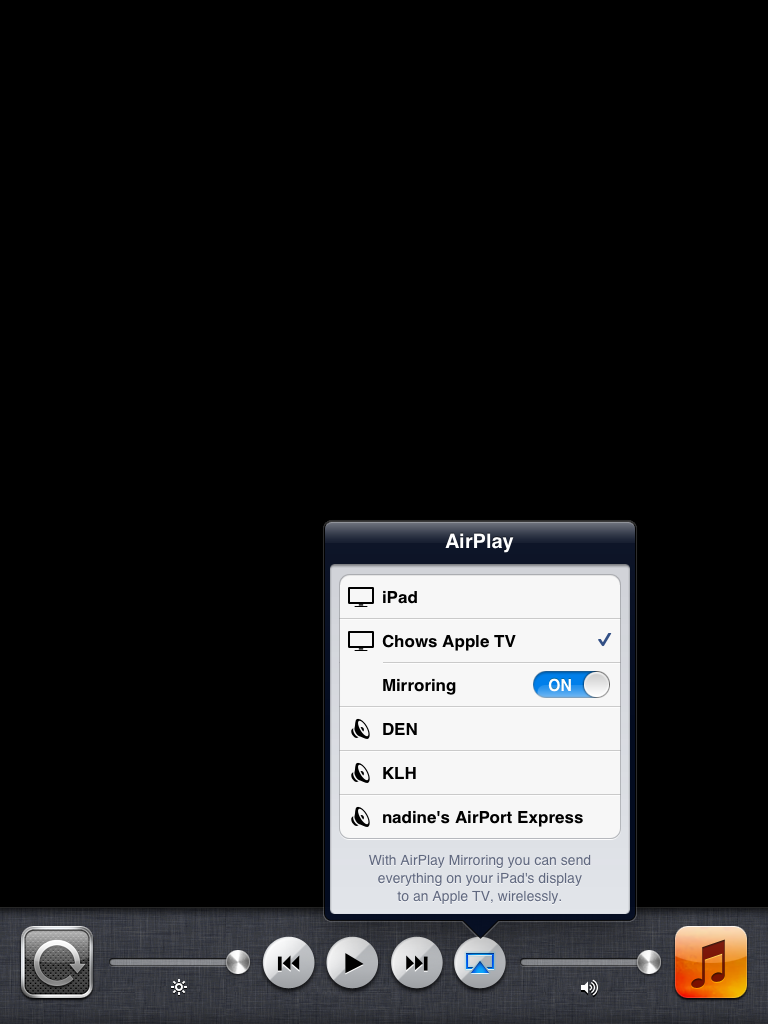
 One very cool feature of iOS 5 is the ability to display your iDevice on your HDTV with an Apple TV over Wi-Fi. You no longer have to use an HDMI cable. Currently iOS 5 only supports the iPad, and I believe only the iPad 2 at that. This is probably due to the processor requirements as the iPad 2 has a faster processor.
In order to enable AirPlay Mirroring in iOS 5 you have to double click the home button and then slide all the way to the right until you see the AirPlay icon. Press that and you will see all your enabled AirPlay devices. Select your AppleTV and you will then see an option to turn on mirroring. Please note that you must be running iOS 5.0+ on your Apple TV as well. Now you can watch, play games, browse the internet, and more all on your big screen TV.
Hopefully there will be support in the future for the iPhone 4 and iPod Touch.
Incoming search terms:
- iOS 5 mirroring
- airplay mirroring iphone 4
- AirPlay Mirroring iphone
- airplay ios5
- ios 5 airplay mirroring
- how to enable airplay mirroring
- AirPlay ios 5
- ios5 mirroring
- iphone 4 airplay mirroring
- airplay mirror
How do you get iOS 5 for the Apple TV? Once you get the file, how do you update it?
I will make a tutorial later. Basically you plug your apple tv into your computer with a mini usb cable. Do not plug the power cord into the apple tv. Open up itunes and hold down the option key(mac) or shift key(windows) and then press restore. Choose the iOS 5 ipsw for the apple TV and let it update.
Do i need to get the UDID registered on apple tv 2 to get ios 5.0 o it? if so, how do I locate the The UDID?
If you are on a windows machine. Download USBView for windows. http://www.ftdichip.com/Support/Utilities.htm
1. Turn off your apple tv
2. unplug all cords from the apple tv
3. plug in the power cord into the apple tv
4. after the white light on the front of the device stops flashing, plug in the usb cable
5. open USB view
6. click on the Apple mobile device USB drive port
7. 0×0409: “XXXXXXXXXXXXXXXXXXXXXXXXXXXXXXXXXXXXXXX” is your UDID
I’ve updated ipad2 to ios5 and I have apple TV with 4.2.2 .. I could not find the 5.0 ipsw file for apple tv anywhere… do you have a link?
it is in the developer portal right under the iOS 5 downloads.
Thank you.. I activated my ipad UDID with the help of my friend who is a developer. I do not want to bother him with apple tv also. So I enrolled to developer program to download the ipsw file. I’m just waiting for the verification email from Apple.. Thanks again
I enrolled to IOS developer program.. But I could not find the iOS5 download tab in the portal. I only see 4.3 ..
Do you need to have your Apple TV Udid activated by a developer to use IOS 5 on the apple tv?
Yes.. But yhe problem is now i cannot locate apple tv UDID on itunes.. Just downloading the xcode.. I’ll do over that..
The UDID is also (on a mac) found in system profiler under the USB.
If anyone can figure out how to find the UUID for the Apple TV 2, please let us know. iOS 5 wants it in order to activate on the Apple TV.
The only way is to download xcode and than connect apple tv to mac and find the UDID.. I could not find the way to locate UDID via itunes
Hey just to let yo know google Iphone Configuration Utility it works best to get UUID and great thing it works for MAc or Windows and was created by Apple..
System Profiler, under the USB tab. It’s the number next to serial number (obviously the UDID though because it is so long…)
Hmmm… I had tried the old XCode and saw my Apple TV but didn’t see any UUID. I then downloaded the beta XCode to try it next. This time, Apple TV didn’t even show up in the list of devices. I will have to try and reinstall again.
I successfully installed apple tv ios5. I found the UDID via organizer of xcode. I register the device and now its working.. And its cool
For some reason, when I fire up XCode, I can see 3 of my iPhone and iPad devices, but not the Apple TV 2. The Apple TV shows up in iTunes, but not in this new beta of XCode. Weird. Since I can get its UUID, I can’t activate it.
click on organizer in xcode and have your apple tv plugged into your computer without the power cord
If you do it like this the comp do not see the apple tv.. I found in a forum the way i wrote.. First plug the power cord. Wait for the light to be solid .. Then connect the usb and unplug the power cord..
Just plug the power cord before connecting it to computer with usb.. Wait for the light of apple tv to get solid.. Than connect it to usb.. And then plug off the power cord.. Now xcode must see the apple tv..
Thanks! The power plug trick did it. Showed up right in XCode.
Thank you!
I had to plug the power cord in and it worked!
I was unable to get my UDID with iTunes or the Xcode Organizer. I did finally get it from the iPhone Configuration Utility. Also, mirroring does not work the original ipad.
This is convoluted. XCode refused to see the device. Then saw it and decided it wasn’t connected, even though it was. Who do I have to screw to get this thing to work?
I am a registered iOS Developer, I have found my UDID and registered it online, but my problem is that the AppleTV won’t show up in the iTunes source list. I have tried everything, but no luck. Does anyone have any tip? Yes I have read the instructions from Apple, and tried them, but it just don’t work.
ive had the same issue with apple tv being recognised by itunes only way it works is with DFU mode or restore mode otherwise it doesnt come up. im also having issues with mirroring not working unsure of the cause so far but i can run music etc over air play and control via remote app but as soon as i select mirroring it turns off airplay
Guys to find UDID just plug device in iTunes and then on Summary tab click on Serial Number…. Then UDID will appear:)
That’s wrong in the case of the AppleTV Series 2
Found your forum, I’m a developer, I have no problem getting all my devices to provision and then activate. I can get Apple TV to show in Xcode and I can get it to show in Itunes, I’ve updated to the new software So whats the issue, here is the rub
It keeps saying that it won’t activate? I don’t get it. I get a green light on all other devices, any advice on how to activate this darn thing?
Thanks
I have an iPad 2, updated to iOS 5. Also updated appleTV.
But I do not get any Ariplay icon on my iPad.
Sliding to the right, I only see an iTunes icon and controls to play music, but NO AIRPLAY.
Any idea of what I am missing?
Tx
You need to be connected to the same wifi network on bouth devices
You need to be connected to the same wifi network
Airplay mirroring works well with my ipad2 . But does an iphone 5 support mirroring. It supports audio but i cant find a way to use this phone to give me the mirroring facilities of the ipad. I understand the iphone 4 can mirror
I don’t think you can mirror an iPhone unless you jailbreak.
Whats a jail break and you can mirror an iphone4