LEI Mobile 6.2 Now Available: Includes iPad Support

Our latest version of LEI Mobile version 6.2 is now available on the Apple App Store. It is now a universal application and works with the iPhone and iPad. Along with other bug fixes, you can also view comments and post directly from the app. The app should be Live very soon so check your updates or if you have not downloaded our app please be sure to check it out.

Want to know the latest news, rumors, and tutorials for hot technology items? Well, here?s LEI Mobile. Not only do we bring you all of the latest news, we also have many reviews of products so that you can make your selection before you buy. What else can we do? LEI Mobile has support for many services. You can connect to the main site, check out reviews, and you can also check out our YouTube channel, or connect with us via Twitter and Facebook. LEI Mobile brings everything under one beautifully crafted roof.


Incoming search terms:

  • 6 1 2_10B146_Restore ipsw crdownload
read more

LEiMobile 6.1 Update Now Available

LEI Mobile has just been updated to version 6.1 and is live in the Apple App Store. If you have a previous version installed just download the update.

The App has been rebuilt to allow better viewing of articles as well as other bug fixes. We have also integrated the ability to comment directly from the application. If you have not downloaded our app yet go check it out. It will send you push notification so that you can stay on top of Apple news, information, and reviews.

In the future we will tweak the app even more and add more features and enhance the layout. As long as you have our app you will always be updated!

Incoming search terms:

  • apple store icon
  • iPhone 6 0 2_10B146_Restore
  • h2o mms settings ios 6 1
  • LEI MOBILE for straight talk
  • beta leimobile straight talk
read more

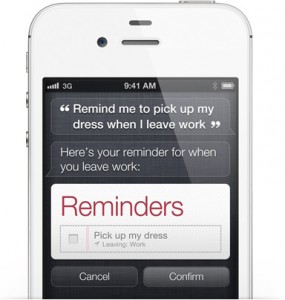
Apple to face Class Action Lawsuit over Siri!

TopClassActions is reporting that iPhone 4S users are in the beginnings to file a Class Action lawsuit against Apple over the misleadings of their voice assistant Siri.

“Are you unhappy with Siri? You’re not alone. A federal class action lawsuit claims the voice-activated Siri assistant on the Apple iPhone 4S doesn’t work as advertised, and is simply a ploy to lure customers into paying $100 more for the 4S.

The iPhone Siri class action lawsuit is brought on behalf of consumers who purchased the iPhone 4S because commercials made the voice-activated “Siri” feature seem easy to use and accurate. It claims consumers would not have purchased the more expensive iPhone 4S if they knew the Siri feature did not work as advertised.”
Stay tuned as this develops.
read more

BREAKING: Call of Duty Elite iPhone App Launches Tomorrow!

Hey guys, it seems that the day has finally come. Activision is ready to finally release it’s Call of Duty Elite app for iOS! I can’t tell you how excited I am!

I have been waiting for this application since September when it was announced at Call of Duty XP!

Activision had been delaying the mobile applications over server and scaling issues that plagued the new service with inaccessibility and lag until mid December.

The Call of Duty Elite iOS app will launch tomorrow and will be a free download, an iPad version will be released shortly after it’s iPhone counterpart.

Incoming search terms:

  • app icon
  • app store logo
  • application icon
  • md 234ll
  • iphone 4s model 234LL
  • iphone 4s model md 234ll
  • iphone MD 234LL
  • iphone 4 md 234ll
  • model 234ll
  • i phone4s 234LL
read more

LEI Mobile 6.0.1 Now Available!

Hey guys, we would like to let you know that we are releasing our first update to LEI Mobile 6 today. We released LEI Mobile 6 and already had it’s first update ready to be sent for approval and it is now live on the App Store! Go download it, it’s a free update and it fixes a lot of various bugs and also improves performance and overall stability.

Here is the full change log:

* Fixes a critical bug that, in rare instances, could crash the application.

* Fixes a critical bug that, in rare instances, would crash the application when going into the main menu of the application.

* Fixes a critical orientation bug.

* Overall performance & stability upgrades.

* Prepares application for major update. (Coming later this year)

Incoming search terms:

  • iphone app icon
  • iphone app
  • the most expensive phone in the world
  • icon app
  • apps store
  • iPod app logo
  • download icon iphone for blackberry
  • apps logo
  • iphone 6
  • apple apps store free
read more

LEI Mobile 6. The Next Major Milestone. Available Now.

Good morning, I am very excited to be here this wonderful New Years Day and finally reveal the details of our next major milestone for our most popular application, LEI Mobile for iOS.

Before we do that, I just want to talk a little about how 2011 was for us and how 2012′s roadmap looks.

So, 2011 was a pretty interesting year for us. Now, I’m not going to stand here and say that it was the easiest and best year that we’ve ever had, because, truthfully, it was a very challenging year, both for iOS development and for the site as a whole.

First off, some statistics. LEI Mobile had it’s best year yet in 2011 in regards to traffic. We even went down a couple times this year with the weight of the thousands of users accessing us simultaneously. Not just that, LEI Mobile has now surpassed the 250,000 download mark during Q4 2011 (and this is without being on iTunes!). That’s a quarter of a million downloads. That is amazing.

One of the biggest challenges that we faced throughout most of 2011 was getting back onto the iTunes App Store. We were removed from the App Store back in February for some internal disputes that we had with Apple and our application’s core. Now, Apple started enforcing some pretty interesting rules that prevented us from returning to the App Store throughout 2011, but today, that all changes.

After developing this new application for the past 10 months, we have not only crafted the most sophisticated application (on a technical level) that we’ve ever attempted, but we’ve also gotten approved onto the App Store and are ready for you all to download the application immediately.

So, before you go and download the most advanced version of LEI Mobile yet, allow me to tell you about some of the new improvements that it brings and a few things your should later this year. Let’s get started.

LEI Mobile 6 has been created on top of our new AVBE 4 (Aka “Phoenix”) engine. We have completely reimagined the application and the engine from that first tap of your finger to launch it to the time that you close it or get a push notification.

One of the first features of LEI Mobile 6 that you will see is actually when it launches. We call it our “instant-on” capability. We have optimized our new engine so that launch is near instant. The application launches so quickly that we had to rethink the “loading” image to keep up with it. You can instantly start using LEI Mobile 6 after you tap it’s icon on the home screen, it’s that fast.

Next up, LEI Mobile 6 sports a brand new user interface. When we say brand new, we mean it. As I said before, we completely reimagined the application and not only did we reimagine the UI to look simple and elegant, but it’s incredibly fast, smooth, and functional.

Above is LEI Mobile 6‘s brand new main menu. As you can see, it’s a very simple set up that we have. You can see we have a bunch of various options and services to choose from organized in an easy to read manner, on top of our new “linen” UI element.

We have once again brought Push Notification functionality into LEI Mobile 6, so you get an alert right when we post a new article! It’s the best way to stay “in-the-know”. It’s free and we’ve done extensive testing (judging by the image below where we were having a little bit of fun with our Push Notification system back in October):

Now, we have broken down the site into: the front page (LEI Mobile), our breaking news, articles we have in our scrolling banner, or “Featured” section, our various reviews (which we plan on having a ton of this year), and finally, our official YouTube page. We plan to bring more services and functionality to the application later this Spring in an upcoming software update.

As you can also see, there is a 2nd section on the main menu. You can see the version that you are running by tapping on the “About” service, send us a quick email directly to our personal inboxes by tapping “Contact Us”, and also a brand new feature that we are calling “Quick Save”. More on “Quick Save” later.

So if you tap on the LEI Mobile service, it will slide over into a brand new “Feed view”. There are a few cool things in our new “Feed view” that you should know about.

First of all, this is an incredibly optimized core that we are running on, so it goes without saying, but it’s fast. Really fast. It completely loads in a matter of about 4-5 seconds on Sprint 3G (Sprint 3G is roughly 0.40mbps where we’ve tested it) and about 1-2 seconds on Wi-Fi.

Keep in mind, it’s not just downloading this little overview of the articles and a high resolution thumbnail, it’s also downloading all of the articles in their ENTIRETY, simultaneously, and it can still do this in mere seconds.

That’s optimization.

After it’s done loading, you can start tapping away from one article to the next with absolutely NO LOAD TIMES and with extreme fluidity and finesse. Why? Because everything was downloaded in those 5 seconds or so, the article, their previews, HD thumbnails, and images, everything.

Also, we do have “Pull To Refresh” functionality in the new “Feed view” as well as a button at the very bottom of the screen that allows you to also load the next page of articles so that you can keep on reading.

Now, we also have a brand new article view. I did say that all of the articles were downloaded when the “Feed view” was being loaded and that you would be able to smoothly tap from one article to the next with extreme fluidity. This is what you are going to see when you tap on an article:

So this new screen is what you will be in the most. It’s the meat, the stories, the articles, the breaking news, etc. that you come to us for. Let me explain everything that goes on here and some of the awesome new features that we’ve built into it.

First of all, you can see the title of the article above the high resolution article image. Then comes the text itself, that is below the image itself and it scrolls so that you can read the whole article.

As you can see, there is a white “info” button on the bottom right. This will take you directly to the comments section if your want to leave a comment on the article that you are reading, it will also take you to the website version of the article if you prefer that.

On the top right, we have a major feature for LEI Mobile 6, sharing, social networking, and “Quick Save”. That little button makes it really easy to both share the article you’re reading to all of your friends and followers on Facebook, Twitter, or via e-mail, but it also makes it really easy to save the article for later.

We have native iOS 5 Twitter functionality included as well, so there is no hassle in setting up your Twitter account with LEI Mobile 6, it is done automatically and it’s ready to go immediately.

Finally, we have our last 2 major features. “Quick Save”.

Quick Save is really a cool little feature because it allows you to save an unlimited amount of articles, in their entirety, and have them always stored in your iCloud backups! You can save articles to read later if you are in a rush or to show them to our friends when you see them.

“Quick Save” articles are also fully compatible with our sharing features, so at any given time, those saved articles can be shared with your friends.

Finally, we have YouTube.

Our YouTube steaming functionality is completely iOS 5 ready and has adaptive stream buffering. What does this mean? It means that the video will load even if you have a sub-par internet connection and will adjust the quality according to your bandwidth, automatically.

It’s using Google’s latest YouTube web technologies, so we have brought LEI Mobile 6 up to speed.

We have full AirPlay functionality built in, so all of our many YouTube videos can be watched on your televisions if you have an Apple TV.

So there you go everyone. That was just a general overview of the brand new LEI Mobile 6 application. This is truly the most ambitious update that we have done thus far. A lot of long days & nights, arguments and celebrations, but we think it was worth it.

We are really excited to FINALLY bring you LEI Mobile 6 after 10 months off iTunes and 363 days since LEI Mobile 5′s launch. It’s been a long road, but we have a lot more in store for everyone for 2012. The new year has just started and we are extremely excited for what’s to come, both in the near future, and our plans that stretch out into later in the year.

LEI Mobile 6 is just the beginning. We are already hard at work on future iterations of LEI Mobile 6, so expect things to get a lot better as 2012 goes on.

Thank you for joining us and go download LEI Mobile 6 from iTunes right now! It’s free and it’s available immediately!


- Alan

Incoming search terms:

  • most expensive iphone case
  • app store button
  • app button
  • available on the app store
  • itunes app store
  • available on app store
  • available on appstore
  • apple store hd
  • app logo
  • iphone 4s md 234ll
read more
Page 1 of 1712345...Last »