Formula 1 returns to the Las Vegas Strip this weekend, and you will not need a cable package to watch the night race on your iPhone or iPad. Apple says the 2026 Las Vegas Grand Prix — the final U.S. race of the season — will stream free nationwide through the Apple TV app.
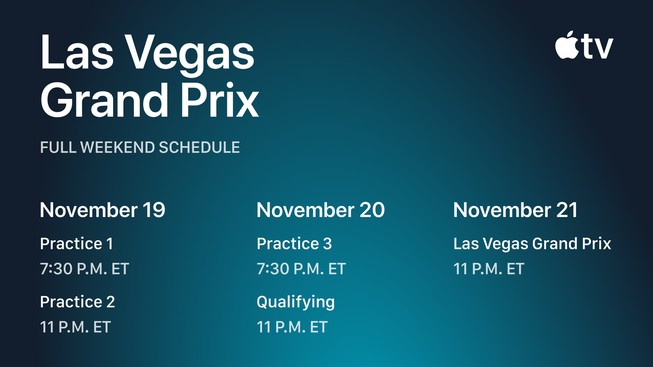
The weekend begins tonight, Thursday, November 19, with two practice sessions. Qualifying follows Friday night, and the Grand Prix starts late Saturday. The free stream makes this an easy event to sample even if you do not normally follow F1 — but a few minutes of setup now will help you avoid searching for the right feed after the lights go out.
Las Vegas Grand Prix schedule in U.S. time zones
Apple’s official schedule lists every session in Eastern Time. Here are the corresponding Central times:
- Practice 1: Thursday, November 19 at 7:30 p.m. ET / 6:30 p.m. CT
- Practice 2: Thursday, November 19 at 11 p.m. ET / 10 p.m. CT
- Practice 3: Friday, November 20 at 7:30 p.m. ET / 6:30 p.m. CT
- Qualifying: Friday, November 20 at 11 p.m. ET / 10 p.m. CT
- Las Vegas Grand Prix: Saturday, November 21 at 11 p.m. ET / 10 p.m. CT
Spanish-language viewers have another option for the race itself: Apple says Univision will begin its simulcast coverage Saturday at 10 p.m. ET, one hour before the start, with pre- and post-race programming.
How to watch on iPhone or iPad
Open the Apple TV app and look for Formula 1 in the Sports area, or use Apple’s direct Formula 1 page. If you removed the TV app, you can reinstall it from the App Store. Sign in with your Apple Account before the session starts so any account or region prompts do not interrupt the stream.
Apple lists iPhone, iPad, Apple TV 4K, Mac, Apple Vision Pro, the web, major smart-TV platforms, Roku, Fire TV, Chromecast with Google TV, PlayStation, and Xbox among the supported options. That gives you a useful fallback: start on a television, then continue on an iPhone or iPad if you move to another room.
The free Las Vegas event is a special promotion. Apple’s broader F1 coverage normally requires a U.S. Apple TV subscription, currently listed at $14.99 per month with a seven-day trial for new subscribers. Check the confirmation screen before starting any trial so you know whether and when it will renew.
Choose more than the main race feed
Apple’s coverage is designed for viewers who want more information than a conventional broadcast can fit on one screen. The company says up to 30 additional live feeds will be available across the weekend. Options include a Driver Tracker, session timing and data, a mixed onboard channel that changes cameras as the action develops, and a Podium feed focused on the top three running positions during the race.
Multiview can combine as many as four live feeds on one screen. That feature is most comfortable on an iPad or TV, where you can keep the main broadcast visible beside timing data or an onboard view. English and Spanish commentary are available, while supported hardware can also deliver Dolby Vision and Dolby Atmos.
Turn on live race updates
If you cannot watch every lap, Apple Sports can put real-time updates on the iPhone Lock Screen and Apple Watch through Live Activities. Apple says this requires a compatible device running iOS 18 or later or watchOS 11 or later. Open Apple Sports, follow Formula 1 and the drivers or teams you care about, then allow notifications and Live Activities when prompted.
Before race night, also check that Low Power Mode is off if you expect to stream for a long period, connect to reliable Wi-Fi when possible, and plug in or bring a charger. Live video, high brightness, and cellular data can drain an iPhone quickly. If your connection is limited, use the main broadcast rather than stacking several feeds in Multiview.
Going to the race? Apple Maps has track details
Fans in Las Vegas can use Apple Maps for a detailed circuit view with turn numbers, the finish line, the pit building, and grandstands. Apple says Maps also includes practical race-week information such as entry gates, rideshare locations, water stations, pedestrian routes, overpasses, and road closures.
The takeaway is simple: install or update the Apple TV app today, sign in, and test the Formula 1 page before the session you want to watch. With the race free in the U.S. and available on both iPhone and iPad, this is one of the easiest weekends of the season to see what Apple’s expanded F1 coverage can do.
Leave a Reply