Holiday break changes the family routine fast: school schedules disappear, travel days run long, and a child’s iPhone or iPad can easily become the default entertainment. Before that happens, parents using iOS 27 can spend a few minutes setting up Apple’s redesigned Screen Time and child-safety controls.
These are more than simple daily app limits. Apple’s current parental-control system includes approval for new websites and contacts, category-based time budgets, flexible schedules, age-based content settings, and expanded Communication Safety. Apple outlined the changes in its iOS 27 child-safety announcement and later published a family guide created with the American Academy of Pediatrics.
Start with the family setup, not the limits
Apple says each child should use a separate Child Account inside Family Sharing rather than sharing an adult’s Apple Account. That account is what connects age-based safeguards and lets a parent or guardian manage Screen Time from their own device.
First, update the iPhones, iPads, and Macs in the family group to the latest software available to them. Keeping the group current helps settings sync consistently and enables the new iOS 27 experience. On the parent’s iPhone, open Settings, tap Family, choose the child’s name, and tap Screen Time. Follow the onscreen setup or upgrade prompt. Apple’s official Screen Time setup guide covers the supported paths, including what to do when an older family device cannot run the newest software.
Use Ask to Browse for the open web
Ask to Buy already gives parents a chance to review eligible downloads and purchases. In iOS 27, Ask to Browse applies a similar idea to websites: a child can request access to a new site in Safari or another supported browser, and a parent can approve or decline it. Apple says Ask to Browse is on by default for children under 13, while the exact age and available settings can vary by country or region.
This is especially useful during travel, when kids may follow unfamiliar links from messages, games, or search results. Before the trip, test one request together so everyone knows what the approval looks like. A short explanation of why a site is blocked will work better than treating every request as a problem.
Set a time budget and a schedule
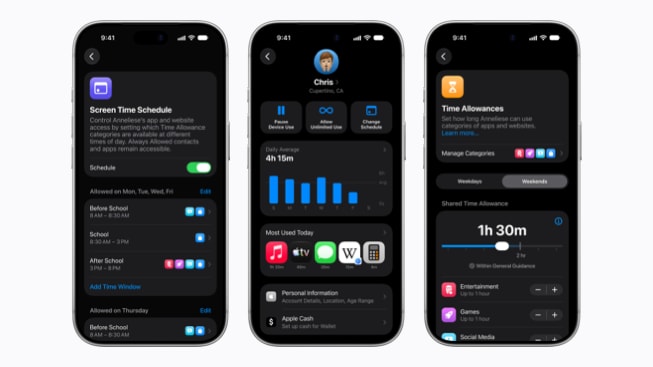
Time Allowances let parents create a daily budget across categories such as games, entertainment, and social media, then adjust individual categories when needed. Screen Time Schedules control when apps are available, with separate routines for weekdays, weekends, or a custom day.
For a holiday week, start with a plan that matches the real itinerary. A travel day may justify more entertainment time, while family meals or bedtime may need a tighter schedule. iOS 27 also gives parents quick controls to pause device use, allow unlimited use temporarily, or change that day’s schedule without rebuilding the whole plan.
Review communication and sensitive-content protections
Parents can decide who a child communicates with in Messages, FaceTime, and Phone, including requiring approval before the child connects with a new person. That deserves a review before a crowded trip, sleepover, or extended-family gathering—especially if the child recently changed numbers, devices, or contacts.
Communication Safety in iOS 27 expands beyond nudity to detect gore or violence in shared photos and videos, including live FaceTime calls. Apple says the analysis happens on the device and Apple does not gain access to the photos or videos. The feature provides warnings and age-appropriate guidance rather than silently sending the content to Apple.
Do this five-minute check before holiday break
- Confirm every child has an individual Child Account in Family Sharing.
- Update family devices and upgrade the parental controls if prompted.
- Test Ask to Browse and one app-download request.
- Create a realistic holiday Time Allowance and Screen Time Schedule.
- Review approved contacts, content age ratings, and Communication Safety.
The best setup is not necessarily the strictest one. Apple and the AAP’s guidance emphasizes talking with children, setting expectations together, and revisiting the plan as they grow. Use the controls to make the family agreement predictable—and leave room to adjust it when a long flight, delayed drive, or special occasion changes the day.
Leave a Reply