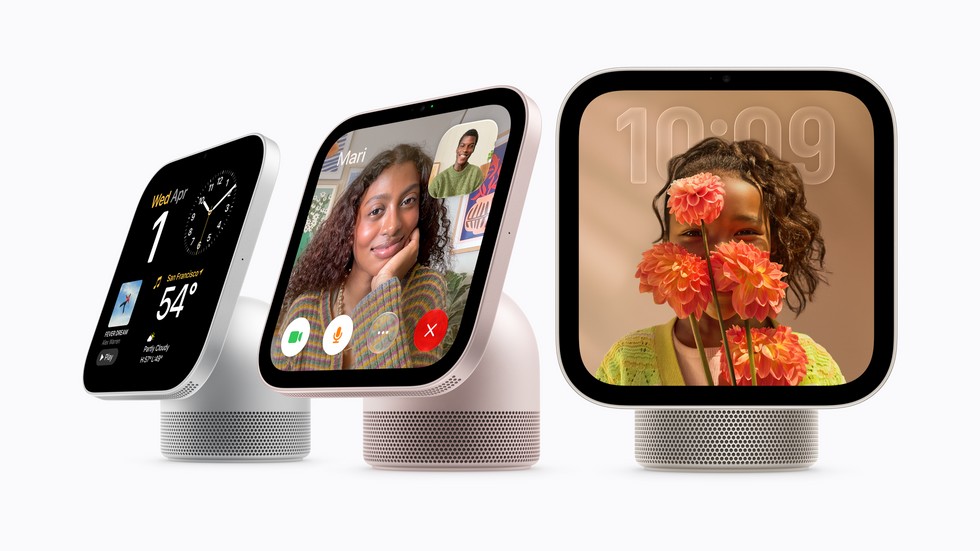
Apple’s long-awaited smart-home display is no longer a preview. Apple HomeView is available to order today, November 13, in the United States and six other markets, starting at $299. The compact screen combines Siri AI, FaceTime, Apple apps, whole-home controls, and room-filling audio in a device intended to be shared by a household.
HomeView’s most important idea is not simply putting Siri on a display. Apple built it to recognize different people, reveal the appropriate personal information, and work with a paired iPhone or iPad. That approach makes setup requirements and privacy behavior just as important as the hardware. Here is what prospective buyers should know.
Apple HomeView price, colors, and availability
The tabletop Apple HomeView costs $299 and comes in silver, starlight, rose pink, and space gray. A wall-mounted version is also $299 and is offered in silver or space gray. Orders are open through Apple’s website and Apple Store app in Australia, Canada, India, New Zealand, Singapore, the United Kingdom, and the United States.
The wall model needs a separate purpose-built mount. Apple says Schneider Home’s USB-C Power Mount starts at $59.95, while an AC-wired option starts at $79.95. A $129.95 Power over Ethernet mount is planned for early 2027. Factor that extra hardware and possible installation work into the real cost of a wall setup.
HomeView is not currently sold in the European Union because Siri AI remains unavailable on iOS there. Siri AI on HomeView launches in English in supported countries, with Canadian French due later in a free software update.
A shared screen that knows who is looking
HomeView uses its camera and microphones to recognize as many as six people by face and voice. Once it identifies someone, it can surface that person’s Messages, FaceTime contacts, Calendar, Reminders, and Find My information. Apple says the A18 chip’s Secure Exclaves process recognition data in a protected compartment that neither the operating system nor Apple can access.
There are sensible limits. For a fully personalized experience, each person needs an Apple Account, a compatible iPhone or iPad, and membership in the shared home in the Home app. Personal content normally depends on the paired device being on the same Wi-Fi network and recently unlocked. Guests can still play music, set timers, check weather, and control smart-home accessories without seeing someone else’s private information.
Apple’s footnotes deserve attention: under specific conditions, personal information may remain available when a paired device has left Wi-Fi. HomeView must recognize the person, and the paired device must remain nearby, online over cellular, and recently unlocked. Households should read Apple’s explanation and decide where a shared display belongs before enabling personal features.
What Siri AI adds
Apple’s HomeView product page describes Siri AI as both a general assistant and a personal one. Anyone can ask broad questions, continue a back-and-forth conversation, or request help with a recipe. A recognized user can go further: Siri can draw on relevant information from the paired iPhone or iPad, understand what is onscreen, and perform actions across apps.
Those features arrive in beta with HomeView software 27.2. Apple also says server-based Apple Intelligence features can have daily usage limits, and expanded access may carry a fee in the future. Buyers should treat the AI experience as evolving software rather than a fixed, unlimited service.
FaceTime, music, and smart-home controls
The seven-inch Liquid Retina display supports hands-free FaceTime, with Center Stage keeping people in frame. A four-microphone array aims to isolate voices, while the tabletop model combines two full-range drivers, a down-firing woofer, and passive radiators. Spatial Audio is supported, and AirPlay can group HomeView with HomePod, Apple TV 4K, and compatible speakers.
HomeView also acts as an Apple Home hub. It can display doorbell and security-camera feeds, adjust lights and temperature, run scenes and automations, and show as many as nine camera streams at once. It can listen for smoke and carbon-monoxide alarms and send an alert to an iPhone, iPad, or Apple Watch. Apple says compatible accessories can be identified by the Works with Apple Home logo; shoppers can check the company’s official accessory directory before buying.
Should you buy one?
HomeView makes the strongest case for households already using iPhone, FaceTime, Apple Music, and HomeKit-compatible accessories. Its $299 entry price is straightforward, but wall mounting adds cost, the best personalized features require current Apple devices, and language and regional support are limited at launch.
Before ordering, confirm that every intended user has compatible hardware and up-to-date software, audit smart-home accessories for Apple Home support, and choose a location where personal notifications will not be visible to passersby. If those pieces fit, HomeView offers a notably integrated command center. If the display will mainly serve as a timer or music speaker, a simpler device may be the better value.
Leave a Reply