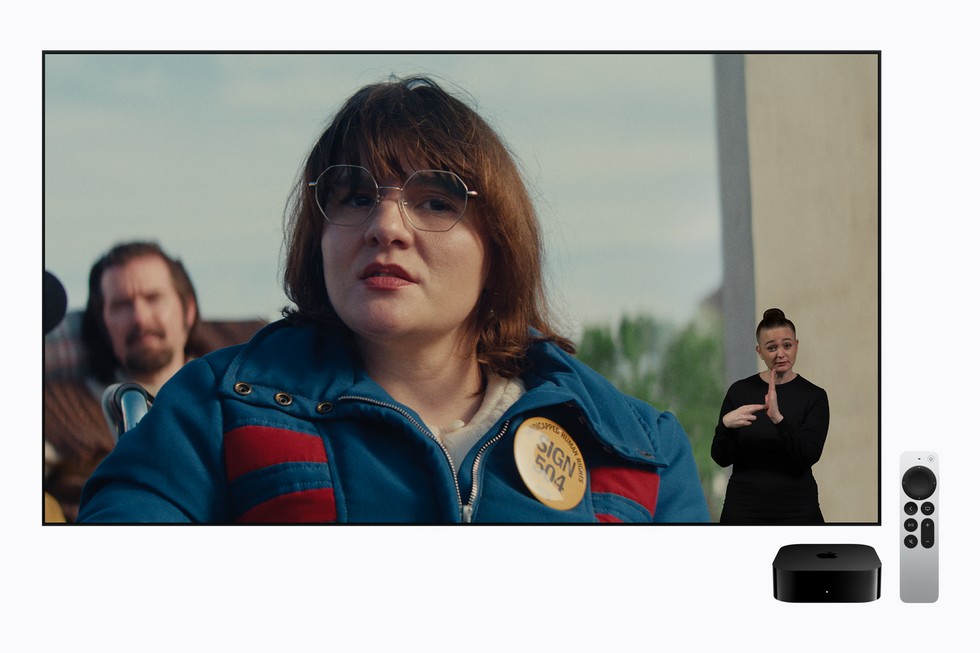
Apple is adding a built-in Sign Language viewing option to the Apple TV app, giving Deaf viewers a new way to watch supported Apple Originals with an interpreter onscreen. The feature arrives Friday, November 13, alongside the global streaming premiere of Being Heumann, and it works on iPhone and iPad as well as Apple TV 4K, Mac, Apple Vision Pro, and supported third-party devices.
The timing makes this more than a technical accessibility update. Being Heumann tells the story of disability rights activist Judy Heumann and the 1977 San Francisco sit-in that helped force the United States government to enforce Section 504 of the Rehabilitation Act. Apple is using that premiere to introduce an experience it says was designed and tested by Deaf and native signers.
What Apple TV’s Sign Language feature does
On supported movies, the Apple TV app can show an accompanying sign language performance while the film plays. Apple says the initial options include American Sign Language (ASL) and British Sign Language (BSL). Each interpretation is produced to match the emotion, meaning, and rhythm of the title instead of functioning like a generic overlay.
Daniel Durant, who appears in Being Heumann, directed the film’s sign language interpretation. Apple says the work was crafted with Deaf audiences in mind from the start. That distinction matters: captions translate dialogue and important sounds into text, while sign language interpretation communicates through a complete visual language that includes movement, facial expression, and spatial grammar. Some viewers may use one, the other, or both.
Apple’s official announcement confirms that F1 will also support ASL and BSL. Way of the Warrior Kid and Greyhound are scheduled to follow later in 2026, with more Apple Original titles planned.
How to turn it on
First, update your device. On iPhone and iPad, the feature requires iOS 27.2 or iPadOS 27.2 or later. It also requires macOS 27.2, tvOS 27.2, or visionOS 27.2 on Apple’s other platforms. Supported third-party streaming devices need the latest available version of the Apple TV app.
Once the update is installed, open the Apple TV app and check its settings for the Sign Language option. After enabling it, begin playing a supported title and press the Sign Language button in the playback controls. Apple will mark compatible movies with a dedicated Sign Language icon, so you can tell whether the option is available before you settle in.
If you are searching for something compatible, try a phrase such as “with ASL.” Apple is also adding a “Movies & Shows with American Sign Language” collection that gathers supported titles in one place. Availability will be limited at launch, so the icon and collection are more reliable than assuming every Apple Original includes interpretation.
Where you can use it
The feature is not restricted to the living-room Apple TV box. Apple says the Apple TV app is available across iPhone, iPad, Mac, Apple TV 4K, Apple Vision Pro, many smart TVs, popular streaming devices, and game consoles. That broad support should let a viewer start on an iPhone or iPad and move to a larger screen without giving up the accessibility option, provided the title and device are supported.
For mobile viewing, headphones can still be useful for any accompanying audio, but the interpreter remains visual. On a smaller iPhone screen, landscape orientation should give the sign language performance more room. On iPad, a stand or case can make longer viewing more comfortable and keep both hands free.
A useful launch title
Being Heumann stars Ruth Madeley as Judy Heumann and is directed by Siân Heder, the filmmaker behind CODA. The story follows Heumann and more than 100 disability rights protesters as they organize a historic sit-in in San Francisco. Its November 13 release gives Apple an unusually relevant showcase for a feature centered on access and authentic representation.
You can add Being Heumann to your Apple TV watchlist now. If you plan to watch on launch day, install the latest software beforehand and confirm that the Sign Language icon appears. Families can also enable the setting together before playback, avoiding a hunt through menus once the movie starts.
The takeaway
Apple’s new Sign Language option launches with only a handful of titles, but the implementation is thoughtful: clear labeling, search support, a dedicated collection, and performances created with Deaf and native signers. For iPhone and iPad owners, the practical step is simple—update to iOS or iPadOS 27.2, enable Sign Language in the Apple TV app, and look for the icon on supported Apple Originals.
Leave a Reply