Review: UnlimTones – Best FREE app on Cydia to Create Ringtones


When you start the app you will be presented with a handful of options:
Top Ringtones: Allows you to see the top ringtones people are currently using. You can then click on the song and download set ringtones based on time of the song that other users have created. You do not even have to own the song and you can download these ringtones.
Top By Genres: Allows you to browse ringtones by the different genres.
Top in United States: Check out the top ringtones today in the US.
My Ringtones: Clicking this connected you to their Facebook App.
SMS Alerts: List of the top SMS alerts that other users have created.
Browse Genres: Allows you to click on a genres and then narrow your search down by Artist.
Top Albums: Get ringtones from the top albums.
Make Ringtone: One of the best features of this application. You can simply create a ringtone from any song you have on your iPhone. Just select the song, choose the start and end time and then save the ringtone. It will automatically show up in you Ringtones located in Settings –> Sounds –> Ringtone. Once you find it located in there, just check it and it is now your default ringtone.
Manage Tones: This allows you to manage all of the ringtones that you have downloaded and created with the app.
Overall I would have to say that this is the best Ringtone Application for the iPhone that is located on Cydia. Again, you will have to jailbreak your iPhone and have Cydia installed in order to get UnlimTones.
Incoming search terms:
- how to use unlimtones
- how do u use unlimtones
- unlimtones ringtone location
- unlimtones
- unlimtones manage tones
- download unlimtones
- unlimtones not showing up in ringtones
- где скачать cydia для iphone 5 unlimtones
- how to use unlimtones version 4 7-57
- use music as ringtone iphone 5 cydia
iOS 6 Direct Download Links
Apple has just announced iOS 6 and it is now available to the general public on September 19. Developers have been testing it for the past few months already. Here are the direct download links to iOS 6.
Some of the New features of iOS 6 include:
- New Maps application with 3D views and turn by turn navigation
- FlyOver Satellite mode which is amazing!
- iCloud Tabs: lets you share tabs in Safari between your computer and iOS device.
- Mail is completely upgraded: Can mark people as VIP and then when you get an email from that person it goes into a special mailbox.
- Passbook: Keeps track of coupons, movie tickets, boarding passes, etc.
- Shared Photo Streams: Share all of your photos directly with your friends and family. It will instantly update on their devices as soon as you take a picture.
- Siri Updates: Integrated sport scores, can launch apps now!, Yelp, Rotten Tomatoes, and Open Table integrated. Post to Facebook and Twitter using Siri.
- Phone App enhancements: Ability to send an SMS or iMessage back if you can’t take the call.
- Redesigned AppStore
You should probably stay away from upgrading to iOS 6 if you rely on a jailbreak and/or software unlock. Please wait until the iPhone Dev Team has released an official method to upgrade safely.
If you are looking for old iOS Download Links you should have a look at this post.
- iPhone 3GS iPhone2,1_6.0_10A403_Restore.ipsw
- iPhone 4 GSM iPhone3,1_6.0_10A403_Restore.ipsw
- iPhone 4 Verizon iPhone3,2_6.0_10A403_Restore.ipsw
- iPhone 4 Sprint iPhone3,3_6.0_10A403_Restore.ipsw
- iPhone 4S iPhone4,1_6.0_10A403_Restore.ipsw
- iPhone 5,1 iPhone5,1_6.0_10A405_Restore.ipsw
- iPhone 5,2 iPhone5,2_6.0_10A405_Restore.ipsw
- iPad 2 Wifi iPad2,1_6.0_10A403_Restore.ipsw
- iPad 2 GSM iPad2,2_6.0_10A403_Restore.ipsw
- iPad 2 CDMA iPad2,3_6.0_10A403_Restore.ipsw
- iPad 2 i2i iPad2,4_6.0_10A403_Restore.ipsw
- iPad 3 Wifi iPad3,1_6.0_10A403_Restore.ipsw
- iPad 3 GSM iPad3,2_6.0_10A403_Restore.ipsw
- iPad 3 CDMA iPad3,3_6.0_10A403_Restore.ipsw
- iPod Touch 4G iPod4,1_6.0_10A403_Restore.ipsw
- iPod Touch 5G iPod5,1_6.0_10A406_Restore.ipsw
iPhone 4S, 4, 3GS, new iPad, iPad 2, 5th and 4th gen iPod Touch get iOS 6 on September 19.
Incoming search terms:
- iphone3 3_6 0_10a523_restore ipsw
- ios 6 direct download links
- iphone4 1_6 0_10a523_restore ipsw
- iphone2 1_6 0_10a523_restore ipsw
- ipad2 1_6 1_10b141 _restore ipsw download
- iPhone4 1_6 0_10A523_Restore
- iphone 3 2_6 0_10A523_restore ipsw download
- which ipad is ipad2 1_6 1_10b141 _restore ipsw
- iphone3 1_6 1 restore
- iphone 4s sprint 6 0 1 iphone4 1_6 0_10a523_restore ipsw
Review: Fake SMS+ for iPhone
Do you enjoying seeing those funny SMS conversations that are all over the web, similar to the picture on the side? Well I can tell you that most of them are fake. The application Fake SMS+, developed by Never Give Up, is an iPhone application that lets you do just that. It will create fake SMS conversations for you to fool your friends and family.
Fake SMS+ does not actually send a fake text message to a person using a spoofed number like SpoofText does, but it does allow you to create some clever fake conversations to show people. The application is very easy to use and very fun. You can even prank people on the spot using Bluetooth.
Faking people on the spot using Bluetooth requires that you have an accomplice who also has the Fake SMS+ application. You each connect via bluetooth and can send messages back and forth so that the person you are pranking thinks that you are really chatting with them.
Fake SMS+ is a clever application and is a perfect application to prank your friends with. It is available on the Apple App Store for $0.99. Check it out today!
Incoming search terms:
- fake iphone text with date and time
- fake sms
- difference between iphone 4s codes and fake iphone 4s
- iphone 4s fake sms
- differancd between real iphone text and fake text
- difference between fake texts and real messages
- iphone 5 fake text message
- how to tell the difference between fake and real text messages
- iphone 5 fake text message dates and times
- iphone app create fake text message conversation
iMessage Waiting for activation
This post is currently about the iOS 5 beta 1, but may apply to future versions of iOS 5.
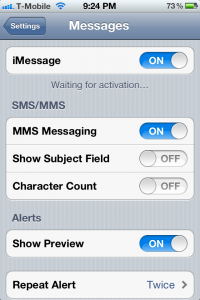
Are you having issues with iMessage not activating? This is very similar the the FaceTime issues where it says waiting for activation. You may find that iMessage will activate if you add another email address. When you do this you may also see an iMessage phone number error.
When you turn on iMessage under the message settings you will see a FaceTime message pop up saying your carrier may charge for SMS messages used to activate FaceTime. Click OK. Go out of settings and try sending a text message to someone you know who is running iOS 5. This will help manually activate iMessage.
Also in the Message settings you will see Received At. Click on that and enter your Apple ID email address and a few other email address if you want. As long as you have a valid email address you will be able to send and receive iMessages but you may have an error receiving them from a phone number if you are on a non approved carrier like T-Mobile. Currently I am on an officially unlocked iPhone 4 running iOS 5 beta 1 on the Tmobile network. I can send and receive iMessages but only with an email address. It shows that there is an error activating with my phone number.
We are working on finding a solution to this problem. Hopefully Apple will fix it before the official release of iOS 5.
iMessages can be sent between iPhone, iPad, and iPod touch.
Incoming search terms:
- imessage waiting for activation
- how to activate imessage
- imessage activation
- activate imessage
- imessage not activating
- imessage activation error
- imessage wont activate
- activating iMessage
- my imessage is not activating
- imessage not working