• Home
  • Reviews
  • iPhone
  • iPad
  • FAQ
  • Tutorials
  • Guest Writer
  • Old Firmware
  • Deals
  • Store
  • Contact

LEi Mobile

All Your Apple iPhone, iPad, & iPod Touch News

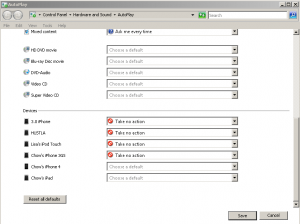
Stop AutoPlay From Popping Up When You Plug Your iPhone, iPad, Or iPod Touch into Your Windows Computer

December 16, 2010 by LEI Mobile 1 Comment

Here is the easiest was to stop that pesky AutoPlay window from popping up when you plug your iDevice in. When you first plug your iPhone, iPad, or iPod into your computer you will see a popup with like: t the bottom you can see a link that says “Set AutoPlay defaults in Control Panel.” […]

  • What we learned from WWDC 2026 and what is coming…
  • Apple Released iOS 26.5.1 to Fix Charging Issue on iPhone Air and iPhone 17 Models.
  • Apple Releases iOS 26.5 With Encrypted RCS Beta, Pride Wallpaper, and Maps Suggestions
  • Apple Releases iOS 26.4.2 With Apple Music, Accessibility, Emoji, and Security Fixes
  • iOS 26.4.1: Apple Music, Accessibility, and Bug Fixes

© Copyright 2015 LEiMobile. Designed By Wittchow, LLC | Contact | Privacy Policy |


Loading Comments...