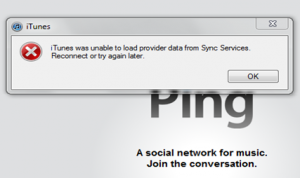
Fix: iTunes was unable to load provider data from Sync Services. Reconnect or try again later
Are you getting the error iTunes was unable to load provider data from Sync Services. Reconnect or try again later? We have had reports of users experiencing this issue with the latest iOS 5 beta and the iTunes 10.5 beta. You may also be receiving this error on non beta software as well.
Since I have not personally seen this error this is no way for me to verify that these solutions fix the problem. In iOS 5 if you just hit OK and ignore the problem you can still Sync. Other people may have problems syncing on older versions of iOS.
This error seems to happen mostly in Windows 7 systems.In order to fix the problem you can try renaming the sqllite file in Windows/System32 or Windows/SysWOW64 to sqllite.dll.old. This will allow a new file to be written and the old file will get ignored.
Another possible fix would be (Win7 64 bit with Roaming profile):
1. Unplug iPhone
2. Rename theSyncServices folder found at C:\Users\<username>\AppData\Roaming\AppleComputer to SyncServices_Old
3. Reconnect iPhone
If you know of any other solutions please post them in the comments. You may also want to read Apple’s long support thread.
Incoming search terms:
- itunes was unable to load provider data from sync services
- itunes was unable to load data from sync services
- itunes was unable to load provider data from sync services reconnect or try again later
- iTunes was unable to load provider data
- itunes was unable to load provider data from sync services itunes 10 5
- itunes was unable to load provider
- iTunes was unable to load dataclass information from Sync Services
- itunes was unable to load data class information from sync services
- itunes unable to load provider data
- itunes was unable to load provider data from sync services reconnect and try again later


