How to Watch ABC Live on iPhone

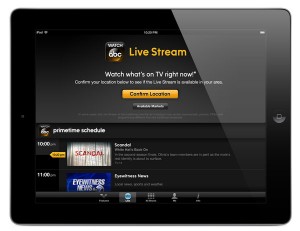
ABC just updated their iPhone app to allow Live Streaming. Currently this feature is only available to residents in New York City and Philadelphia.  The preview is set to end on June 30th and they will constantly be adding more cities.

If you want to watch ABC live early before your city is announced we have found a way to do it. You will need to have a jailbroken iPhone for this to work and you are limited to whats currently live in the selected cities.

1. Open up Cydia and download a fake GPS location app. I choose to use LocationHolic.
2. Open up your fake GPS location app and set your location to either New York City or Philadelphia as these are the only participating cities at the time of writing this article.
3. Now open up Watch ABC and enjoy live TV on your iPhone!

Incoming search terms:

  • watch abc live on iphone
read more

Review: Cloud Music Player – SkyDrive, Box.com, Dropbox, Google Drive

Cloud Music Player – SkyDrive, Box.com, Dropbox, Google Drive, developed by Willengale Solutions Ltd, is the best cloud music player I have tried yet. It lets you connect to all of the hot and free storage companies and stream music directly from those services.

I typically store music on Dropbox, because I have a lot of space and use it all of the time. Unfortunately I do not utilize it to stream music as you don’t really have that many options and you have to click on the next song for it to start playing. With the Cloud Music Player app you can easily select all of your music from within Dropbox, press play, and relax. It will continue playing all of your songs in a specific folder until you stop. You can even play the songs in the background so you can do other things on your iPhone at the same time.

If for some reason you do not have an internet connection such as on an airplane, you can download all of the songs directly into the app and play them in offline mode. This is great if you just got a new song and didn’t have time to transfer it to your music app.

The only issues I have found so far is that you cannot play DRM protected music that was purchased through iTunes. Luckily most of the new music is DRM free, but it is expected that this would be an issue. Also your only options are mp3, aac, m4a, wav, aiff, m4r, mp4, caf, mov; but those are  most commonly used anyways.

If you have some of these storage accounts with some free space and are interested in streaming, Cloud Music Player – SkyDrive, Box.com, Dropbox, Google Drive is the app you need. It will cost you $2.99 but is a great price since it is almost like iTunes Match at a fraction of the price. Check it out on the Apple App Store today.


Incoming search terms:

  • best cloud music player
  • скачать jailbreak 6 1 для iphone 4s 10b329
  • cloud music player google drive
  • cloud music player iphone box com
  • iphone itunes sync waiting for changes to be applied
  • itunes ipad sync waiting for changes to be applied
  • music player for google drive mobile
  • storing music collection match dropbox google drive
read more

The Average Gigabytes Used on Mobile Phone Data Packages

These days, mostly everyone uses a smartphone for their mobile phone. Unlike when you own a so-called “dumb” phone, when you have a smartphone, you will find that your wireless carrier will require you to purchase a data plan or upgrade your existing one, depending on how old it is. In particular, the four major wireless carriers — AT&T, Sprint, T-Mobile and Verizon Wireless — offer unlimited data plans as part of their packages. More mobile phone users are now transitioning to providers like Clear that provide wireless internet deals with unlimited data plans for on- the- go and home solutions.

While many consumers opt for these data plans, the majority of these individuals never consume more than 2GB of data per month. This is a fairly standard amount as it is the average tier for most smartphone data plans across all of the wireless carriers.

According to a study conducted by research firm NPD Connected Intelligence, the majority of mobile phone users do not need unlimited plans, and in fact, 2GB is more than sufficient to satisfy these individuals. The NPD also collected data from an app on 1,000 Android smartphones to track how much data the owners would consume each month. This is not taking into consideration the usage of iPhone users, but the firm determined that three percent of consumers on Verizon Wireless consume more than 3GB per month, 4 percent of users on Sprint and AT&T consume over 3GB per month and as much as 11 percent of T-Mobile users consume more than 3GB each month. It was also determined that T-Mobile customers tend to be of the younger demographic, which means there is more streaming of music and video to smartphones among this group.

Generally, on the whole, the majority of customers on wireless carriers who have a data plan tied to their mobile phone are not even at the 2GB point. As of the first quarter of 2012, the average data usage for these individuals measured in at approximately 450MB of data per month. It is not surprising that wireless data usage is considerably low due to the fact that all smartphones now come with Wi-Fi capabilities built in. Shared data is also a popular option that is offered by the two top carriers, AT&T and Verizon Wireless, which help consumers to limit their data usage overall.

Reference: http://www.fiercewireless.com/story/unlimited-unnecessary-npd-report-finds-average-smartphone-data-use-below-2/2012-08-24

Incoming search terms:

  • restore iphone 5 bypass passcode 6 1 2
  • tmobile mms settings 6 1 2
read more

Amazon Instant Video Now available on the iPhone

More and more major applications are hitting the iPhone this week. Up next we have Amazon Instant Video. If your not familiar with Amazon Instant Video, you have been missing out. It is a Netflix like service that allows you to stream videos anywhere.

If you are an Amazon Prime member, you get access to Unlimited instant streaming of thousands of movies and TV shows with Prime Instant Videos as well as FREE 2-day shipping. This is a great service and highly recommended. Students get a discount too!

Amazon Instant Video has been available on the iPad for awhile now, and lots of people have been waiting for the service to hit the iPhone so they can watch TV shows and movies on the go. The only downside of the app is that it requires a Wi-Fi connection. This is a major turn off right now. Hopefully they update the app soon and allow streaming over 3G, 4G, and LTE. There are still plently of people that have an unlimited data plan, and a lot of the times the cell phone companies internet speeds are faster than home Wi-Fi networks.

Another downfall of the application is that Airplay is not supported at this time, so if you were planning on streaming videos through your Apple TV, you will have to jailbreak your Apple TV and use XBMC. Hopefully Amazon will address these issues in a future update. In the mean time enjoy your Prime videos on your Wi-Fi network.


Incoming search terms:

  • turn on amazon instant video with lte
  • amazon instant lte
  • amazon instant video iphone requires wifi
  • amazon instant video on iphone lte
  • amazon prime streaming iphone lte
  • amazon prime video iphone lte
  • amazon prime video on lte
  • iphone 5 att lte tab missing ifile
read more

Air Playit – Remote Media Streaming App for iPhone iPad

Ever wished you could access the video library on your home computer via your iPhone iPad for playback while you are away? If your answer is yes, the remote media streaming app Air Playit is likely to be welcomed. With it, you can remotely access the video library on home computer even though you are far from home and play any video in any format on your iPhone iPad without having to convert the video beforehand.

Air Playit works by making your computer a personal cloud server to stream audios and videos directly to iPhone iPad via either WiFi Connection or 3G/4G network. It is able to convert videos on the fly during streaming. With 320 different video & audios codecs built in, Air Playit supports streaming almost all videos regardless of the file formats.

It consists of two parts: Air Playit server and client application.

Servers supported:

Windows OS (XP, 2000, Vista, Windows 7)

Mac OS (Leopard/Snow Leopard/ Lion)

Client supported:

iOS: Apple iPad, iPhone, iPod touch with iOS 4.2.1 and above

Android OS


To get this video audio streaming app working, you need to install the app client (iPhone Download Link or iPad Download Link) on your devices as well as install the streaming server on your PC or Mac.

1. After the streaming server is downloaded and installed on your PC or Mac, you simply tell the server which media folders to stream by clicking the “Shared Folders” tab. Two options are available: Add Folder or Add iTunes Playlist. You can also specify permission to your shared folder.

2. Air Playit supports automated server discovery on local network by Bonjour Service. You can also add remote server by specifying IP address.

3. Click “Play” to watch the video you prefer. If the video format is not supported by your devices, Air Playit will convert the video on the fly automatically. No need to wait before watching.


Incoming search terms:

  • setup remote server airplayit
  • stream hbo go to airplayit
  • leimobile com airplay
  • xbmc air playit
read more
Page 1 of 212