Review: Fake SMS+ for iPhone
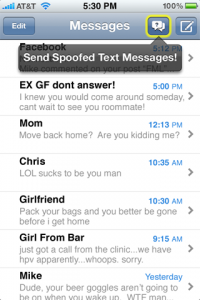
Do you enjoying seeing those funny SMS conversations that are all over the web, similar to the picture on the side? Well I can tell you that most of them are fake. The application Fake SMS+, developed by Never Give Up, is an iPhone application that lets you do just that. It will create fake SMS conversations for you to fool your friends and family.
Fake SMS+ does not actually send a fake text message to a person using a spoofed number like SpoofText does, but it does allow you to create some clever fake conversations to show people. The application is very easy to use and very fun. You can even prank people on the spot using Bluetooth.
Faking people on the spot using Bluetooth requires that you have an accomplice who also has the Fake SMS+ application. You each connect via bluetooth and can send messages back and forth so that the person you are pranking thinks that you are really chatting with them.
Fake SMS+ is a clever application and is a perfect application to prank your friends with. It is available on the Apple App Store for $0.99. Check it out today!
Incoming search terms:
- fake iphone text with date and time
- fake sms
- difference between iphone 4s codes and fake iphone 4s
- iphone 4s fake sms
- differancd between real iphone text and fake text
- difference between fake texts and real messages
- iphone 5 fake text message
- how to tell the difference between fake and real text messages
- iphone 5 fake text message dates and times
- iphone app create fake text message conversation
5.0 – 5.1 Unlock iPhone 4S, iPhone 4, iPhone 3GS SAM Tutorial
Here is a nice little trick to unlock your iPhone. It is good for 3 years even if Apple closes the loop hole. This unlock will work on any baseband as long as your jailbroken on iOS 5.0, iOS 5.0.1, or iOS 5.1. To get started you will need to know what carrier your iPhone is currently locked to, your Jailbroken iPhone you want to unlock to use on a different carrier like T-Mobile, and a computer with the latest version of iTunes installed with a working internet connection for activation.
- Launch Cydia from your iPhone.
- Click on Manage at the bottom.
- Press the Sources button.
- Click Edit in the top right corner.
- Click add and type: http://repo.bingner.com and press Add Source.
- Click the return to Cydia button and then click on the source Bingner.
- Click on SAM (Subscriber Artificial Module).
- Press install on the upper right corner. Then Confirm. Then press reload SpringBoard.
- You will now be taken back to your iPhone’s home screen and will see a new icon titled SAMPrefs. Click and open it.
- Tap Utilities from within the program.
- Select De-Activate iPhone. Your iPhone will deactivate.
- Under More Information, confirm that your iPhone is deactivated and that SAM is enabled.

- Tap Method and choose By Country and Carrier.
- Tap Country and choose the Country of the sim the phone was originally locked to.
- The choose carrier and click on the carrier the phone is locked to. NOT YOUR SIM your trying to unlock. (For some carriers operating more than one Carrier ID you may need to select SIM ID.)
- Click More Information and copy the IMSI under SAM Details to the clipboard.
- Next Tap Spoof Real Sim to SAM.
- Go back to the main SAM screen and past the IMSI number that you copied earlier.
- Connect your iPhone to iTunes and let it activate your iPhone. ”Double click “Phone Number” parameter at the main device screen and make sure that the ICCID matches that of your SIM card.”
- Unplug your iPhone from the computer and close iTunes.
- Reopen SAMPrefs on the iPhone and disable it.
- Connect your iPhone to the computer again and open iTunes. You will get a message that says “The iPhone failed to actiave. Please try again later.” This is normal. Just close iTunes and open it back up. You will then get a signal shortly and your iPhone is unlocked.
- You should now backup your iPhone unlock ticket in case this method is ever blocked.
- Push notifications may stop working after this procedure but can be easily restored with “clear push” utility in SAM followed by connecting to iTunes.
Your phone will work normally with your SIM card and that SIM card ONLY since we have tricked iTunes to think that ICCID is one of the intended carrier’s. The phone can be rebooted and connected to iTunes freely without losing the “unlock”, at least for now.
Incoming search terms:
- leimobile source cydia
- Spoof Text Message Free
- iphone 5 basic tutorials
- lei mobile source cydia
- lei cydia source
- simple mobile iphone settings cydia
- iphone3 1_6 0_10a523 jailbreak
- descargar ipod4 1_6 0_10a523
- spoof text free cydia
- dtvrunner download
Send Fake Text Messages With SpoofTexting For iPhone
We have all seen the spoof dialing program where you can prank someone by using any number you want. You call up the spoofing service and they reroute your call so it looks as though you are calling from a different number. This is always a funny prank to pull on people. You could even change your voice with the built in voice changer.
Now the creators of SpoofCard have also created SpoofTexting where you can fake your text messaging number. Wouldn’t it be funny to message your friend using his girlfriend’s phone number and tell him she is pregnant? Well now you can. SpoofTexting allows you to send text messages to anyone in the USA from any phone number you want. You can actually specify what number you want the message to appear from! The person receiving the message will not be able to distinguish if the message is really coming from that phone number, or from you spoofing the number. SpoofTexting is an application that you can download on Cydia (must be jailbroken as Apple obviously would not allow this in the AppStore).
SpoofTexting is the only app that can send messages to every wireless provider in the USA, including Sprint, Verizon, AT&T, and T-Mobile. Try SpoofCard for FREE! If you visit the Spooftexting website you can earn free credits to try out the service. Inside the application you can purchase additional credits starting at $4.99 for 10 messages.
Incoming search terms:
- send a text from a fake number
- how to text someone from a different number
- how to text someone from a fake number
- spoof text free
- prank text app iphone
- send a fake text
- fake number text app
- text someone from a different number
- text from a different number app
- send fake text app
Funny iPhone 4 Spoof Commercial
Incoming search terms:
- iphone 4s funny commercial
- mms message spoofing
- can I text back and forth using a fake number
- can u receive a return text after text spoofing someone
- Fake Iphone MD234LL Software Update
- simple mobile funny commercial
- sms texts that can change numbers spoof
- working text spoof