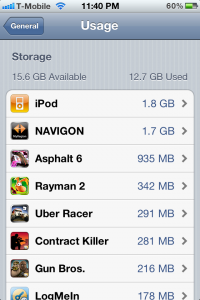
iOS 5 Offers A New Way to Manage Storage

This review was submitted by our guest writer Brody White. If you would like to be a guest writer here check out the Guest Writer page.  You can write about anything you want related to our website and we even provide you with promo codes to apps for you to review.

iOS 5 was released the other day with many new features (200 to be exact). But only 10 were talked about and very few others even mentioned. So Apple has left it up to us to find the unsung heroes of Monday’s keynote.  It seems almost every time I unlock my iPhone I find something new, and as I was browsing settings I came upon an entire new way to manage the storage on your iPhone.

When going into Settings>General>Usage you will find that there is now a storage section that displays the first 10 apps on your iPhone that take up the most memory. The first is usually your music library which you are not allowed to delete any content from; but you can go into a large app like “Navigon” and delete the Documents and Data or the app entirely. By deleting the Documents and Data you delete all of your progress / saved settings from “Navigon” or any other app. For example deleting Documents and Data from “Pages” you would delete all saved documents. Overall it’s a pretty convenient way to free up space on your iPhone since it shows what is taking up the most space.

Also as a quick thought who wouldn’t love it if you could export or email the Documents and Data so that you could import it onto another iDevice say from you iPhone to iPad that way you would be on the same level of Angry Birds on both devices!

Incoming search terms:

  • how to manage storage on iphone
  • navigon ios 5
  • navigon ios5
  • iphone manage storage
  • how to manage space on iphone
  • manage storage on iphone
  • how to manage storage on ipad
  • how to manage ipad storage
  • how to manage iphone storage
  • how to delete documents and data from iphone apps
read more

MobileNavigator Update 1.8 Now Out

Navigon’s MobileNavigator is personally my favorite GPS application for the iPhone 4.  Today they released version 1.8.The update adds a Reality Scanner feature that helps finding points of interest close-by, presenting them in an augmented reality view. Version 1.8 also includes safety camera alerts as an In App Purchase, an at-a-glance traffic gage and a new NAVTEQ map. In conjunction with the update launch, MobileNavigator apps and In App Purchase prices will be reduced by up to $15 thru April 28, 2011.

Download MobileNavigator from the iTunes AppStore today for  as little as $24.99 for MyRegion

Incoming search terms:

  • navigon traffic live review
read more

Spring Travel Navigation Giveaway from NAVIGON

NAVIGON, a global leader of navigation applications, is about to launch a spring travel giveaway. The contest starts on Thursday, March 3rd, and will run for 10 days. NAVIGON’s iPhone navigation app MobileNavigator is the perfect travel companion, for international, domestic and even local travel.

NAVIGON is giving away 10 ultimate travel packages that consist of an iPhone app version of choice (including all international versions for destinations that span the globe) and the new iPhone Design Car Kit.

How to enter?

It’s easy! Follow @NAVIGON_US (and @LEiPhone We would appreciate it!) on Twitter and Tweet #navigontravel.

Why is NAVIGON MobileNavigator the optimal travel companion?

MobileNavigator has many features that are tailored for travelers finding their way that make this app indispensable for getting around on foreign territory. The app offers maps for many countries around the globe and support of a wide range of languages, travel guides, local points of interest, speed warnings, no roaming fees when getting directions abroad (other than off-board navigation apps), social media integration and much more. MobileNavigator lets you leave your guidebooks, maps, and worries about getting lost at home.

NAVIGON will announce a winner every day at 5PM EST on Twitter between March 3 -12, 2011. We also have a dedicated page on our website that outlines details and terms & conditions. NAVIGON Contest Page.

read more

Multitasking with NAVIGON MobileNavigator On iOS4

Now that multitasking is coming on the iPhone in just a few days with iOS 4, Navigon wants show you just how smooth and convenient this new capability is while on the go. NAVIGON’S head of iNavigation from Germany, Bernd Hahn, demo’s how you don’t have to stop MobileNavigator when you receive a call or use other functions. Many have been waiting for multitasking to come to the iPhone  and NAVIGON will have this and many other features available in its next update.

read more

Navigon MyRegion App 50% Off

NAVIGON has their MyRegion navigation apps for 50% off to celebrate this year’s WWDC conference with a significant price cut on MyRegion.

If you are traveling to The Bay Area for this year’s WWDC or heading out of town for upcoming summer holiday, you now have the chance to save 50 percent on a full featured, premium GPS navigation app. NAVIGON MyRegion goes on sale for a very limited time only. The app will be available for only $14.99 (normally $29.99) from June 1-11th, and maps of additional regions will be $9.99 (usually $14.99).

MyRegion gives you the power of choice by letting you pick the map region/regions you need but still includes the features known from the award winning North American version, MobileNavigator. It is the first iPhone navigation app that lets users upgrade to additional regions within the app and on the go, providing cross country navigation by choice. The total U.S. map is downloaded upon purchase of the first “MyRegion,” which allows activation of additional map regions via a seamless In App Purchase from within the application. NAVIGON MyRegion allows premium navigation at a reduced price including functions such as Reality View Pro, Google Local Search, Lane Assistant Pro, Enhanced Pedestrian Mode, NAVIGON MyRoutes and much more.

You can download Navigon MyRegion here.

read more
Page 1 of 212