T-Mobile iPhone Carrier Update is NOW out
We jumped the gun last week and announced that the carrier update was out. It is now officially out. Just plug your iPhone into your computer and launch iTunes and you will see the message to update. You can also do it directly from your iPhone by going to Settings –> General –> About.
It will say: Carrier Settings Update New settings are available. Would you like to update them now.
Once you are finished installing the update you will see that your carrier is now T-Mobile 14.1. This update will enable LTE on the AT&T iPhone 5. Not the Verizon iPhone 5. It will change your 3G icon to 4G and will enable HD Voice as well as visual voicemail. It will also put all of the correct settings for MMS.
AFTER THIS UPDATE YOU WILL NO LONGER HAVE FREE PERSONAL HOTSPOT. To enable Personal Hotspot on this account, contact T-Mobile.
Here are the complete list of features:
Features
- Enables the following:
- Visual Voicemail
- 4G network indicator
- Commercial Mobile Alert System (CMAS)
- AWS LTE (T-Mobile and officially unlocked AT&T iPhone 5 only)
- HD Voice (T-Mobile and officially unlocked AT&T iPhone 5 only)
- AWS HSPA+ (T-Mobile and new 2013 AT&T iPhone 5 only)
- Auto configures:My Account bookmark
- MMS Settings
- Personal Hotspot Settings (Smartphone Mobile Hotspot)
- APN settings for LTE connectivity
Incoming search terms:
- leimobile com tmobile
- lte setup optional iphone 5
- to enable personal hotspot on this account contact t-mobile
- tmobile carrier update 14 1
- new carrier settings iphone 14 1
- how to get back hotspot on iphone 5 tmobile after carrier update
- tmobile iphone 5 carrier settings
- tmobile carrier 14 1 iphone 4
- tmobile 14 1
- how to remove tmobile iphone settings
Official T-Mobile iPhone Carrier Update Coming April 5th
TMONews got their hands on some insider information that states the official T-Mobile iPhone carrier update will be released on April 5th. This update is similar to the hack that we already created that allows LTE support, however, it appears that Visual Voicemail will also be supported on the iPhone.
- The T-Mobile Carrier Update is a minor iOS software update that enables official iPhone support by T-Mobile. When installed, the software update enables a handful of capabilities like Visual Voicemail, MMS Settings and Network/Device optimizations that customers do not have access to today.
- On April 5, the software update will begin being pushed via OTA to all iPhone devices on the T-Mobile network with iOS 6.1.x or higher.
This is great news. T-Mobile is finally recognized as an official carrier of the iPhone after so many years of people having to hack to get it working. Now we wait until April 5th!
Incoming search terms:
- 14 1 iphone tmobile manual carrier
- tmobile carrier update lost pcweb
- t mobile lte mmsc
- t mobile carrier 14 1
- tmobile iphone carrier update personal hotspot
- how to manually update t mobile carrier software
- how to update tmobile carrier iphone 5 mamualy
- tmobile hspa mms settings 2013
- carrier update 14 1 ipad
- t-mobile 14 1 carrier bundle ipad 2
Simple Mobile iPhone MMS Settings For iOS 5
These are the settings you need to get MMS working on your iPhone running iOS 5.0 and above. This includes iOS 5.1.1 and iOS 6.0. There are 2 ways to get MMS working on your Simple Mobile iPhone. The first requires you to jailbreak. This is the easiest way. If you have a factory unlocked iPhone, you can use the iBackupbot method below to get mms working without a jailbreak.
If you are on the $25 15 Day Talk & Text plan, you cannot use MMS as a data plan is required. When your current plan expires, upgrade your plan to one that includes data so you may take advantage of the MMS feature.
1. Add our Cydia repo to find the iPhone MMS Fix for Simple Mobile.
Our Repo is http://beta.leimobile.com/repo/
Once you install the fix you will need to reboot your phone and go into settings->general->network and make sure the APN is correct.
The settings should look like this:
Apn: simple
Mmsc: http://smpl.mms.msg.eng.t-mobile.com/mms/wapenc
Mms proxy: 216.155.165.050 You may need to change the proxy to 216.155.165.50:8080
Mms max: 1048576
Mms ua prof URL: http://www.apple.com/mms/uaprof.rdf
If you are using the $40 TalkTextILD plan, you cannot use MMS as a data plan is required. When your current plan expires, upgrade your plan to one of the data capable plans – 50MB or 150MB – that Simple Mobile offers.
2. If you are unable to jailbreak and/or have a factory unlocked iPhone you can use iBackupBot which allows you to modify files on your iPhone without jailbreaking.
1. First things first. Make a full backup of your iPhone in iTunes.
2. Download the program iBackupBot. Make sure to select Mac or Windows. You may use the free trial, but it is best to purchase!
3. Launch iBackupBot and just hit OK to all of the messages that may pop up. It may take a while to load all the device information if you have multiple backups saved on your computer.
4. Once loaded you will want to find your most recent backup on the left had side and select it.
5. Next you will see a list of files show up in the righthand box. Scroll down until you see Library/Preferences/com.apple.mms_override.plist.

6. Double click on the mms override.plist and it will pop up a box to edit the file.
7. Download this com.apple.mms_override.plist and paste the contents into the box or manually write it out. It should looks similar to the picture below which is for T-Mobile. Simple Mobile’s will look a bit different. The MMSC string should be http://smpl.mms.msg.eng.t-mobile.com/mms/wapenc

8. Now put a checkmark in the box next to Library/Preferences/com.apple.mms_override.plist and then click on File at the top and select restore.
9. iBackupBot will restore this new edited file onto your iPhone.
10. I will make a video Tutorial soon.
Incoming search terms:
- iphone3 1_6 0_10a403
- simple mobile mms settings for iphone 4 ios 5 1 1
- iphone 5 simple mobile
- plist for simple mobile
- ios 5 0 1 tmobile mms
- simple mobile iphone 4s mms
- simple mobile iphone 5
- lei mobile mms fix t mobile
- simple mobile iphone 4 ios 5
- betaleimobile
T-Mobile MMS Settings For iOS 5 and iOS 6
The MMS settings for T-Mobile on iOS 6. These are the exact same as iOS 4 and iOS 5. Currently the easiest way to get MMS working on tmobile is to jailbreak and install the fix from our repo.
Now what happens if you have an unlocked iPhone 4S running on T-Mobile like I do? Well, right now there is no way to jailbreak the iPhone 4S and so you can’t get MMS working. Don’t worry, LEI Mobile has your back. If you have a factory unlocked iPhone and DO NOT want to Jailbreak or can’t Jailbreak but want MMS settings for T-Mobile I have a solution.
First off here are the correct MMS settings for T-Mobile on iOS 5.
Jailbreaking Required Settings:
Please add our Cydia repo to find the iPhone MMS Fix for T-Mobile.
Our Repo is http://beta.leimobile.com/repo/
To install our repository you will open up Cydia. Click on Manage at the bottom. Click On Edit in the top right. Click Add in the top left. Type http://beta.leimobile.com/repo/ and then press Add Source. Then Click on the LEI Mobile source and install the T-Mobile MMS Fix or the Simple Mobile MMS Fix if you have Simple Mobile.
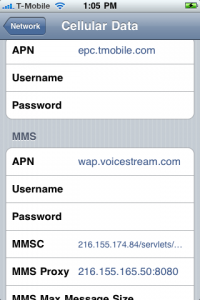
Once you install the fix you will need to reboot your phone and go into Settings->General->Network-> Cellular Data Network and make sure the APN is correct for both your data APN and your MMS APN. All other settings should be filled in. Depending on your plan you may have different settings. If you don’t know the correct settings try them all. The most common is epc.tmobile.com and wap.voicestream.com. Others include internet2.voicestream.com and internet3.voicestream.com
Here is a video to help out:
UPDATE: This method will work on the latest version of iOS including iOS 6
Now if you have a factory unlocked iPhone and do not want to jailbreak to get MMS working on T-Mobile you can do some tweaking to your backup files.
1. First things first. Make a full backup of your iPhone in iTunes.
2. Download the program iBackupBot. Make sure to select Mac or Windows. You may use the free trial, but it is best to purchase!
3. Launch iBackupBot and just hit OK to all of the messages that may pop up. It may take a while to load all the device information if you have multiple backups saved on your computer.
4. Once loaded you will want to find your most recent backup on the left had side and select it.
5. Next you will see a list of files show up in the right-hand box. Scroll down until you see Library/Preferences/com.apple.mms_override.plist.

6. Double click on the mms override.plist and it will pop up a box to edit the file.
7. Download this com.apple.mms_override.plist (mirror link here) and paste the contents into the box or manually write it out based on the picture below. Then Save and Close the file.

8. Now put a check mark in the box next to Library/Preferences/com.apple.mms_override.plist and then click on File at the top and select restore.
9. iBackupBot will restore this new edited file onto your iPhone. Make sure you set your APN correctly and all of the other info is filled in. The cellular Data APN can be whatever T-Mobile gives you. The MMS APN must be wap.voicestream.com.
10. Reboot and enjoy MMS picture messaging on T-Mobile!
Incoming search terms:
- tmobile mms fix ios 5
- ipad contacts icon
- ibackupbot mms
- iPhone Contacts icon png
- mms fix for iphone 4 ios 5
- mc922ll unlocked
- simple mobile iphone mms settings for ios 5
- tmobile iphone mms settings ios 5
- i5mms repo
- tmobile ios 5 mms fix
[FAQ] MMS Updated
[UPDATE] Ok as far as I’ve been able to find out. T-Mobile is the best to go in the MMS department (it just takes a lil longer to send), Simple Mobile on the other hand doesn’t work very good. There’s nothing we can really do to help, the best you can really do is send and sometimes receive. Sorry, switch to T-Mobile if you can.
Alright so the same questions keep coming in about Simple Mobile and T-Mobile MMS, so it’s about time for a centralized place to put the answers as the questions are asked again. Email questions or ask in the comments.
Q: It doesn’t work, need help!
A: Reboot? This hardly helps anyone in finding out what is wrong, be specific!
Q: Cydia gives me an error, sending log files.
A: Umm don’t do that! Send me a screenshot of the error, Cydia logs don’t tell me anything useful Ok these actually help now, but don’t just send me BLANK emails with log files because they wont be read unless you actually type a message….
Simple Mobile
Q: I can send but not receive on Simple Mobile, why’s that?
A: That is the absolute best most people can do, Simple Mobile refuses to cooperate to get iPhones working on their network. Switch carriers!
Q: Why does my picture come out so messed up when I do receive on Simple Mobile?
A: Answered above, network doesn’t like iPhones.
T-Mobile
Q: I can’t send or receive, what’s wrong?
A: If you’re going to ask that way send me a screen shot of your cell network settings and be sure both APN fields are filled and you actually have MMS on your account.
Incoming search terms:
- sending apple logo to device
- tmobile mms fix ios5
- beta leimobile apn settings not saving
- iphone doesn\t have apn settings cydia beta mobile
- tmobile carrier update 14 1 keeps resetting back to wap voicestream com
- carrier update 14 1 how to simple
- update carrier settings for iphone 4s on simple mobile
- t mobile carrier settings cydia
- t mobile mms apn settings iphone 4s april
- visual voicemail iphone 4s tmobile cydia