Review: iDrate – Hydration monitor, water log, drink alarm

iDrate – Hydration monitor, water log, drink alarm link , is an application developed by Locassa Ltd. iDrate is a simple gesture based hydration log and alarm. Most people are not drinking enough water everyday and it can lead to dehydration which in turn can cause a bunch of problems including stress and headaches. Staying hydrated helps improve your overall health, keeps you looking younger, and aids your natural digestion.

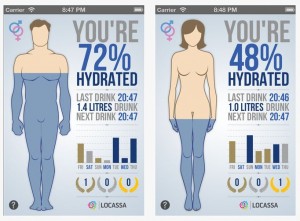
iDrate is a simple application that will help remind you to drink water throughout the day. You even get a push notification stating “You are due to have some water!” The visuals are amazing and the gestures to navigate are very well done. Simply hold down on the screen and move up or down and the cup with fill with water and even change to large bottles as you move up. On the main screen you have tons of visual cues to easily see how much your have drank towards your daily goal as well as how you have done throughout the week. As you drink more water your rewarded with bronze silver and gold medals per day. Obviously you want to try and get all golds.

iDrate is a very well designed application and is a great little app that helps you stay healthy by making sure your drinking the proper amount of water each day. It is a FREE app on the Apple App Store, so go and check it out!


Incoming search terms:

  • iphone3 3_6 0_10a523_restore
  • water hydration
  • plague inc us nuke china
  • DEHYDRATION
  • hydration monitor
  • hydration log
  • water/hydration
  • hydration water
  • leimobile com review-idrate-hydration-monitor-water-log-drink-alarm
  • drink enough water
read more

Apple Releases iOS 5.0.1 to address iPhone 4S Battery Issues

Apple has released iOS 5.0.1 which helps the iPhone 4S poor battery issues. The release also brings several other enhancements including multitasking gestures for the original iPad.

- Fixes bugs affecting battery life
- Adds Multitasking Gestures for original iPad
- Resolves bugs with Documents in the Cloud
- Improves voice recognition for Australian users using dictation

iOS 5.0.1 is available for iPhone 4S, 4, and 3GS, the iPod touch (3G and 4G), and all iPad models. You can get the update via iTunes or via an over-the-air update if you have iOS 5 installed.

The build number is 90A405.

Direct iOS download links can be found here: http://leimobile.com/firmware-downloads/

Jailbreakers and Unlockers should stay away from iOS 5.0.1 until there is a proven way to upgrade.

Incoming search terms:

  • h2o mms fix ios 5
read more

5 More New features of iOS 5

This review was submitted by our guest writer Brody White. If you would like to be a guest writer here check out the Guest Writer page.  You can write about anything you want related to our website and we even provide you with promo codes to apps for you to review.

Here is a little bit more in depth look into iOS 5, of some of the features that were not discussed at Monday’s keynote or anywhere else for that mater.

The camera app. Along with being launched from the lock screen and using the volume up button for shutter the camera app has an interesting new way to view the camera roll. After you have taken a picture and want to preview it you used to have to press the small preview square in the bottom left but now you simply swipe your finger to the right and the photo you just took is displayed. From there you can continue to swipe through all your previously captured photos.

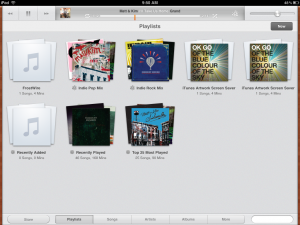
2. The iPad iPod app. To be truthful there actually is no iPod app any longer, it has been replaced with a newly named Music app and music note icon. When entering the app you get a more iTunes like feel with a wood grain outline. The play, previous, and next buttons are all larger and located at the top left. Next to them is a newly designed play bar displaying the progress of your playing music along with album artwork, shuffle and repeat buttons, and genius. There is now a search bar in the bottom right to search through artists, songs, playlist, or any of the sections. Another feature is a button that links to the store which opens the iTunes app. Now two of the more interesting features are that you can now delete music straight from the Music app which is a step towards cutting the cord from your Mac. Also when playing a song and viewing its album artwork you can simply swipe across the artwork and it skips to the next song.

3. Custom Vibrations. It is now possible to make your own vibration pattern for all of your contacts. Located in Settings>General>Accessibility you can turn on custom vibrations, then return to Settings and in Sounds scroll to vibration patterns where you can create custom vibration patterns for certain contacts that you can assign later with the Contacts app.

4. Multitasking on the iPad. Way back on a previous developer preview many of us were exposed to a new way to navigate the iPad. It was multitasking gestures. With the first release most of them could be glitchy, slow, and overall unreliable. But now with iOS 5 they have been redesigned to be fairly smooth and functional. One of the gestures pinching five fingers to return to the home screen has been improved in that when pinching slowly you notice the home screen now fades in from black and the app icons are already there during the animation while previously all you could see were the names of the apps. Another gesture that I use very frequently would be four finger swipe up to reveal the app switcher. This makes switching apps really fast and convenient and now with iOS 5 they fixed just a small thing that I noticed. When using four fingers to swipe up you can continually swipe up and down opening and closing the switcher as before it would either crash due to so much input or would just ignore it. Also you have the ability to swipe four fingers from right to left and it will move to the next open app in the switcher.

5. Notification Center. Ahh the biggest and best new feature of iOS. Everything about Notification center will forever change how we use our iPhones and iPads. It has also changed the settings for notifications as well, when going to these new settings there are now many more options. First you can choose how to arrange you widgets and notifications either manually or by time of arrival. By choosing manual you can have your weather widget at the top at all times or on bottom if you choose along with the location of all your notifications. When you enter the settings for an individual app you now have options for it appearing at all in the center, how many of it’s recent items you would like it to display, if you would like to view it in the lock screen, and the alert style wether it be the cool new banners or the old annoying pop-ups. But out of all these good things I have found one flaw, there are no widgets for the iPad. Why, I do not know, but for some reason iPad users will not get the same luxury of having weather and stocks in their notification center.

Incoming search terms:

  • ios 5 weather widget
  • ios 5 weather lock screen
  • ios 5 clock
  • iOS 5 iPad clock
  • four finger swipe ios 5
  • ios 5 lock screen weather
  • ios 5 compass
  • ios 5 clock app
  • ios 5 stocks app
  • ios 5 three finger swipe
read more

iPod4G At iOS 4.3.1 *Untethered Jailbroken*


i0n1c () has released a YouTube Video showing off the iPod Touch 4G jailbroken in an untethered state on iOS 4.3.1. There is no ETA on the release but hopefully it will be out soon.  Here is his official statement:

Meanwhile everyone should have noticed that my prediction became true and Apple released iOS 4.3.1 in order to fix the PWN2OWN vulnerability in Safari. It was very unlikely that Apple also fixed the kernel vulnerability I used for my untether exploit. Mainly because the kernelcache binary is about 8-10 MB in size and the likelihood that Apple finds the same vulnerability in that short amount of time was very low. However you never know until you try it. So this morning when I woke up and saw that Sn0wbreeze 2.4 beta was released I thought it would be fun to create a new video. Unfortunately Sn0wbreeze does not work with my iPad 1 and so I had to test with my iPod 4G. In the video you can see how I switch off the iPod, then restart it, show the version, show that it is tethered and has the multitasking gestures, i show that you can buy ringtones and then I show cydia and the ninja jump game from last time. Because several people misunderstood me in the past: a. I repeatedly stated that I will not release a jailbreak tool – I will only give out the untether. I did not try yet, but if it is feasible the untether could be a cydia package. b. While the vulnerability I use is in the iPad 2 kernel my untether will NOT SUPPORT the iPad 2, because there is no way to install it there (bootrom exploits fixed). – however Comex is working on that part. c. I am not giving out any ETA again, because the Jailbreak community is simply nuts. Last time I gave an ETA and even before that had passed I got constantly insulted by people that were demanding an immediate release. Sorry guys the more you insult people with the knowledge to actually do what YOU WANT the less motivation there is to use our free time to give it to you. d. The only reason why I did not finish the untether before the ETA was due to unexpected work overload in my real job. It had nothing todo with the untether being too hard or unreal. e. I don’t know why the dev team has not released a redsn0w that does tethered jailbreak for 4.3.1 – I would prefer that to be available, cause sn0wbreeze obviously does not work 100% yet. f. If you want to learn more about iPhone kernel hacking/exploitation you should come to SyScan Singapore at the end of April. http://syscan.org/index.php/sg/program

Incoming search terms:

  • ios 4 3 mms fix
  • bbyscroopy verification error
  • bbyscroopy pirat3 com verification error
read more

On YouTube Today: My Demo Of iOS 4.3′s Multi-Touch Gestures

Hey guys, here’s a video I did to demo all of iOS 4.3′s multi-touch gestures. I really think that this is the future. iOS 4.3 is a little buggy, but hey, it’s beta 1. All software is buggy at beta 1 stages.

I’m sure that we will see massive improvements in the next beta and a world of difference in the final build.

So check out the video!

read more