Fix: Cannot connect to iTunes Store in iOS 6
Did you just update to iOS 6 and get the message “Cannot connect to iTunes Store” while opening up the App Store? It seems like this is a common problem for a lot of people. Luckily there is a very easy fix.
To fix your issue you will need to open up Settings. Browse to General, Date and Time, and change set automatically to off. Next set the date at least 1 year ahead of today’s date. Once you do that you can go back and change Set Automatically to the On position.
Now go back into the App Store and the cannot connect error should be resolved. This will also enable you to see Passbook compatible applications if your running iOS 6 and could not see them before. If this still did not fix your problem leave a message bellow and we will help you out
Incoming search terms:
- direct tv jailbreak fix
- unable to connect to itunes store on iphone 4s
- cannot connect to itunes store iphone 4s ios 6
- cannot connect to itunes store iphone4 mobile
- tmobile iphone cant connect to app store
- tmobile iphone 4 cannot connect to app store
- tmobile cannot connect to app store
- t-mobile unlocked iphone 4 cannot connect to itunes
- itunes update 11 01 12 issues
- iphone5 cannot connect itunes store
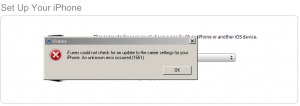
iTunes could not check for an update to the carrier settings for your iPhone. An unknown error occurred (1661)
Are you getting the error iTunes could not check for an update to the carrier settings for your iPhone. An unknown error occurred (1661)? This happened to me after a restore from iOS 5 beta. I am guessing since Apple changed the carrier settings around and blocked the ability to edit edge settings on non approved carriers with this version of the beta is the reason we are seeing this error.
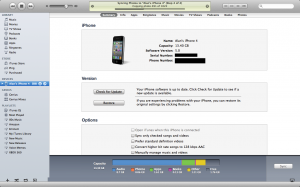
I have an officially unlocked iPhone 4 running T-Mobile USA and on iOS 5 beta 7 when I go to Settings -> General -> About -> my Carrier shows up as Not Available. Apple will most likely fix this error, so we can guarantee that there will be an iOS 5 beta 8 and iOS beta 9 may be the GM (Golden Master).
Incoming search terms:
- itunes error 1661
- itunes could not check for an update to the carrier settings for your iphone 1661
- itunes could not check for an update to the carrier settings for your iphone
- itunes error 1635
- iTunes could not check for an update to the carrier settings for your iPhone an unknown error occurred (1630)
- itunes could not check for an update to the carrier settings for your iphone 1630
- itunes could not check for an update to the carrier settings for your iphone 1660
- error 1661 iphone
- md643ll/a
- itunes 1661 error
Fix: the operation couldn’t be completed. (com.apple.appleaccount error 0.)
Did you get this error when trying to restore your iPhone or iPad from an iCloud backup while beta testing iOS 5
? I did and here is how to fix it. When your iDevice asks for your Apple ID and you are positive you are entering the right username and password in and you still get the error “The operation couldn’t be completed. (com.apple.appleaccount error 0.)” this is due to some glitch in Apple’s servers. To fix this problem you will need to login to your account on a computer through iTunes. Change your password and make sure your credit card and billing are correct.
Now try to login to your Apple ID on your iPhone, iPod Touch, or iPad and you will finally be able to get past this error and restore from an iCloud backup.
Incoming search terms:
- apple account error 500
- com apple appleaccount error 0
- icloud backup error
- appleaccount error 500
- aterror error 3
- the operation couldn’t be completed (coredavhttpstatuserrordomain error 500 )
- com apple appleaccount error 500 ipad
- icloud error 500
- iCloud restore error
- restore iphone from icloud
FAQ: How To Fix iOS 5 Photo Sync Issues
Hey guys, now, as you know, iOS 5 has been around for a few days and I have been playing around with it since it came out on Monday. However, there was one thing that I could not do with my iPhone anymore, and that was sync photos correctly. It would sync about 100 out of the over 1,000 pictures I usually sync to my iPhone (and they wouldn’t be in the same album either) and it would give me a triangle in iTunes next to my iPhone.
Well, I figured out a way to fix the sync issues I was having. Turns out, as I believe is the case (not confirmed by Apple yet), but the photos database that iOS 2.0 -> 4.3.3 used is no longer compatible with iOS 5. So, I had to delete the database and allow iTunes 10.5 (beta) to create a new one, that was iOS 5 compatable.
All you have to do is go into Finder, click on “Pictures” and look for a file called “iPhoto Library”, then, right click (or put 2 fingers on the track pad) and click it, and choose “Show Package Contents”.
Now, look at the picture above for reference, and find a folder called “iPod Photo Cache” and delete it. Also, make sure to EMPTY YOUR TRASH!! If you don’t, then it won’t always work as Finder will sometimes still consider it as still being there.
Then, close iTunes and relaunch it.
Now, go to sync your photos onto your iOS 5 device, it should now work!
You should see it syncing your pictures! As for the triangle (forgot to do so in my screenshot that I took), after the sync is complete, click on it to get rid of it. If it disappears it means that everything is 100% synced up and ready to go!
There you go guys! Have fun!
Incoming search terms:
- waiting for changes to reconcile
- itunes waiting for changes to reconcile
- waiting for changes to reconcile iTunes
- iOS 5 beta 2 waiting for changes to reconcile
- sync session failed to finish
- waiting for changes to be applied
- itunes reconciling photos
- ios 5 photo sync
- iphone waiting for changes to reconcile
- ios 5 iphoto
BREAKING: iTunes Store Purchases Unavailable WorldWide
UPDATE: Some people that were having issues have reported that they are slowly getting back access to the store. I can now download from the iTunes Music Store and the Mac App Store. It takes a couple tries for the iTunes App Store to work correctly, but it seems the issues are starting to be resolved. 2:29 p.m.
UPDATE 2: Looks like all services are back up as of 2:37 p.m.
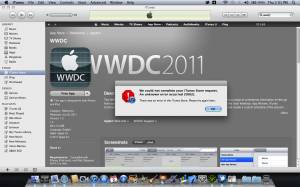
Some breaking news, looks like the iTunes Store has been going down world wide. I experienced this a few moments ago when trying to download the official WWDC 2011 app from iTunes and I have recieved multiple reports of the same issue.
We are unsure of what is causing the issues but, if you ask me, they are migrating the store to the new data center.
It’s not just the App Store, but the iTunes Music and Video stores, as well as podcasts, are down.
We will keep you updated as we get more info…
Incoming search terms:
- account not verified icloud
- icloud verification failed
- error 1661 ipod restore
- how to fix itunes error 1661