Simple Mobile iPhone MMS Settings For iOS 5

These are the settings you need to get MMS working on your iPhone running iOS 5.0 and above.  This includes iOS 5.1.1 and iOS 6.0. There are 2 ways to get MMS working on your Simple Mobile iPhone. The first requires you to jailbreak. This is the easiest way. If you have a factory unlocked iPhone, you can use the iBackupbot method below to get mms working without a jailbreak.

If you are on the $25 15 Day Talk & Text plan, you cannot use MMS as a data plan is required. When your current plan expires, upgrade your plan to one that includes data so you may take advantage of the MMS feature.

1.  Add our Cydia repo to find the iPhone MMS Fix for Simple Mobile.
Our Repo is  http://beta.leimobile.com/repo/
Once you install the fix you will need to reboot your phone and go into settings->general->network and make sure the APN is correct.

The settings should look like this:

Apn: simple
Mmsc: http://smpl.mms.msg.eng.t-mobile.com/mms/wapenc
Mms proxy: 216.155.165.050 You may need to change the proxy to 216.155.165.50:8080
Mms max: 1048576
Mms ua prof URL: http://www.apple.com/mms/uaprof.rdf

If you are using the $40 TalkTextILD plan, you cannot use MMS as a data plan is required. When your current plan expires, upgrade your plan to one of the data capable plans – 50MB or 150MB – that Simple Mobile offers.


2. If you are unable to jailbreak and/or have a factory unlocked iPhone you can use iBackupBot which allows you to modify files on your iPhone without jailbreaking.
1. First things first. Make a full backup of your iPhone in iTunes.
2. Download the program iBackupBot. Make sure to select Mac or Windows. You may use the free trial, but it is best to purchase!
3. Launch iBackupBot and just hit OK to all of the messages that may pop up. It may take a while to load all the device information if you have multiple backups saved on your computer.
4. Once loaded you will want to find your most recent backup on the left had side and select it.
5. Next you will see a list of files show up in the righthand box. Scroll down until you see Library/Preferences/com.apple.mms_override.plist.

6. Double click on the mms override.plist and it will pop up a box to edit the file.
7. Download this com.apple.mms_override.plist and paste the contents into the box or manually write it out. It should looks similar to the picture below which is for T-Mobile. Simple Mobile’s will look a bit different. The MMSC string should be http://smpl.mms.msg.eng.t-mobile.com/mms/wapenc

8. Now put a checkmark in the box next to Library/Preferences/com.apple.mms_override.plist and then click on File at the top and select restore.
9. iBackupBot will restore this new edited file onto your iPhone.
10. I will make a video Tutorial soon.

Incoming search terms:

  • iphone3 1_6 0_10a403
  • simple mobile mms settings for iphone 4 ios 5 1 1
  • iphone 5 simple mobile
  • plist for simple mobile
  • ios 5 0 1 tmobile mms
  • simple mobile iphone 4s mms
  • simple mobile iphone 5
  • lei mobile mms fix t mobile
  • simple mobile iphone 4 ios 5
  • betaleimobile
read more

iOS 5 Untethered Jailbreak by Pod2g


@pod2g has something special this holiday season, an Untethered jailbreak for iOS 5. No more plugging into a computer every time you reboot your jailbroken iOS 5 device!

The video below shows Pod2g with an untethered iPod Touch running iOS 5. Please note that this is iOS 5 and not iOS 5.0.1 so you may need to downgrade or hopefully his jailbreak will support iOS 5.01 and above.  Stay tuned for more information.

Incoming search terms:

  • evesi0n jailbreak 1 5
  • tmobile mms settings 5 0 1
  • leimobile com 7
  • iphone3 1_6 1 jailbreak
  • t-mobile mms fix for ios 5
  • simple mobile iphone 5 0 1 picture messaging
  • resnow para 2 1_6 0_10a403
  • mms data for version 6 0 (10A403) for tmobile
  • iphone3 1_6 1 10a403 _custom_restore ipsw
  • iphone2 1_6 1_10b141 _custom restore
read more

Apple Releases 5.0.1 Beta to Developers: Fixes iPhone 4S Battery Issues

Apple has released iOS 5.0.1 to developers to address the battery issues that iPhone 4S users are experiencing. Batteries have been draining in less than 12 hours. The good news is that this is just a bug with iOS 5, but the bad news is that it may take weeks to release it to the public.

If you have a developer account go download it now and report your findings. After just a few hours of testing iOS 5.0.1 on my iPhone 4S, I have not noticed a big difference.

  • OS 5.0.1 beta contains improvements and other bug fixes including:
    • Fixes bugs affecting battery life
    • Adds Multitasking Gestures for original iPad
    • Resolves bugs with Documents in the Cloud
    • Improves voice recognition for Australian users using dictation
    • Contains security improvements
  • iOS 5.0.1 beta introduces a new way for developers to specify files that should remain on device, even in low storage situations.
  • iOS 5.0.1  beta build 4D199

iTunes 10.5.1 Beta 2 was also released at the same time. iTunes 10.5.1 beta 2 includes a number of important stability and performance improvements for iTunes Match, and is a required update for all subscribers to iTunes Match beta. iTunes Match is now also available on your Apple TV. Your iCloud libraries will be deleted at the end of this beta

Incoming search terms:

  • iphone3 1_6 1_10b144 _restore ipsw
  • h2o wireless mms settings for iphone io5
  • icon contact
  • iphone 4s h2o wireless
  • applestore png
  • iphone 4s ios 5 0 1 beta
  • live tv3g
  • plist data for iphone3 1_6 1_10B144 build download
read more

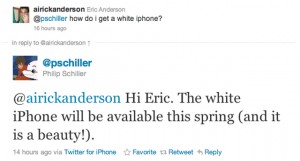
Phil Schiller Confirms White iPhone In “Spring”; What iPhone Is He Really Referring To?

Hey guys, some breaking news hitting us this morning. It looks like Phil Schiller has let out some news. It appears that he has stated that the white iPhone will come “this spring”. However, I don’t think he’s referring to the iPhone 4. Why? 2 reasons.

The first, he never said iPhone 4. He just said “iPhone”. Phil Schiller is the SVP of World Product Marketing at Apple, he has to use the correct names for the devices, so why not in this instance? Sure, it could be because he was on Twitter, but remember, this is Apple we’re talking about.

He had to get approval to say this in a public medium.

Also, until June 21st, it’s still Spring. Apple’s rumored WWDC 2011 dates are set to be on June 5-9th. This gives them time for a June 17th launch of iPhone 5. It’s still Spring.

Anything is possible, but it seems weird that he didn’t say “iPhone 4″ seeing what he does at Apple.

More to come…

read more

Today On YouTube: The iPad 2 Launch Videos

Hey guys, Brandon & I managed to snag a couple of iPads amidst the chaos that is an Apple launch. We both got a 16GB Black Wi-Fi iPad 2 (sorry Mike!) and while he was in Texas and I was in Iowa, we both were updating you guys on the happenings.

I have uploaded my video that I captured on the iPad 2 launch at my Best Buy. Check these, and more, out on our YouTube channel by clicking here!

Waiting In Line At The Apple Store:

Change Of Plans (Running To Best Buy):

iPad 2 Launch Procedure: Best Buy:

Follow The Leader: iPad 2 Launch:

iPad 2 Unboxing:

Incoming search terms:

  • hedy M98
read more
Page 1 of 212