CONFIRMED: Apple Had 64GB iPhone 4 In Development

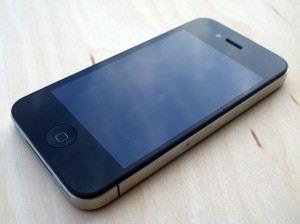
Hey guys, now, as you know, last year at about this time, Gizmodo got their hands on the next generation of iPhone, this turned out to be the iPhone 4. Now, there was a lot of drama and a lot of speculation and everything, we were sure the device was legit when we saw the images. I knew this was Apple’s device, turned out to be true.

Anyways, if you recall, Gizmodo’s iPhone 4 was remote wiped and there was no way to restore it since iOS 4 for iPhone 4 was still months away. Well, a couple days ago, i heard rumors of someone having gotten their hands on a 64Gb iPhone 4 prototype, it was just until today that I could confirm that this is legitimate.

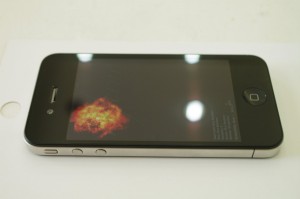
It seems as though M.I.C Gadget got a hold of a leaked iPhone 4 “engineering prototype” from a back room deal at one of Apple’s Chinese production plants.

Now, some things of note, the back says “XXGB” like Gizmodo’s iPhone 4, this could signal that the phone they had was 64GB since other leaked units had 16GB or 32GB where the capacity was at. This could have been Apple’s way of concealing it.

Also, we have the serial number and judging by the way Apple does their serial numbers, this phone was manufactured about 1 year ago. Also, it carries the model number of 995-6049LL. It also lacks the “+ and “-” on the volume buttons, just like Gizmodo’s model. Oh, and it was completely unlocked, no carrier locks whatsoever as well as running iOS 4.1 (I guess they haven’t updated to iOS 4.2.1?)

This is pretty cool stuff. However, this makes you wonder, why didn’t Apple release a 64GB iPhone 4? This may also signal that a 64GB model is coming to iPhone 5, but maybe it will be introduced this Summer at WWDC.

Unwire.hk, is  reporting that you can purchase a 64GB iPhone 4 Prototype in Sin Tak, which is the greyest grey market in all of Hong Kong, so this means that they must have a few of them.

Incoming search terms:

  • iphone 5 64gb
  • iphone 5 64 gb
read more

Pwnage Tool 4.2 Released; Fixes iBooks & Perfects 4.2.1 Untethered Jailbreak

Hey guys, well, moments ago, the iPhone Dev Team released their latest Pwnage Tool. This new Pwnage Tool works on all iOS devices (except iPod touch 2nd generation) since it uses both the limera1n exploit and Chronic’s untether exploit.

Also, they have perfected the jailbreak in order to fix the new iBooks update as well as the Apple TV Wi-Fi bug (Apple TV forgets what Wi-Fi network password is to be used after it goes to sleep or after a certain amount of time) as well as some other random fixes that should perfect the jailbreak and in turn, increase battery life. If you want the iBooks update fix, you should run the Pwnage Tool, or wait until Cydia 1.1 is launched.

I have been hearing a lot of buzz around Cydia 1.1 and I can’t wait for it to be released!

Here is what the iPhone Dev Team had to say:

PwnageTool also includes two very recent improvements to the 4.2.1 JB:  iBooks was just fixed by @comex and @pushfix last night so that it works as intended on DRMed books, and the wifi problem on AppleTV 2G was fixed by @nitotv, @DHowett, and @saurik.  Both of these fixes will also be available in upcoming Cydia package updates, so if you’re already jailbroken you can wait for those updates rather than restore and jailbreak again.

You can download the latest Pwnage Tool by clicking here!

read more

PRESS RELEASE: LEI Mobile 5 Coming 01.03.11 & 01.06.11

UPDATE: LEI Mobile 5 (with Push Notifications) has just launched on iTunes! Download it now!

Good afternoon everyone. I am very happy that you guys could join us today as we unveil the next generation of our most popular application. Yes folks, that’s right, I’m referring to LEI Mobile.

Now, the LEI Mobile app has been nothing but a success. We have shipped over 150,000 copies of the application across iOS devices and Mac OS X. We have been using the iTunes App Store and Cydia as our distribution channels, with BigBoss as our exclusive carrier on Cydia. We couldn’t be happier with the performance of LEI Mobile in the iOS software market.

We have garnered over 36% market share in the Site-Specific market on Cydia since our launch just one year ago. We have swiftly overtaken the market and we are very excited to be in that #1 spot with our closest competitor at about 12% market share. P1nkSn0w and SocialMe have also been performing very well, grabbing over 50,000 downloads since January (SocialMe) and July (P1nkSn0w). We couldn’t be happier.

Incoming search terms:

  • PRESSRELEASE:LEIMobile5Coming01 03 11&01 06 11|LEiMobile
read more

T-Mobile iPhone MMS Settings For iOS 4

Earn a Free iPhone 4S. Click Here!

Many people have been asking for the MMS settings to use for T-Mobile.  This will work on all versions of the iPhone and any firmware.  Whenever you restore your iPhone you lose the settings and since T-Mobile is not an official carrier in the US yet, you will have to manually enter these settings in.

UPDATE: Please add our Cydia repo to find the iPhone MMS Fix for T-Mobile.
Our Repo is  http://beta.leimobile.com/repo/

To install our repository you will open up Cydia. Click on Manage at the bottom. Click On Edit in the top right. Click Add in the top left. Type http://beta.leimobile.com/repo/ and then press Add Source.  Then Click on the LEIMobile source and install T-Mobile MMS Fix.

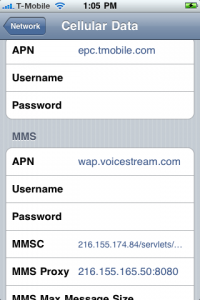
Once you install the fix you will need to reboot your phone and go into Settings->General->Network-> Cellular Data Network and make sure the APN is correct for both your data APN and your MMS APN. All other settings as seen in the picture to the right should be filled in.

———————————–

You will not have to do anything below if you followed the instructions above.

Our Tmobile MMS fix from our repo will support all iOS 4 firmwares: 4.0, 4.0.1, 4.0.2, 4.1, 4.2.1, 4.3, 4.3.1, 4.3.2, 4.3.3 and will most likely work in all other iOS firmwares.  In order for MMS to work on non approved carriers you will have to jailbreak.

If the above fails, go to: Settings->General->Network->Cellular Data Network and enter these settings:

APN: wap.voicestream.com
Username:
Password:
MMSC: 216.155.174.84/servlets/mms
MMS Proxy: 216.155.165.50:8080
MMS Max Message Size:
MMS UA Prof URL:

Once you are done just reboot your iPhone and MMS should be working.  If they are not working correctly try these settings:

APN: epc.tmobile.com
Username:
Password:
MMSC: http://mms.msg.eng-t-mobile.com/mms/wapenc
MMS Proxy: 216.155.165.50:8080
MMS Max Message Size:
MMS UA Prof URL:

Reboot again and MMS should be working on your iPhone.

THESE SETTINGS SEEM TO WORK IF YOU HAVE JAILBROKEN YOUR IPHONE. This is the manual way of applying the settings. You only need to do this if our Cydia repo is not working.

Navigate to /var/mobile/Library/Preferences/com.apple.mms_override.plist on your iPhone and edit the file by pasting whats below.  You can download a program like ifile from cydia to do this.

<?xml version=”1.0″ encoding=”UTF-8″?>
<!DOCTYPE plist PUBLIC “-//Apple//DTD PLIST 1.0//EN” “http://www.apple.com/DTDs/PropertyList-1.0.dtd”>
<plist version=”1.0″>
<dict>
<key>MMS</key>
<dict>
<key>GroupModeEnabled</key>
<false/>
<key>MMSC</key>
<string>http://mms.msg.eng.t-mobile.com/mms/wapenc</string>
<key>MaxMessageSize</key>
<integer>1048576</integer>
<key>MaxRecipients</key>
<integer>10</integer>
<key>MaxVideoBitrate</key>
<integer>131072</integer>
<key>Proxy</key>
<string>216.155.165.50:8080</string>
<key>UAProf</key>
<string>http://www.apple.com/mms/uaprof.rdf</string>
<key>UserAgent</key>
<string>SonyEricssonW800i/R1L</string>
</dict>
</dict>
</plist>

After that reboot your phone, enter the correct APN settings, and everything should work.


Incoming search terms:

  • leimobile repo
  • tmobile mms settings
  • tmobile mms settings iphone
  • tmobile iphone mms settings
  • iphone tmobile mms settings
  • simple mobile mms settings
  • mms settings for tmobile iphone
  • tmobile iPhone settings
  • tmobile iphone mms
  • iphone mms settings
read more

LEI Mobile v4.1 Now Live!

Wow, is all I can say. We have been trying to push this update for weeks now on the App Store. It was rejected many times, left and right, mostly for stupid little things, but finally, the app is live!

So why the big bother with releasing this update? This is a massive change to the LEI Mobile that could be found on the App Store.

First of all, it brings the all new GUI found in the LEI Mobile v4.x series. This includes:

Better GUI

New Services

Many Bug Fixes

Faster

More Stable

Not just that. We also have iPad support. This is our biggest feature. We have been working hard on bringing an all new experience to the iPad. I think the interface is a winner.

It uses this all new dock at the top of the screen that has all of the services available for LEI Mobile, and then it has a full browser-like task bar at the bottom, and your content front and center.

The pages load insanely fast. We focus a lot on speed and performance of our applications, and LEI Mobile v4.1 is amazing.

Also, we have Push Notifications for the iPad version as well. This was one of our major goals for the iPad version, and we’ve got the goods.

LEI Mobile v4.1 is a universal binary. This means that both the iPhone/iPod touch and the iPad versions of the apps are in the same app file. In the same download, which makes it easier on the end-user.

So there you go guys, this is a major update and I encourage everyone to update as soon as you can.

read more