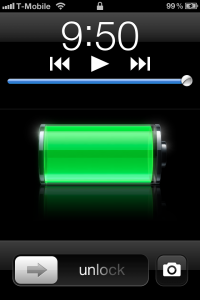
Slide To Camera Leaked in Pre GM Version of iOS 5.1
It appears that both BGR.com and Blogdoiphone.com have gotten their hands on a leaked version of iOS 5.1 which is a version higher than what it out for the current developers. One of the new features found is the ability to slide the lockscreen up to launch the camera. Currently, to open the Camera application without having to unlock your phone, you have to double tap the home button. This show a picture of a camera and then you press that to launch the camera. The average iOS users does not no about this and now Apple is making it a lot easier for everyone to quickly launch the camera from the lockscreen. Another secret feature that is present is Siri will now speak Japanese. We knew this was coming and now it is confirmed. We expect iOS 5.1 to be released in the beginning of March.
Incoming search terms:
- camera ios5 1 cydia
- apple tv j33 2012
- new apple tv j33
- mindef approved service provider for phone camera removal service
- iphone4S home button
- ios 5 lock screen has camera
- ios 5 1 beta 3 build 9b5141a
- different lockscreens for iphone 4 cydia
- camera for ios5 1cydia
- back cover housing for iPad 2 ebay
[Live Blog] Lets Talk iPhone!
Ok today’s the day. There is no live video, so we are bringing you a live blog to help get the news out. The event starts at 10am Pacific / 12n Central / 1pm Eastern. We will update this article in descending order. Please keep the refreshing a couple minute apart so we don’t risk going offline.
Thanks, now lets get going!!
Hey guys, Alan here, we are set to be covering this live Apple event. We have already seen Apple leak the iPhone 4S in Japan and is slated for an October 14th launch (just as we had reported a few days ago). Also, the iPhone 4S is said to have new GPS features. We’ll see soon.
Tim Cook is on stage announcing his first ever product launch. Then goes into talking about the new Hong Kong Apple Store and it’s beauty
Apple is going over some details of how they are doing right now:
*Nearly half of iPods sold are to customers buying their first iPod
* 45 million iPods sold, July 2010 – June 2011
* Over 300 million iPods sold to date
* iPod. The world’s #1 music player
* NPD: iPod holds 78% U.S. market share, August 2011
* NPD: 23% U.S. market share for Mac, August 2011
* Mac installed base: 58 million users
* YOT growth: Mac, 23%, Windows PC, 4%
* Mac OS X Lion: 6 million copies downloaded via Mac App Store to date; 80% growth over previous release (Snow Leopard)
* Sold more Macs on opening day in Hong Kong store than at any other store opening in the world
iPads are showing up everywhere. iPads in schools are helping kids learn in amazing new ways. … Every state in the US now has an iPad pilot program or deployment. And almost 1000 schools have a one-to-one program … About 1000 universities across the US have iPad programs.
Tim Cook handed the stage to Scott Forstall.
Scott is going over some iOS statistics including:
• 18 billion apps downloaded – over 1 billion apps downloaded per month
• iOS App Sto now has over half a billion apps, 140,00 iPad apps
• Mobile installed base: iOS 43%, Android 33%, RIM 17%, Other 7% – comScore, July 2011

New App called Cards. Make Greeting Cards on your iPad and send them to friends and family, 2.99 in the States, 4.99 internationally. You even get a push when the card has been delivered!
Scott Forstall has announced that iOS 5 will go public on October 12th, just 2 days earlier than what we had reported.
Also, just to recap, here are the major features that iOS 5 brings to the table: Notifications, iMessage, Reminders, Twitter integration, Newsstand, myriad Camera improvements, Game Center additions (67 million Game Center accounts to date), Safari improvements (tabbed browsing, etc.), Mail upgrades, PC free (over the air updates).
Eddie Cue takes the stage to talk about iCloud. Quick overview of how iCloud manages photo storage and distribution. “It just works.”
“Over a third of the music we sell in the iTunes store is purchased on iOS devices,” says Cue. He notes that once iCloud launches, songs purchased via iPhone or iPad on iTunes will automatically be downloaded to a users’ Mac for no additional charge.”
Find my iPhone has been updated to find Macs as well.
New app: Find My Friends. Locates family and friends via some sort of Find My iPhone mechanism. Timed location sharing. Easily located friends and family, temporary sharing option, simple privacy controls and great parental restrictions.
Moving on now to iTunes Match. “With over 20 million songs, Apple has the largest music store in the world. We’ll scan your music library and match it and if we find something we don’t have, we’ll upload it. … again, the goal here is data ubiquity across devices…
iTunes Match is $24.99 per year.
ITunes Match will be available “at the end of October”.
Apple has announced a new iPod Nano. This new iPod Nano is available today and features “giant icons” and new watch faces. The new iPod Nano will be available for $129 8GB and $149 16GB.
Also, Apple has announced an updated iPod touch. This new iPod touch will run iOS 5 and will also come in black and White. Configurations come as follows:
8GB $199
16GB $299
32GB $399
Apple has announced the iPhone 4S
The iPhone 4S comes with an A5 processor with 7X the graphics. It has the same exact iPhone 4 design and it basically looks like a CDMA iPhone 4.
iPhone 4S is a “world phone” meaning that it has both GSM and CDMA guts.
“I don’t know what Droid bionic users do between pictures,” says Schiller. “Get coffee, I guess.”
Apple announces “Siri for iPhone”. Voice control and AI have made it to the iPhone. The final design looks just like the fan made video that was floating around. The iPhone understands anything and everything that you ask it.
Siri can read your messages, even reply to them, \set calendars, reminders, check stocks, weather, searches, etc. this is all done “hands free”. Siri is in “beta”. Siri is iPhone 4S only (LAME!)
Apple has posted a slide on the iPod Classic “The reports of my death have been greatly exaggeraterd”. Which means our report on the iPod being killed is inaccurate.
The iPhone 4S will be available for pre-order on October 7th and available on October 14th (just as we had reported) Also, it will be available in a 64Gb configuration
The new iPhone pricing goes as follows:
iPhone 4s
64GB for $399
32 for $299
16 for $199
iPhone 4 will now be available for $99, 8GB only.
iPhone 3Gs, 8GB for free.
Oh, and yes, it’s on Sprint!
No, iPhone 5! Darn!
Tim Cook leaves us with this quote:
“When you look at each of these things, they’re industry-leading in and of themselves, but what puts them out front is how they’re engineered to work together so well. Only Apple can make such powerful hardware and services like this and bring them together. I am so proud of Apple and all the people that worked so hard to make these things a reality.”
That’s it for the event everyone, thanks for sticking with us. We’ll be doing other articles with more detail soon!
Incoming search terms:
- customer buying ipod
- mobile hand set installed base by region (%) 2011
- npd ipod market share 78%
WTF: Sprint Payed Apple $20 Billion For iPhone 5 Exclusive?
What the FRENCH TOAST?! The rumor mill is churning at full speed as some very shocking news is hitting the internet. Apparently, the Wall Street Journal and BGR has said that Sprint has paid Apple $20 Billion to have the iPhone 5 exclusively until Q2 2012. This is incredible.
None of our Sprint sources ever mentioned anything like this, so the only way to truly know is to see tomorrow. We were completely shocked to hear this rumor and were not expecting the iPhone 5 to be an exclusive.
Now, this could all be a bunch of bull crap, but who knows? For all we know, Sprint may well be “betting the company” on the iPhone. Apple could be interested since they are the only ones with unlimited data and are willing to pay for 30 million iPhones regardless of Sprint selling them or not.
This is what BGR had to say:
I have been going back and forth for weeks with one of my incredibly solid industry contacts on a piece of information that I couldn’t really process at first – information that is so unbelievable, even from a source this solid, that I couldn’t report it. With this new WSJ report on an Apple/Sprint deal, however, it doesn’t look so crazy.
I have been told that Sprint will be getting the iPhone 5 – yes the real iPhone 5, not the iPhone 4S – as an exclusive. And it will be a 4G WiMAX device. AT&T and Verizon would launch the iPhone 4S and get the iPhone 5 some time in the first quarter of next year as an LTE device. Globally, the iPhone 5 might be available as a 4G HSPA+ device.
BGR also goes on to lay down the details of the hardware Apple will announce tomorrow:
The iPhone 4S Apple will introduce tomorrow will feature the following:
- A low voltage Apple A5 CPU (it won’t be the same as the iPad 2 chip, clock for clock).
- Updated front and back camera sensors. FaceTime HD in the front, 8-megapixel 1080p HD video recording in the back.
- Multiband 3G Qualcomm chipset — North American & International GSM/UMTS/HSPA bands for AT&T and Global carriers, North American CDMA & International GSM/UMTS/HSPA bands for Verizon and Sprint.
- NFC support.
- Metal or “premium” plastic on the back case.
And here is what my source said about the iPhone 5 that will launch as a Sprint exclusive:
- Faster CPU.
- Larger 4-inch screen, similar to LG’s NOVA display but with a higher resolution.
- 1GB of RAM.
- Slightly larger design overall, but thinner and with a larger battery.
- 32GB of storage.
- iPhone 5 exclusive software and APIs (Assistant).
- Dedicated Assistant button, possibly integrated with the new home button, “think gestures or a two-stage button like a camera shutter key).
Incoming search terms:
- sprint iphone 5
- i phone5 release sprint
- sprint apple iphone
- sprint iphone 5 2012
- iphone 4 wallpaper broken battery
- iPhone 5 WTF
- sprint and apple wallpaper
- Sprints News Phone 2012
5 More New features of iOS 5
This review was submitted by our guest writer Brody White. If you would like to be a guest writer here check out the Guest Writer page. You can write about anything you want related to our website and we even provide you with promo codes to apps for you to review.
Here is a little bit more in depth look into iOS 5, of some of the features that were not discussed at Monday’s keynote or anywhere else for that mater.
The camera app. Along with being launched from the lock screen and using the volume up button for shutter the camera app has an interesting new way to view the camera roll. After you have taken a picture and want to preview it you used to have to press the small preview square in the bottom left but now you simply swipe your finger to the right and the photo you just took is displayed. From there you can continue to swipe through all your previously captured photos.
2. The iPad iPod app. To be truthful there actually is no iPod app any longer, it has been replaced with a newly named Music app and music note icon. When entering the app you get a more iTunes like feel with a wood grain outline. The play, previous, and next buttons are all larger and located at the top left. Next to them is a newly designed play bar displaying the progress of your playing music along with album artwork, shuffle and repeat buttons, and genius. There is now a search bar in the bottom right to search through artists, songs, playlist, or any of the sections. Another feature is a button that links to the store which opens the iTunes app. Now two of the more interesting features are that you can now delete music straight from the Music app which is a step towards cutting the cord from your Mac. Also when playing a song and viewing its album artwork you can simply swipe across the artwork and it skips to the next song.
3. Custom Vibrations. It is now possible to make your own vibration pattern for all of your contacts. Located in Settings>General>Accessibility you can turn on custom vibrations, then return to Settings and in Sounds scroll to vibration patterns where you can create custom vibration patterns for certain contacts that you can assign later with the Contacts app.
4. Multitasking on the iPad. Way back on a previous developer preview many of us were exposed to a new way to navigate the iPad. It was multitasking gestures. With the first release most of them could be glitchy, slow, and overall unreliable. But now with iOS 5 they have been redesigned to be fairly smooth and functional. One of the gestures pinching five fingers to return to the home screen has been improved in that when pinching slowly you notice the home screen now fades in from black and the app icons are already there during the animation while previously all you could see were the names of the apps. Another gesture that I use very frequently would be four finger swipe up to reveal the app switcher. This makes switching apps really fast and convenient and now with iOS 5 they fixed just a small thing that I noticed. When using four fingers to swipe up you can continually swipe up and down opening and closing the switcher as before it would either crash due to so much input or would just ignore it. Also you have the ability to swipe four fingers from right to left and it will move to the next open app in the switcher.
5. Notification Center. Ahh the biggest and best new feature of iOS. Everything about Notification center will forever change how we use our iPhones and iPads. It has also changed the settings for notifications as well, when going to these new settings there are now many more options. First you can choose how to arrange you widgets and notifications either manually or by time of arrival. By choosing manual you can have your weather widget at the top at all times or on bottom if you choose along with the location of all your notifications. When you enter the settings for an individual app you now have options for it appearing at all in the center, how many of it’s recent items you would like it to display, if you would like to view it in the lock screen, and the alert style wether it be the cool new banners or the old annoying pop-ups. But out of all these good things I have found one flaw, there are no widgets for the iPad. Why, I do not know, but for some reason iPad users will not get the same luxury of having weather and stocks in their notification center.
Incoming search terms:
- ios 5 weather widget
- ios 5 weather lock screen
- ios 5 clock
- iOS 5 iPad clock
- four finger swipe ios 5
- ios 5 lock screen weather
- ios 5 compass
- ios 5 stocks app
- ios 5 clock app
- ios 5 weather widget ipad
How to enable the Camera app from the lockscreen in iOS 5
The Camera application got some really cool upgrades in iOS 5. One of my favorite features is the ability to use the volume up button to snap a picture. This makes it so much easier to take photos now.
Another way Apple has improved the speed of taking pictures is allowing users to launch the camera app right from the lock screen. Now when your iPhone is locked and you double tap the home button you will see a camera icon next to the slide to unlock bar. Press this and you will be snapping pictures in no time. You will only be able to see the pictures you take in the session for security reasons. If you want to view all of your pictures in the photo album you will have to unlock your iDevice. (Note: I am not talking about the carrier unlock. I am talking about the slide to unlock!).
On a side note, another cool feature is the built in photo editing. You can auto enhance photos, remove red eye, and crop all from the photos app now.
Incoming search terms:
- ios 5 camera lock screen
- ios5 camera lock screen
- ios 5 lock screen camera
- ios 5 no camera button on lock screen
- ios 5 camera button
- ios 5 camera button lock screen
- ios5 lockscreen
- ios 5 camera on lock screen
- ios 5 no camera button on lockscreen
- ios 5 lockscreen camera