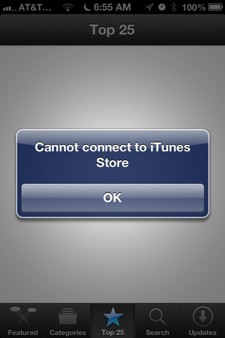
 Did you just update to iOS 6 and get the message “Cannot connect to iTunes Store” while opening up the App Store? It seems like this is a common problem for a lot of people. Luckily there is a very easy fix.
To fix your issue you will need to open up Settings. Browse to General, Date and Time, and change set automatically to off. Next set the date at least 1 year ahead of today’s date. Once you do that you can go back and change Set Automatically to the On position.
Now go back into the App Store and the cannot connect error should be resolved. This will also enable you to see Passbook compatible applications if your running iOS 6 and could not see them before. If this still did not fix your problem leave a message bellow and we will help you out
Incoming search terms:
- direct tv jailbreak fix
- idevice tv the operation could not be completed
- idevice
- yhs-per_003
- ios 6 verbindung mit itunes store
- unable to connect itunes store ios 6
- не работает appstore ios 6
I had this same issue and just went to the sign in, in the settings section and it worked. When I hit passbook it shows apps but nothing happens I can click the App Store link on the bottom as it takes me to the iTunes Store are those icons when I first tap on passbook suppose to work or is it just a picture of different apps for generalization also when I did your way of advancing the date everything from Verizon to gmail and Facebook saying it could not be recognized and asked if i wanted to cancel???
I have the same problem and tried the suggested solution. Didn’t work, I still have the same problem. Shouldn’t have update to the new ios. Everything worked fine before.
Phone apple. They had me reboot by holding down home button and on/off button at same time for 15seconds. Problem solved.
I have tried the recommended solutions for the “cannot connect to the iTunes store”.it still does not work.
hi.I have ipad2 …and todays update ios4 to ios6 ..but I have problem to download apps ,it have error “Cannot connect to iTunes Store”.I try to fix it with your suggestion.but it dosent work for me ..can you help me to solve problem ?
Same Error, i have tried the above mentioned fix.
i did everything it was said to do on the phone it still didnt resolve the problem please help me