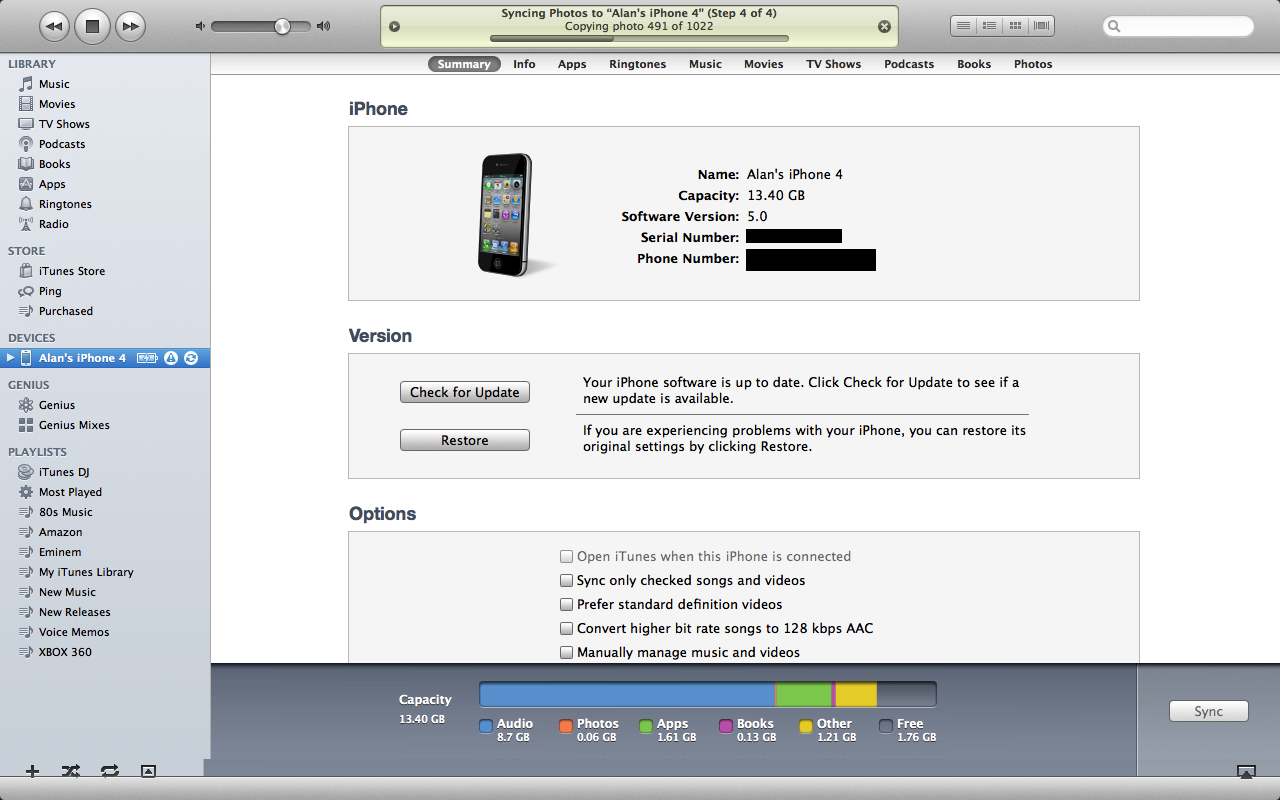
Hey guys, now, as you know, iOS 5 has been around for a few days and I have been playing around with it since it came out on Monday. However, there was one thing that I could not do with my iPhone anymore, and that was sync photos correctly. It would sync about 100 out of the over 1,000 pictures I usually sync to my iPhone (and they wouldn’t be in the same album either) and it would give me a triangle in iTunes next to my iPhone.
Well, I figured out a way to fix the sync issues I was having. Turns out, as I believe is the case (not confirmed by Apple yet), but the photos database that iOS 2.0 -> 4.3.3 used is no longer compatible with iOS 5. So, I had to delete the database and allow iTunes 10.5 (beta) to create a new one, that was iOS 5 compatable.
All you have to do is go into Finder, click on “Pictures” and look for a file called “iPhoto Library”, then, right click (or put 2 fingers on the track pad) and click it, and choose “Show Package Contents”.
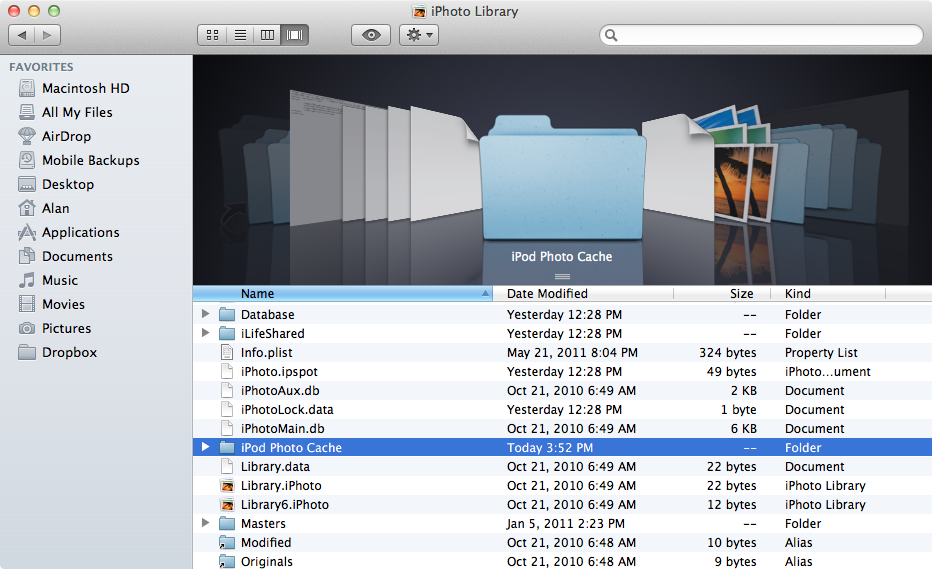
Now, look at the picture above for reference, and find a folder called “iPod Photo Cache” and delete it. Also, make sure to EMPTY YOUR TRASH!! If you don’t, then it won’t always work as Finder will sometimes still consider it as still being there.
Then, close iTunes and relaunch it.
Now, go to sync your photos onto your iOS 5 device, it should now work!
You should see it syncing your pictures! As for the triangle (forgot to do so in my screenshot that I took), after the sync is complete, click on it to get rid of it. If it disappears it means that everything is 100% synced up and ready to go!
There you go guys! Have fun!
Incoming search terms:
- waiting for changes to reconcile
- itunes waiting for changes to reconcile
- waiting for changes to reconcile iTunes
- waiting for changes to be applied
- sync session failed to finish
- iOS 5 beta 2 waiting for changes to reconcile
- itunes reconciling photos
- ios 5 photo sync
- iphone waiting for changes to reconcile
- ios 5 iphoto
will this delete the photos I have on my iPhone that I have not transferred?
No. this doesn’t touch the camera roll, plus, you should have photo stream on. ;P
Great. Worked for me. Thanks.
Thanks a lot!! That’s exactly what I was looking for!
Hey, no prob! Glad you got it fixed!
you. are. the. man.
thank you so much!!!
Hey, no problem Katie! Glad I could help!
boo….it stopped working lol I thought I had it but I guess not. Now nothing will sync. It just says (no matter what i change from music to ical settings) “waiting for changes to reconcile” and then it goes away and nothing happens. before it was at least trying to sync and telling me it was doing it. now it stopped. 🙁 I’m on an iPhone 4 with ios5 (duh) tethered jb with only five icon dock and uisettings installed from cydia. Nothing crazy on the list of things that make your life hell lol. Also I’m running Lion but did NOT update to the latest beta bc I’ve heard too many problems with it.
Lol, well that’s why. I would update to preview 4 & the new update that was released last night. Not sure where you heard that it’s buggy, but it’s really great! And the update sent out yesterday fixed a minor Top Sites bug. It feels like it’s GM.
Also, iCloud finally works for me in the new build 🙂
Is there a similar fix for Windows 7 users? I tried deleting the photo cache and resync, but still receive this error message…
Sincerely
yeah, check “My Pictures” or “My Photos” lol, haven’t used a PC in so long, lol. I can’t remember the path. There should be an “iPod Photo Cache” folder somewhere
Yes, I did delete this folder, but it didn’t help 🙁
you have to uncheck “Photos” in iTunes as well, and delete the folder again (and empty your trash).
I love you.
Thanks, solved my iPhoto sync issue
Allan could u help im still havin major probs syncing my pics from iphoto on mac
Make sure you are as up-to-date as possible. Also, if you can, download iPhoto 9.2 beta 2
HELP PLEASE:
Same happening with Beta 2 and its worse…………only issue is with photos and its worse than before. tried ur solution but only works for 1 sync then have do it all over again?????
HELP GREATLY APPRECIATED FOLKS
Well for me, the bug is gone in beta 2. What you have to do is update to iTunes 10.5 beta 2, restore to iOS 5 beta 2, update Mac OS X 10.6.8 (or Lion preview 4 pack 1), and install XCode 4.2 beta 2. All of those installed with ensure that you don’t have sync issues. Then, Wi-Fi sync as USB syncing is a little janky at the moment on beta 2.
What is xcode 4.2 beta 2? Do i have install it?
Im on latest snow leopard and have itunes 10.5 beta 2 AND ios 5 b2 installed and all fine except syncing issues?
lol. XCode is what developers use to make apps for Mac OS X & iOS. It has some USB protocol changes. That may help.
I install everything so that I have my bases covered. I don’t have issues anymore, so that may fix your issues.
As I said, Wi-Fi syncing is a lot more reliable in beta 2. Try that. I’m sure it’ll fix. If not, go to Settings -> General -> Reset -> Reset All Settings. That will fix any weird preference bugs.
I’ve also installed ion Beta 2 with iTunes Beta 2 and Lion 10.7 Build 11A459e and I’m having sync issues. I tried the fix above and my Photos are syncing. However in the iTunes capacity graph for my iPad 2 they are listed as Other and not Photos. Also the sync is constantly giving errors.
That’s a known bug. It says in the documentation that photos will show up as “other”. And yes, especially iPhone 4, there are sync issues. Wi-Fi sync, it’s more stable.
im same with snow leopard new 1.6.8 and also beta 2 itunes / ios and haning constant sync errors. Usually the sync gets to point then see triangular warning for device n sync error popup! Beta 1 synced fine. Do i need xcode? I dont develop apps just use beta firmware for fun.
I would liek to know the answer to this aswell. I am getting the little caution triangle and it won’t sync. Any solutions?
Its using wi-fi sync that i see errors and usb!!
Loads error msg’s!!
It is a beta man. I see major stability in beta 2. Beta 1 was great, but I see a lot less issues with beta 2.
Here’s a workaround I have been using. Right click on the name of your device, and click “back up”. Make sure iCloud backup is off in Settings-> iCloud-> Storage and Back Up.
This lets it sync.
I’ve been using this in the meantime.
Thanks man!
let me know if it works for you. It’s been working for me.
Well it allowed me to back-up so thanks 🙂
But isn’t that just saving whats already on phone to my mac rather than getting my iphoto files ONTO my device?
Sorry for all the questions………..ive been updating to Beta and owned iPhn from the very 1st model so no newbie, but this Beta’s syncing has me scratching my head 🙂
Appreciate your replies bro……….
Jordan – Scotland,UK
nope. As long as you check what you want, hit apply, and let it fail. Then use “back up”. It’s a way to start the sync service. It’s also backing up of course, but it syncs what isn’t there yet.
Yeah, same here. I’ve had all the iPhones and iPod touch (started off with a 1st gen iPod touch in October 2007 -> Now 🙂
Xcode 4.2 iOS SDK 5 (Snow Leopard)
this one?
I can’t sync anything to my iphone and whenever i press sync it just says waiting for changes to reconcile then stops, do you know how to solve this?
Make sure to update everything. This bug went away with iTunes 10.5 beta 5, iOS 5 beta 5, Lion GM, and iPhoto 9.2 beta 2. 😀 (and iCloud beta 6)
You need to tell us what OS ur on windows or mac and version?
Got ITUNES BETA 2 INSTALLED?
UPDATED MAC TO LATEST OS SNOW LEOPARD VIA SOFT UPDATE YET?
We need know so we can help you buddy
IS IT BETA 1 OR 2 Ios5?
Mac
I have itunes beta 2
I have the lastest snow leopard update
and its beta 2
I am getting the caution triangle next to my device and it won’t wifi sync. Also, it’s not completing the wifi sync or usb sync of my iPad because there is some file missing…
Deleting the cache worked well for me, but you NEED to reboot for it to work. If you don’t reboot, then it is likely not to work.
or make sure to restart iTunes and your iOS device. 😀 That will do the trick. 😛
Thank you so much, this error was driving me nuts.
GREAT! It works with beta 3 too!
Thanks a lot!
J.
Hello Alan
Thank you very much, it worked for me.
but i got another problem, can you help me? i had ios 5 and beta 1 and itunes 10.5 beta 1. then i made a backup of my iphone 4, and then upgraded to itunes 10.5 beta 3 and then ios 5.0 beta 3.
when i tried to restore from my back up, which i did in 10.5 beta 1, i couldnt. itunes cant find my back up. can i do anything to take it back? i had a problem, i couldnt sync my photos with aperture before, so i have deleted about 200 pictures. now the photos are deleted from my iphone. :/
pleas answer me here or mail me..
Yep. This was in the iOS 5 that Apple gave you when they released the beta 3 seed. Reatore from back up from iOS 5 beta 1 or older are not compatable with beta 3.
And now, with Lion installed, the iPhoto Library is invisible and this fix is moot!
Nope. Download InvisibliX and unhide the ~/Library folder or the Pictures folder. My pictures folder was never hidden, but if yours is, download this: http://bre.ad/0f1h2y
All you do is drag it to your /Applications folder.
Then, click on the magnifying glass within the InvisibliX app. And go in the finder and find your directory, then drag that directory into the InvisibliX window to unhide or hide it.
Then, you press the magnifying glass again so that not everything is showing.
Then you can proceed to the fix. 😀
THanks! Saw a couple posts on Apple Support about this w/o answers so I shared this link after successfully using your instructions.
Thanks! I hope I can help other fellow developers with my workaround. 😀
Hi there
Thanks for the tip. I thought I was there and then it wasn’t 🙁
I’m running Beta 4 in iTunes and iOS 5 on Lion.
I have unchecked syncing my iPhoto Library in iTunes, but the iPad (1st gen) still shows my entire library, but what looks like in thumbnail form, i.e. low res.
When I try to re sync the entire library I get the error:
The iPad could not be synced because the sync session failed to finish.
I tried to sync ‘all events’ instead and get the same error above.
Any help greatly appreciated 🙂
At this point, I would hold off on anything. Take screenshots of all your apps because when beta 5 comes out tomorrow, do not restore from any back ups. They won’t be compatible with previous versions of iOS. So, after that, we’ll see if Apple has fixed the syncing issues plaguing us since beta 1. 🙂
I strongly believe iOS 5 beta 5 will be out on August 5th.
Get it? iOS 5, beta 5, on August 5th? 😀
Oh btw, iTunes shows 0.71 GB used for Photos which I am guessing is thumbnail versions of my entire library.
You will get your reward in Heaven.
Cheers.
haha, thanks Matt.
Updated to beta 5 last night and I only see black space where the photos should preview in the photo app and camera roll. Tried the workaround you suggested, and it didnt work unfortunately.
I grabbed screen caps and uploaded them through the dev center earlier. If apple comes back with a fix I’ll share with others on here as well.
Thanks! Yeah, I sent them a bug report. Make sure to submit through their reporter and not the dev forums, they don’t look there.
I had the same problem as Jay (black spaces where photos should have been previewed) but went through the procedure outlined here (deleting the iPod photos cache) here and it seems to have solved the problem. Thanks Alan!
FYI Alan, I do find iOS5 beta 4 & 5 very buggy, I have many things that don’t work well and I don’t see how this is even close to GM.
Hey no problem. Also, make sure to always restore and never click “restore from back up”. This is why people are having issues. I never restore from back up and it’s flawless. No bugs on the iPhone side, just bugs with iTunes syncing.
Your fix worked like a charm.
Many thanks for sharing!
C
Glad it worked for you Carl. 😛
This worked great! Thanks!
Glad I could help you Kim. 😀
Great solution! I actually wasn’t worried about my photos not syncing right but my movies would not sync. After I deleted the photo cache it fixed my video sync problem. Thanks for the help!
I do not have the file mentioned “iPod Photo Cache”, what else can I do?
hey, I did what you said, but it still doesn’t work. I’m on iPhone ‘ with official iOS 5. At the end of the sync it just stays on “waiting for items to copy” and it stays like that for ever. Any suggestions?
Thanks.
dito… didnt work for me either
Hello,
It’s the same on my mac with iTunes 10.5 it tays on ” en attente d’éléments à copier” in french. which means in english “waiting for items to copy”
I tried this and it did not restore my camera roll. Any suggestions?
I tried this and it did not restore my camera roll. Any suggestions? Thanks for trying to help us out!
i have a little bit defferent problem. when i sync 3GS iOS5 with iTunes 10.5 (final relase), iTunes fall down. all content (music library, contacts, calendar…) sync ok, but when i will sync photos (6000+ photos in iPhoto library), iTunes did transfer 200-300 photos, then falls down.
any idea to solution this bug? thanks for answer
So I have a little different issue and tried the same approach you mentioned (which should have worked). I rebuilt my iPhoto deck with new thumbnails for videos so that you can tell which video is which. (for our business, we have built powerpoint decks into iPhoto albums that include videos). All the thumbnails were showing up fine pre-ios 5. Once the employees updated their iPads to iOS 5, the thumbnails went back to being the first frame of the video. All help is greatly appreciated!
Found a workaround (terrible). Took all 39 videos and grabbed the thumbnails and brought them into Final Cut. Made one frame in front of each video for the thumbnail then rendered out. I’m sure that this isn’t the easiest method but it sure did save my ass for a large conference we have coming up. If anyone has a better solution, please feel free to enlighten me.
Terrible but I appreciate the hack around. Good work. In my office we take great pride in the of the hacks we have put in place to get round stupid stuff like this. (i just hope we never have a boss who gets technical stuff).
Everyday I come into work feels like a hack around so I’m right there with you! Our CEO is pretty technically driven so he always has new ideas for us in the creative group. We’re now looking into creating an app that we can push all of our presentation content (video and slides) out to the iPads and iPhones. Should be an interesting little undertaking!
THIS WORKED PERFECTLY!! THANK YOU SO MUCH!! YOU ROCK!
Hi, Thanks for trying to help everyone. So I updated my Iphone tonight and I cannot sync my photos or my music. I get no messages or anything, it is just blank in my phone. I tried your solution several times and still no luck. Any suggestions? Thank you so much.
try to switch on manual marking your photo folders in itunes, then sync. it will not work properly, but thats ok. next time, if you switch to sync full iphoto library, it should work fine.
Had little hope only it would fix my identical problem when syncing apps, music and books. Well, as expected, it didn’t. Glad to still have my old Nano.
Just downloaded new software and my itunes wont sync all it says is sync failed to start and it wont connect to my computer w/ wifi?
Help!!! its not working for me!!! and i dont know why
Thank you sooooo much Alan. It worked like a charm.
worked for me! thanks
You’re a genius!! You saved my sanity. I was going nuts!!! Thank you thank you thank you!!!
You are great worked for me.
Thank you
Recently updated to iOS 5 and syncing was working fine the first day. But today, when I tried to sync my iPad, the progress stays on ‘waiting for items to copy’, and the sync doesn’t finish so I have to cancel. What it gets stuck on seems to change everytime, so one time it was syncing Genius data, another it was syncing audiobooks etc. I’ve restored my iPad 4 times now but it still gets stuck.
Same syncing problem with the 5.0 OS on iphone. deleted the ipod caches and everything. What it’s doing now is syncing about 3/4 of my 10,000 picture library and just randomly leaves folders out. they show up as icons on my iphone, but are empty. Looks to me like the photo encoding has changed and requires more space? These are the same photos as before but it looks like my memory usage bar is twice as big as before (10 Gigs vs 5 Gigs or so). Confused and frustrated. P.S> I sync to a PC running Vista. Always worked fine before.
after deleting ipod photo caches and finished re-syncing, could you still see your geotags attached to photos?
in my case, all attached geotags has gone after i did that,
THANK YOU SO MUCH!!!!!!!!!